INSTRUCTION MANUAL 6
AUTOMATIC WAKE-UP
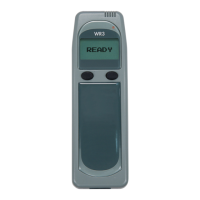
The IGNITION INTERLOCK WR3 can be programmed to wake-up 3 times a day. This
feature ensures that the Handset is warmed to operating temperature before you enter
the vehicle. Programming instructions are provided below.
NOTE: The wake-up feature will be temporarily disabled if the WR3 is not used for 3
consecutive days.
1. Press and hold the left button to access the user menu.
Use the left button to scroll to Wake-Up.
Press the right button to select this option.
2. Select a time slot by placing the cursor underneath an on/off
setting. If necessary, change the setting to on.
Set the wake-up time for that time slot.
NOTE: The left button moves the cursor, the right button changes
the value.
3. Press and hold the right button to exit the Wake-Up submenu.
Select Exit to exit the user menu.
Wake-up
1. on 07:00
2. off --:--
3. on 16:00
Wake-up
➙
Exit


 To Next Page