12
MODEL No.: CAP18FA.9 • 10/2021 • 706768
AFTER SALES SUPPORT
(toll free)
e-mail: info.aldi@positecgroup.com1300 889 028
20 V Li-ion Air Pump
11
MODEL No.: CAP18FA.9 • 10/2021 • 706768
AFTER SALES SUPPORT
e-mail: info.aldi@positecgroup.com
1300 889 028
(toll free)
20 V Li-ion Air Pump
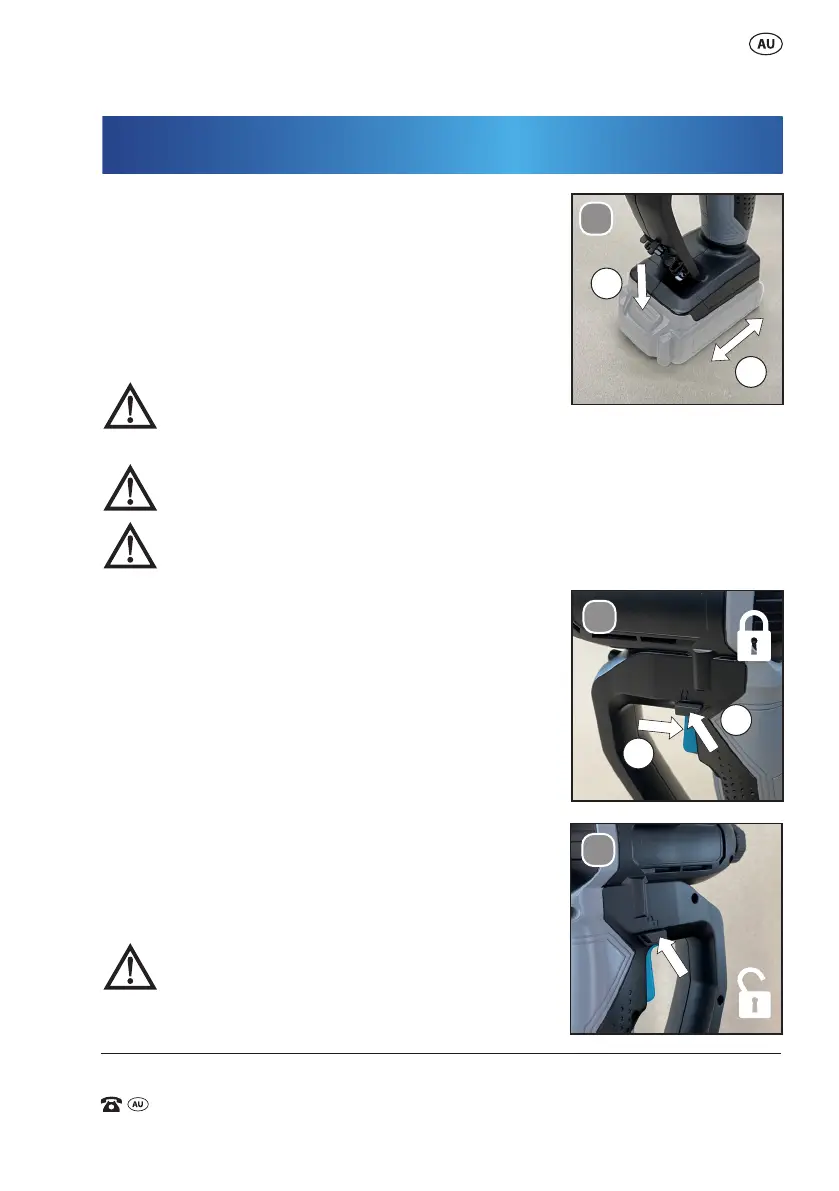
To remove or install battery pack
(not supplied)
Depress the battery pack release button (13) to
release battery pack (14) from the air pump. After
recharging, insert the battery pack (14) into battery
port. A simple push and slight pressure will be
sucient. (See Fig. E)
WARNING: Do not allow familiarity with this
product to make you careless. Remember that a careless fraction of a
second is sucient to inict serious injury.
WARNING: Do not leave items to be inated, unattended, while
inator is in use. These items can burst and could cause serious injury.
WARNING: Since the pressure gauge is not calibrated, and is
therefore not binding for exact values, tyre pressure must be checked
using a reliable measuring device before driving a
vehicle with vehicle tyres inated with the inator.
Driving a vehicle with improperly inated tires
could result in serious injury.
On/o switch
Depress the trigger switch (16) to start the air pump
and release it to stop the air pump. (See Fig. F1)
Continuous use
Depress on/o trigger switch (16) then lock on
button (17), release on/o switch (16) rst and
lock on button (17) second. Your switch (16) is now
locked on for continuous use. (See Fig. F1)
To switch o the air pump just depress the lock on
button (17). (See Fig. F2)
WARNING: Risk of bursting. Do not operate
pump to result in output pressure greater
than marked maximum pressure of item to be
inated. Do not use at pressure greater than 150 PSI.
Operation
E.
1
2
F1.
1
2
F2.


 To Next Page