11
11
AFTER SALES SUPPORT
1300 889 028 (toll free)
e-mail:
MODEL No.:
info.aldi@positecgroup.com
YLW6281D • 700234 • 01/2020
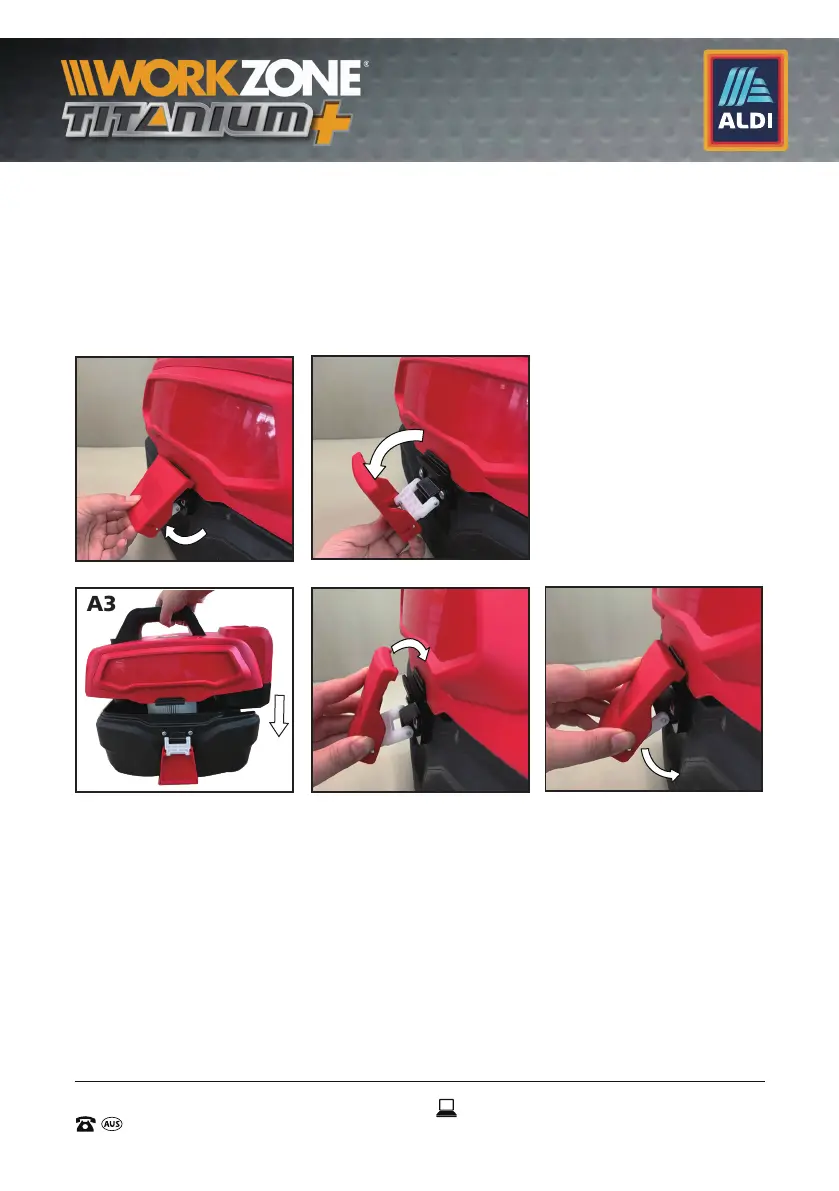
2) Align the side locking latch (7) with the notch on the ridge of the
appliance head (5) lip. (See Fig. A4). Then press the side locking latch (7)
down to fasten the engaged part to lock the appliance head (5) for one
side.(See Fig. A5).
3) Lock the other side with the same steps above.
4) The appliance head (5) is locked on the tank (6) firmly.
7.2 Assembling the hose holder (12)
1) To attach the hose holder (12), firstly remove the assembly screw
(10) by turning it in an anti-clockwise direction using a philips head
screwdriver (Not supplied). (See Fig. B1)
2)
Align the raised key-shaped part of the hose holder (12) with the
caved key-shaped part on the rear bottom of the wet & dry vacuum
vacuum. You will feel the two parts engage if done correctly. Insert
the screw (10) through the screw hole on the hose holder (12), then
through the hole of the key-shaped part on the rear bottom of the
A1
A2
A3 A4
A5


 To Next Page