EN
FR
ES
Battery Charging
Note: Normal charging time is approximately 50minutes for a recently discharged 2.0Ah capacity
battery.
However, if the Battery has been left in a discharged state for some time, it may take Additional time
to charge.
1.
2.
3.
Note: Make sure the Battery and Battery Charger are lined up correctly. If the Battery does not slide
on to the Battery Charger easily, don’t force it. Instead, remove the battery, check the top of Battery
and the Battery Charger slot are clean and undamaged and that the contacts are not bent.
Battery Charge Level: The Battery has a built-in Battery Charge Indicator Pressing on the button to
the right will indicate the charge level. The right LED indicates a high charge level and the left a low
charge level that will mean the battery pack will require charging soon.
IMPORTANT: When a low charge level is indicated, the tool may stop operating while in use, which is
dangerous when operating the product. Always ensure the battery pack has a good charge level.
When the battery is full charged, the battery charger will stop charging (switch to stand by). There are
no restrictions on how long a battery can remain in the charger. Recommended is to remove the
battery from the battery charger when the battery is full charged or the charger is disconnected from
the supply.
Fault Codes
The battery should be charged at ambient temperatures between 10 and 40°C (ideally around 20°C).
After charging, allow 15 minutes for the battery to cool before use.
Ensure that the charger is disconnected from the mains supply after use, and is stored correctly.
DO NOT leave batteries on charge for extended periods and NEVER store
batteries on charge. The
battery charger monitors battery temperature and voltage while charging. Remove the Battery once
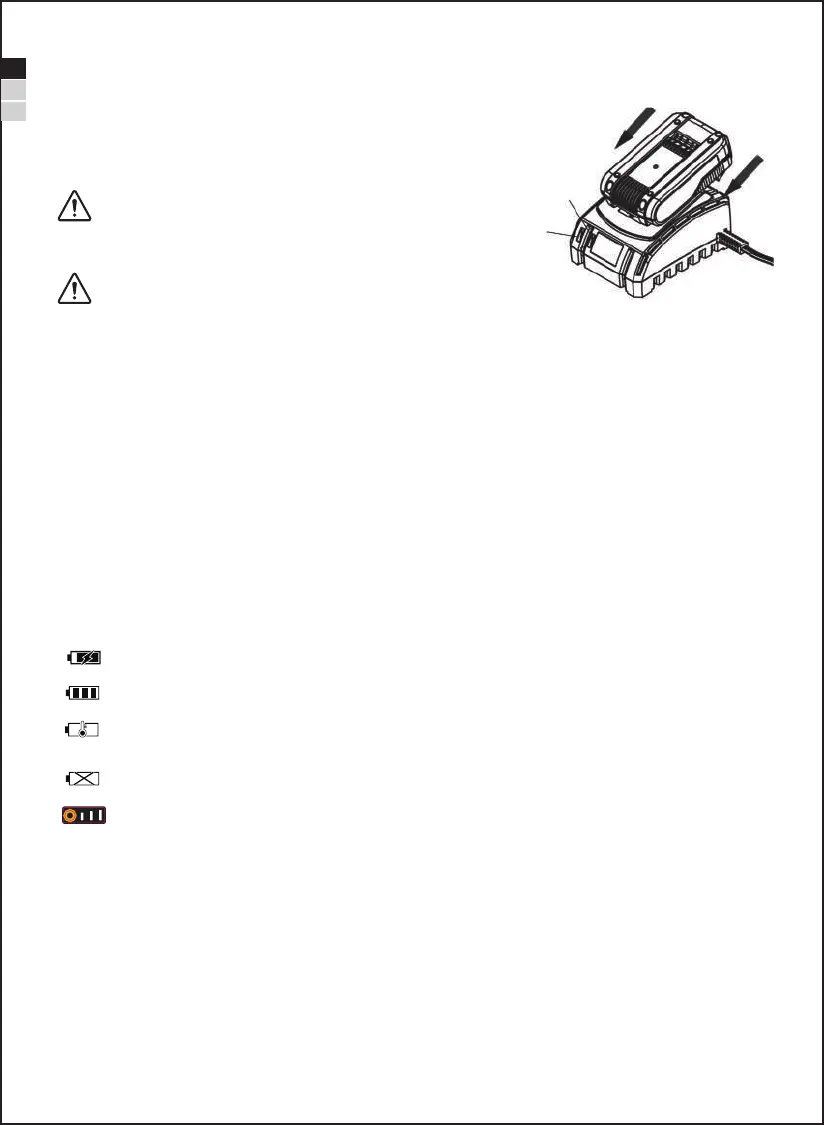
Slide a fully or partially discharged battery on to the battery charger.
Once charging, the Red LED (23) will on and Green LED (24) will off.
When the battery is fully charged, the Red LED will off and Green LED will on.
The Red LED always light when the battery is charging.
The Green LED always light if the battery is fully charged
The Battery will not be charged if the battery temperature is deviation. In that case, the Green LED flashes
until the battery cool down to normal temperature.
The battery will never be charged if the battery is damaged. In that case, the red LED always flashes.
The electric energy is divided into 3 grades, If you want to check the electric energy of battery, you need to
press down the electric energy button.
- 11 -
1. If fitted, remove any battery charger.
2. Insert the battery charger mains plug into a suitable mains
socket.
NOTE: The green LED (24) on the charger will always bright to
indicate that charger is ready to charger the battery.
WARNING: Use this charger ONLY to charge the supplied
battery or additional purchased batteries that are specifically
designed for this tool.
WARNING: Failure to follow the correct procedure when
charging batteries will result in permanent damage.
23
24


 To Next Page