11
4.3 ADVANCED SETTINGS.
Login:
Before you go to the advanced settings menu, you fi rst need to log in with a password. The password
is the same as the SSID code for the camera in “pairing” mode.
The default password is “12345678”. Press the
button to fi ll in the password. After entering the
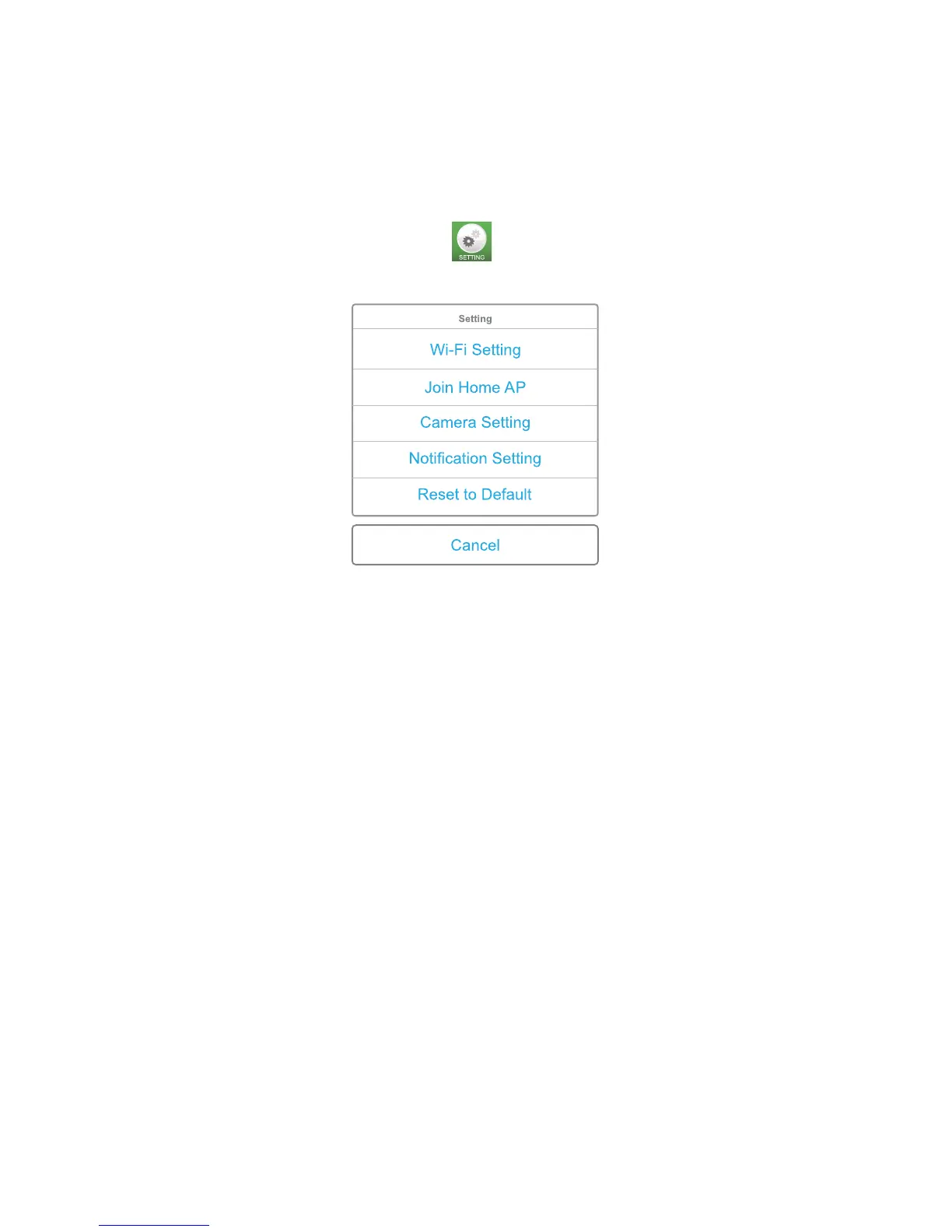
correct password, the following screen will appear.
Wi-Fi setting: Go to Wi-Fi settings on the camera and set the Wi-Fi connection
directly to the camera. Change your password from the camera.
Join Home AP: Access the point settings from your router to be able to establish a
network and Internet connection with the camera
Camera setting: Set the frame rate and resolution of the image.
Notifi cation setting: Alarm settings for sound detection and the temperature alarm
Reset to Default: Reset to factory settings.
Wi-Fi Setting:
(only available when using an internal Wi-Fi network connection)
The SSID name and password can be changed in this menu. The SSID name is the name the
camera WiFi sends out when connected directly to your smart phone or tablet.
The default name is “Alecto-IVM-180”. It may be helpful to change the name when using multiple
cameras. You can change the password of the camera in this menu. This is to prevent any misuse
of the images by others. The password should contain a minimal of at least 8 characters. After
changing the password, the registration process should be restarted.


 To Next Page