11
Gradual Up/Down
This exercise evaluates how quickly you can play while still maintaining accurate time.
To use Gradual Up/Down:
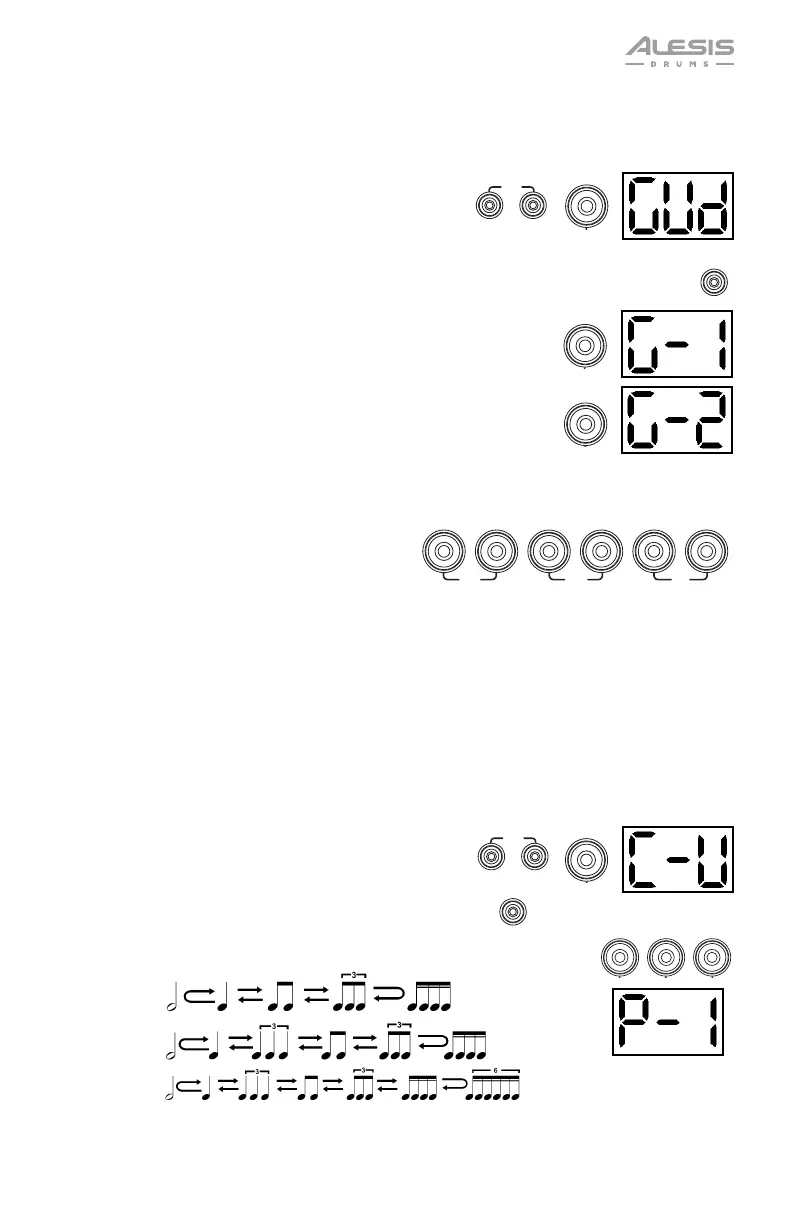
1. Press the Pattern button and Tempo button at the
same time. Then press the 2 button.
2. Set the metronome's time signature and interval (as
described in the Using the Metronome (Click) section).
3. Press the Start/Stop button.
4. Do one of the following:
• Press the 1 button to select G-1 Mode. In this mode, the
tempo automatically decreases or increases by 5 BPM every
4 measures, depending on your accuracy.
• Press the 2 button to select G-2 Mode. In this mode, the
tempo automatically decreases or increases by 1 BPM each
measure (The starting tempo is your metronome's current
setting).
5. Hit the pads in time with the metronome. The six LEDs of the 1-5/Variation buttons indicate
how accurate or “in time” you are.
• When you are right on the beat, the 3
and 4 buttons light up.
• When you are slightly off the beat, the 2
or 5 buttons will light up.
• When you are off the beat, the 1 or
Variation button will light up.
• When you are completely off the beat,
no buttons will light up.
6. Press the Start/Stop button to stop.
Rhythm Change Up
This exercise helps you practice changing rhythms while still maintaining accurate time.
To use Rhythm Change Up:
1. Press the Pattern button and Tempo button at the
same time. Then press the 3 button.
2. Press the Start/Stop button.
3. Press the 1, 2, or 3 button or use the – / + buttons to select a rhythmic
progression, shown below:
P-1:
P-2:
P-3:
4. Press the Start/Stop button to begin.
START
/STOP
1
2
SLOW
GOOD
FAST
12345
VARIATION
START
/STOP
2
3













 To Next Page