5
27. Mixer: Press this button to enter or exit Mixer menu. To exit the Mixer menu, wait 3 seconds.
28. Metronome: Press this button to turn the metronome on or off.
29. Touch: Press this button to turn the touch response on or off.
30. Dual: Press this button to turn Dual Mode on or off.
31. Lower: Press this button to turn Split Mode on or off.
32. Sustain: Press this button to turn the Sustain effect on or off.
Note: To use this feature with a conventional sustain pedal instead of the button, connect
a 1/4” (6.35 mm) sustain pedal (not included) to the sustain input on the rear panel.
33. Number Buttons: Use these buttons to enter a value shown in the display. Use the ∧/∨
buttons to increase or decrease the value.
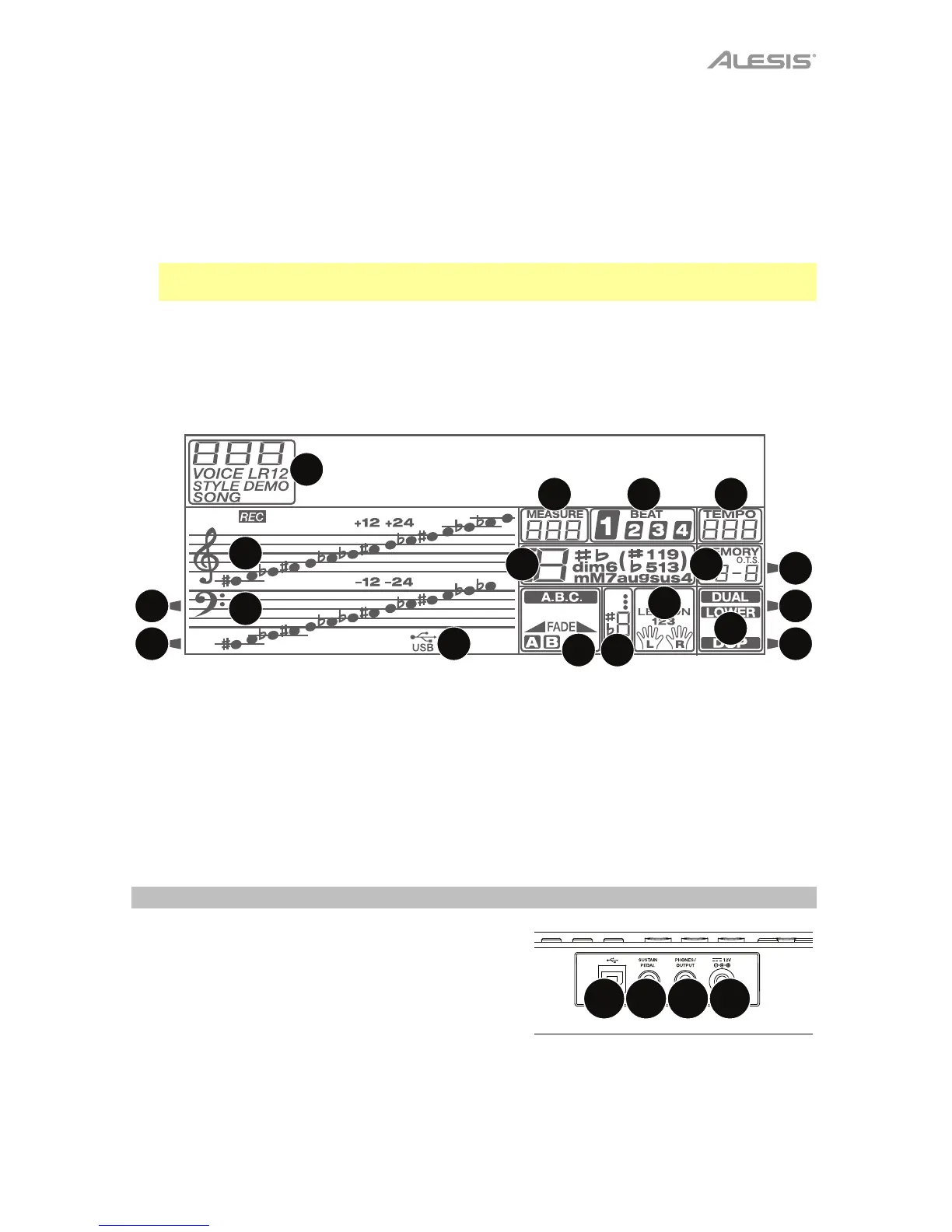
Display
34
39
40 41 42
43
44
45
46
47
48
49
50
5135
37
36
38
34. Record
35. Play
36. Modulation
37. Sustain
38. Touch
39. Voice/Style/Demo/Song
40. Measure
41. Beat
42. Tempo
43. Store M1-M4/1-Touch Setting
44. Dual/DSP
45. Left/Right Hand Lesson Mode
46. Score
47. A.B.C./Fade/A/B
48. Chord
49. Treble Clef
50. Bass Clef
51. USB
Rear Panel
1. Power Input: Use the included power adapter to
connect this input to a power outlet.
2. Phones Output: Connect headphones here to
hear the keyboard sounds, rhythms, and songs.
3. Sustain Input: Connect an optional 1/4” (6.35
mm) TS sustain pedal to this input.
4. USB Port: Use a standard USB cable to connect
this USB port to your computer. This connection is
used to send and receive MIDI data to and from
your computer.
1
2
34



 To Next Page