EasyManua.ls Logo

Alesis M1 ACTIVE - Input Connection Types

Alesis M1 ACTIVE
40 pages
Print Icon
To Next Page IconTo Next Page
To Previous Page IconTo Previous Page
Loading...
Spcrker lnrtalldlon
lnput
Connections
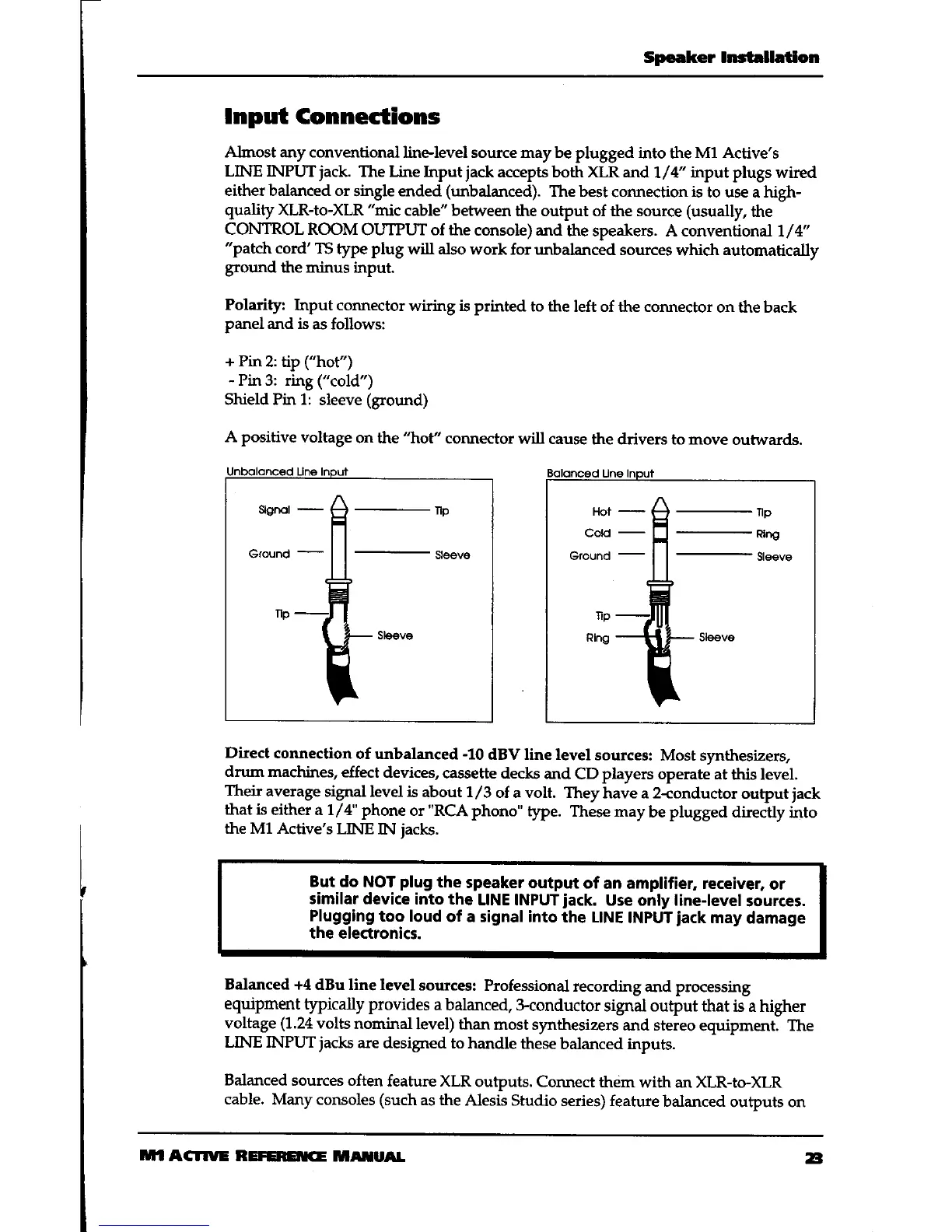
Almost any conventional
line'level source may be
plugged
into
the
M1 Active's
LINE INPUT
jack.
The Line Input
jack
accepts both XLR and
t/4" input plugs wired
either balanced or
single ended
(unbalanced).
The best
connection
is
to use a high-
quality XLR-Io-XLR
"mic
cable" between
the output of the source
(usually,
the
CONTROL ROOM
OUTPUT of the
console) and
the speakers. A conventional
1/4"
"patch
cord' TS
type plug will also
work for unbalanced
sources
which
automatically
ground
the nrinus input.
Polarity:
Input corurector
wiring is printed
to the
left of the connector
on the back
panel
and is
as follows:
Pin
2: tip
("hof')
Pin3: ring("cold")
Shield Pin 1:
sleeve
(ground)
A positive
voltage
on the
'trot"
connector
will cause
the drivers to move
outwards.
Direct
connection
of unbalanced
-10
dBV line level
sources:
Most synthesizers,
drurn rrachines,
effect
devices,
cassette decks
and
CD players operate at
this level.
Their
average
signal level is
about 1
/3
of a volt. They
have a 2-conductor
output
jack
that is
either a L/4" phone
or
"RCA
phono"
fie.
These may
be plugged directly
into
the Ml Active's
LINE
IN
jacks.
But do NOT
plug
the
speaker output
of
an amplifier, receiver,
or
similar device
into the
tlNE INPUT
jack.
Use only line-level
sources.
Plugging
too loud
of a signal into
the LINE
INPUT
jack
may
damage
the electronics.
Balanced +4
dBu line level
sources:
Professional
recording
and processing
equipment
typically provides
a balanced,
3<onductor
signal output that
is a higher
voltage
(1.24
volts
nominal
level) than
most synthesizers
and stereo
equipment. The
LINE INPUT
jacks
are
designed to handle
these
balanced inputs.
Balanced
sources often
feature XLR
outputs. Corurect
them
with an XLR-Io-XLR
cable.
Many consoles
(such
as the
Alesis Studio
series) feafure
balanced
outputs on
ISI
ACIIUE REFENSTG
TATUA|.
a

Related product manuals