Connections: Chapter 3
QuadraSynth Plus Piano Reference Manual 31
Example 2: Using an External Sequencer
The QuadraSynth Plus can generate MIDI signals that are recorded by a
sequencer. On playback, the sequencer sends this data back into the
QuadraSynth Plus, which then serves as a multitimbral sound module (in Mix
mode). The sequencer can generate data over several channels; in Mix mode, the
QuadraSynth Plus can be programmed so that individual Programs play
sequenced data on specific channels.
Example: If the sequencer transmits a piano part over channel 1, a bass part over
channel 2, and a drum part over channel 10, you could set up a QuadraSynth
Plus Mix so that a piano sound plays only the MIDI data assigned to channel 1, a
bass sound plays only the MIDI data assigned to channel 2, and drums play only
the MIDI data assigned to channel 10. The QuadraSynth Plus can store up to 100
User Mixes.
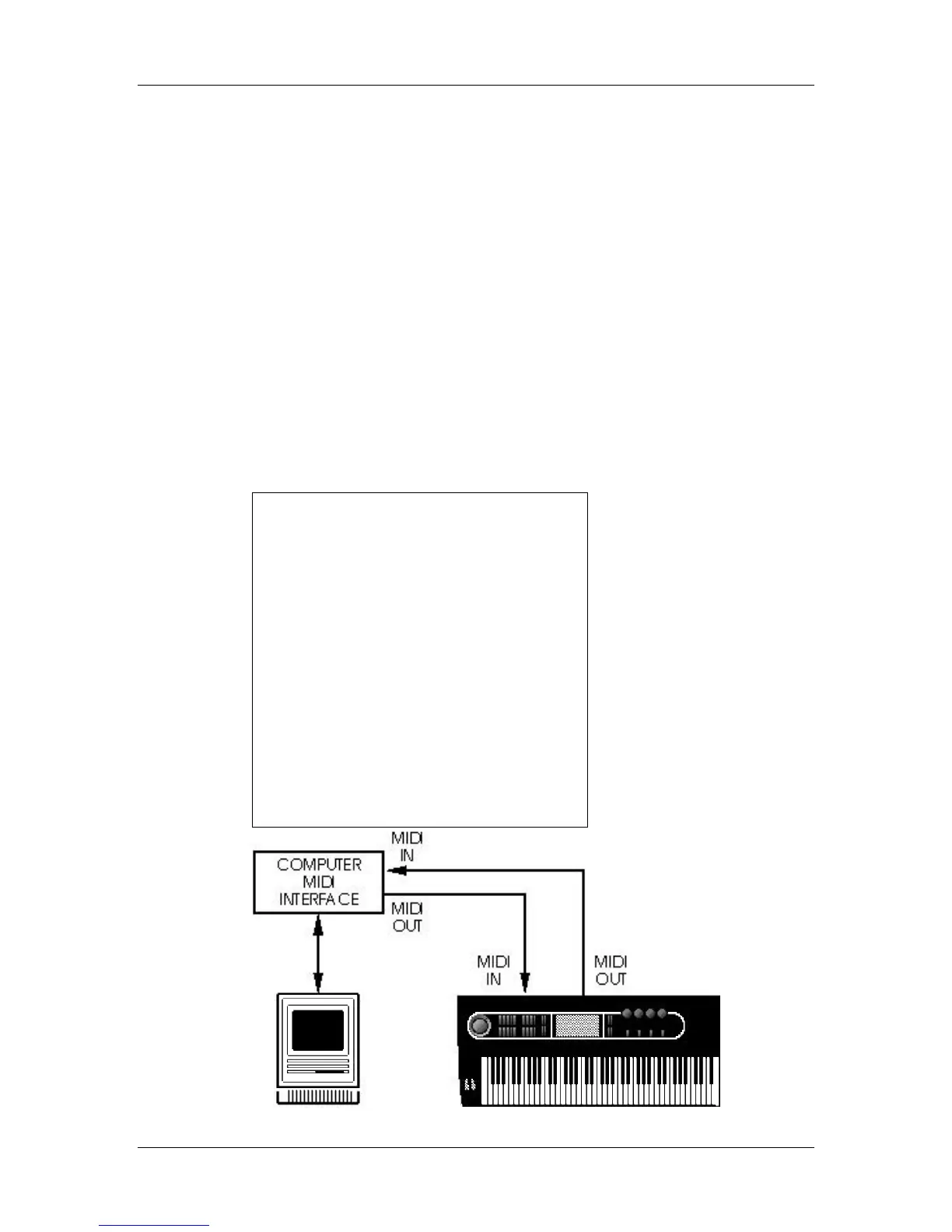
Connect the sequencer’s MIDI Out to the QuadraSynth Plus’s MIDI IN, and the
QuadraSynth Plus’s MIDI OUT to the sequencer’s MIDI In. This allows the
QuadraSynth Plus to send data to the sequencer for recording, and play back
data from the sequencer.


 To Next Page