8373 Zone Paging Adapter (FW 1.7)
Document 91-00071B Algo Communication Products Ltd (604) 454-3792
05/06/2020 4500 Beedie St Burnaby BC Canada V5J 5L2 support@algosolutions.com
Page 33 www.algosolutions.com
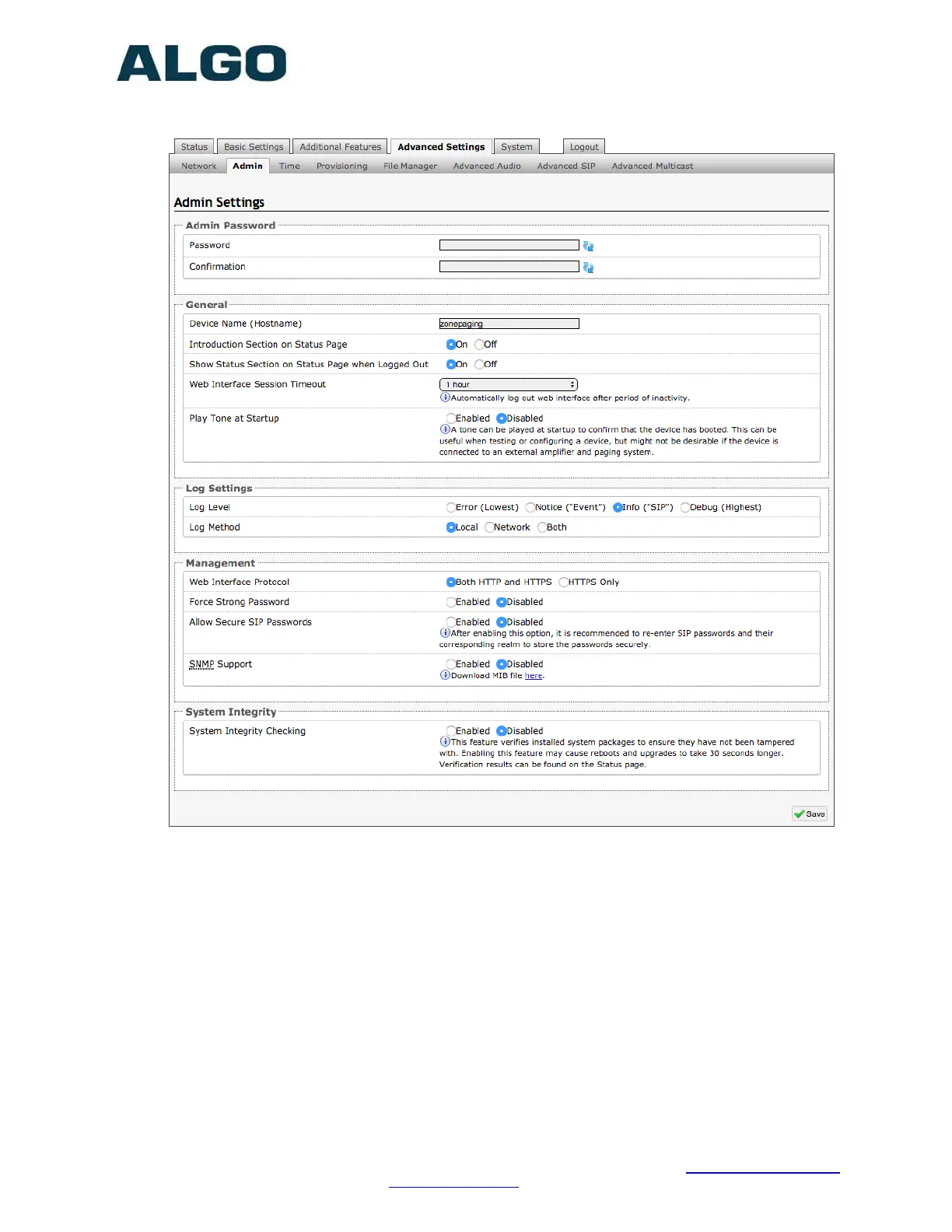
Advanced Settings Tab – Admin
Password
Password to log into the 8373 Zone Paging Adapter web interface. You should change
the default password algo in order to secure the device on the network. If you have
forgotten your password, you will need to perform a reset using the Reset Button in
order to restore the password (as well as all other settings) back to the original factory
default conditions.
For additional password security see ‘Force Strong Password’ below.
Confirmation
Re-enter network admin password.
Device Name (Hostname)
Name to identify the device in the Algo Network Device Locator Tool.


 To Next Page