4
www.observint.com
© 2015 Observint Technologies, Inc. All rights reserved.
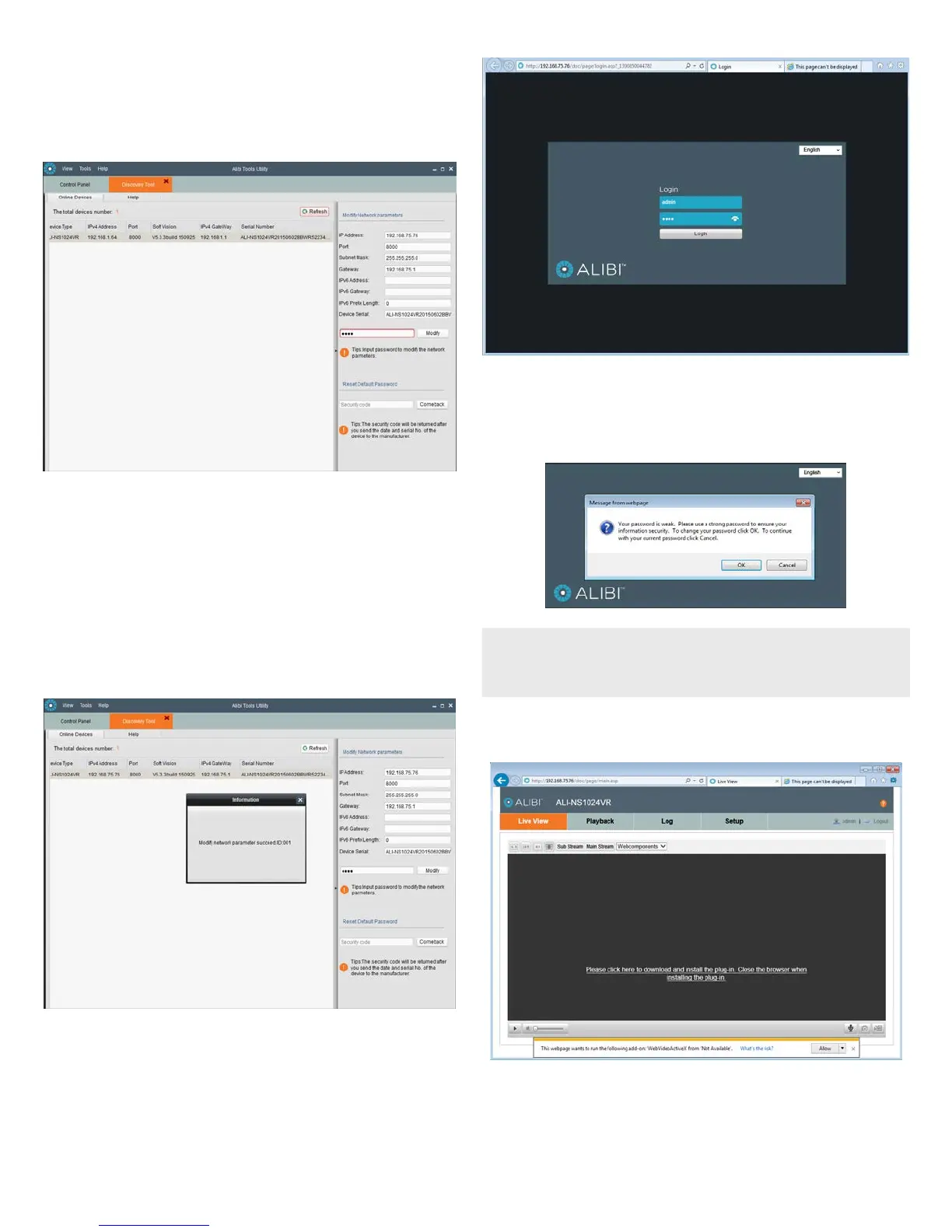
b. Modify the network settings to values compatible with the subnet where it is installed:
» If the IPv4 Address shown for the camera is 192.168.1.64 (default IP address) and the
camera is new (un-congured) or was reset to its factory default state, the camera did not
nd a DHCP server on the network. Modify the parameters in the right pane to values you
prefer and are compatible with the network. An example is shown in the screen below.
» If the IPv4 Address shown for the camera is something other than 192.168.1.64
(default IP address) and the camera is new or was reset to its factory default conguration,
the camera did nd a DHCP server on the network and acquired new network parameters
that are compatible with the network. If necessary, change the parameters in the right pane
to values that you prefer and are compatible with the network. An example is shown in the
screen above.
c. Enter the admin password for the camera in the Password eld. The default admin user
password for Alibi cameras is 1111.
d. Click the Modify button. The new IP address, port, and other settings will change and appear in
the list with the device you modied.
6. Close the Alibi Tools Utility by clicking the Close icon ( T ) in the upper-right corner of the screen.
Step 4. Login to the camera
To access the camera from a computer on the LAN:
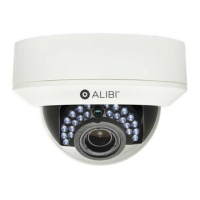
1. Open your Microsoft Internet Explorer (IE) browser on your computer and enter the IP address of the
camera in the URL eld. In the example below, the IP address of the camera is 192.168.75.76.
2. In the login window, enter your User Name and Password in the appropriate elds, then click
Login. The default User Name and Password for Alibi cameras is admin and 1111.
3. If the password you enter for your camera is a weak password, the following pop-up window will
appear. Follow the instructions to create a “strong” admin password.
NOTE
Observint recommends using strong passwords in all of your surveillance devices. Strong passwords
have a minimum of 8 characters with upper case and lower letters, numbers and special characters.
And we recommend you reset your password regularly, especially in high security systems. Resetting
the password monthly or weekly will better protect your security system from hackers and criminals.
4. If this is the rst time you are logging into a camera and are you are using Internet Explorer 10 or
newer, a message may appear at the bottom of the window to use ActiveX Controls. Click Allow.
5. If this login is the rst login to an Alibi camera from your computer and browser, continue with the
following sub-steps to install WebComponents:
a. After a successful login to the camera, a message will appear in the middle of the Live View
window requiring you to load a plug-in. Click on the message to continue, then click Run in the
pop-up block at the bottom of the screen.




 To Next Page