2
www.observint.com
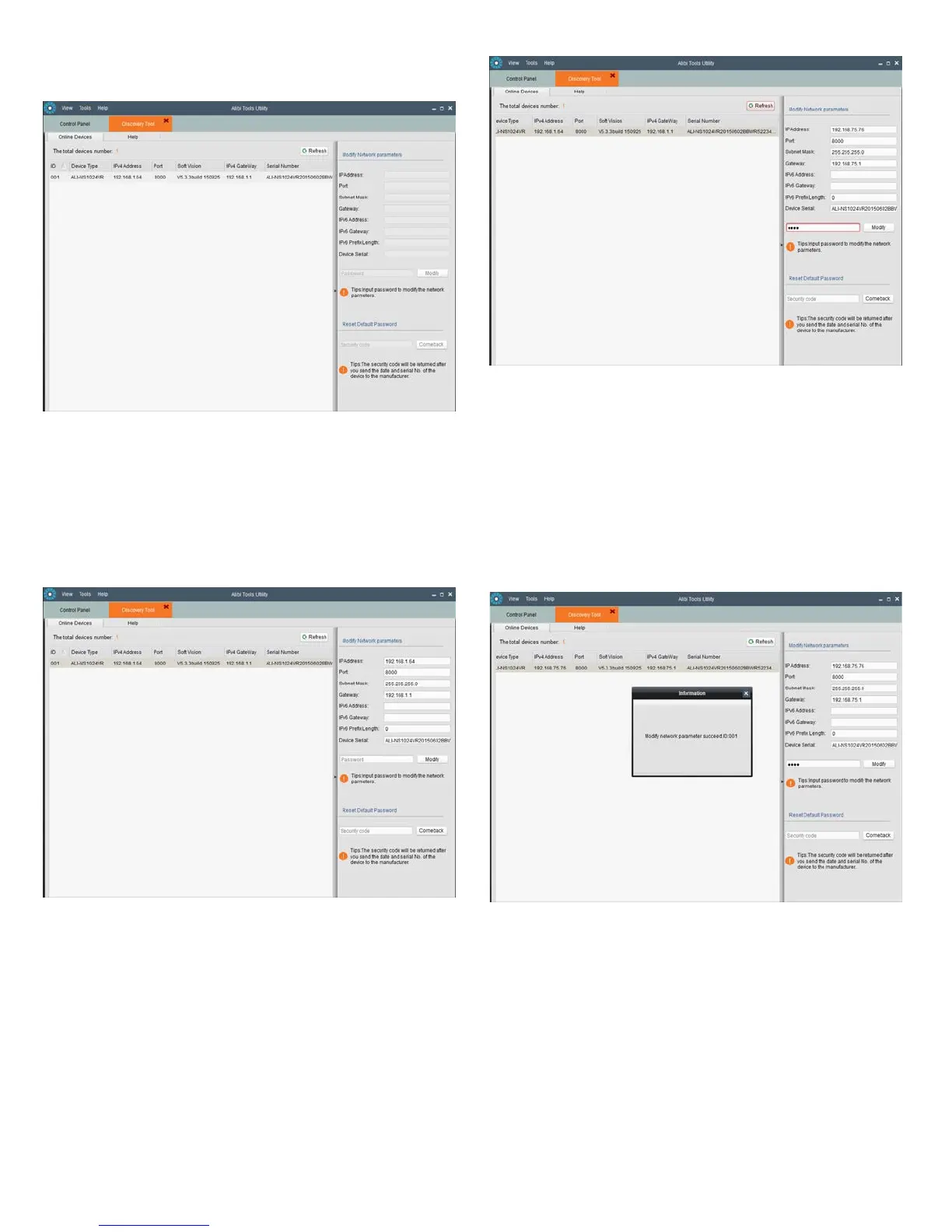
4. Double click on the Discovery Tool icon. The tool will automatically discover Alibi cameras and
recorders installed on the network.
In the example screen shown above, an ALI-NS1024VR camera was discovered. Notice that the IP
address of the camera is 192.168.1.64 (default IP address). This camera, although congured for a
subnet that is probably foreign to the network it is installed on, is still found by the tool.
5. To change the network settings of the camera to be compatible with the subnet where it is installed,
do the following:
a. Click on the device to highlight it. Notice that the network parameters for the device populate
the elds in the right frame.
b. Modify the network settings to values compatible with the subnet where it is installed:
» If the IPv4 Address shown for the camera is 192.168.1.64 (default IP address) and the
camera is new (un-congured) or was reset to its factory default state, the camera did not
nd a DHCP server on the network. Modify the parameters in the right pane to values you
prefer and are compatible with the network. An example is shown in the screen below.
» If the IPv4 Address shown for the camera is something other than 192.168.1.64 (default
IP address) and the camera is new or was reset to its factory default conguration, the
camera did nd a DHCP server on the network and acquired new network parameters that
are compatible with the network. If necessary, change the parameters in the right pane to
values that you prefer and are compatible with the network. An example is shown in the
screen above.
c. Enter the admin password for the camera in the Password eld. The default admin user
password for Alibi cameras is 1111.
d. Click the Modify button. The new IP address, port, and other settings will change and
appear in the list with the device you modied.
6. Close the Alibi Tools Utility by clicking the Close icon ( T ) in the upper-right corner of the screen.
Step 4. Login to the camera
To access the camera from a computer on the LAN:
1. Open your Microsoft Internet Explorer (IE) browser on your computer and enter the IP address of the
camera in the URL eld. In the example below, the IP address of the camera is 192.168.75.76.
© 2015 Observint Technologies. All rights reserved.



 To Next Page