6 Right microphone
Provides digital sound input for audio recording and voice calls.
7 Service Tag label
The Service Tag is a unique alphanumeric identifier that enables Dell service
technicians to identify the hardware components in your computer and
access warranty information.
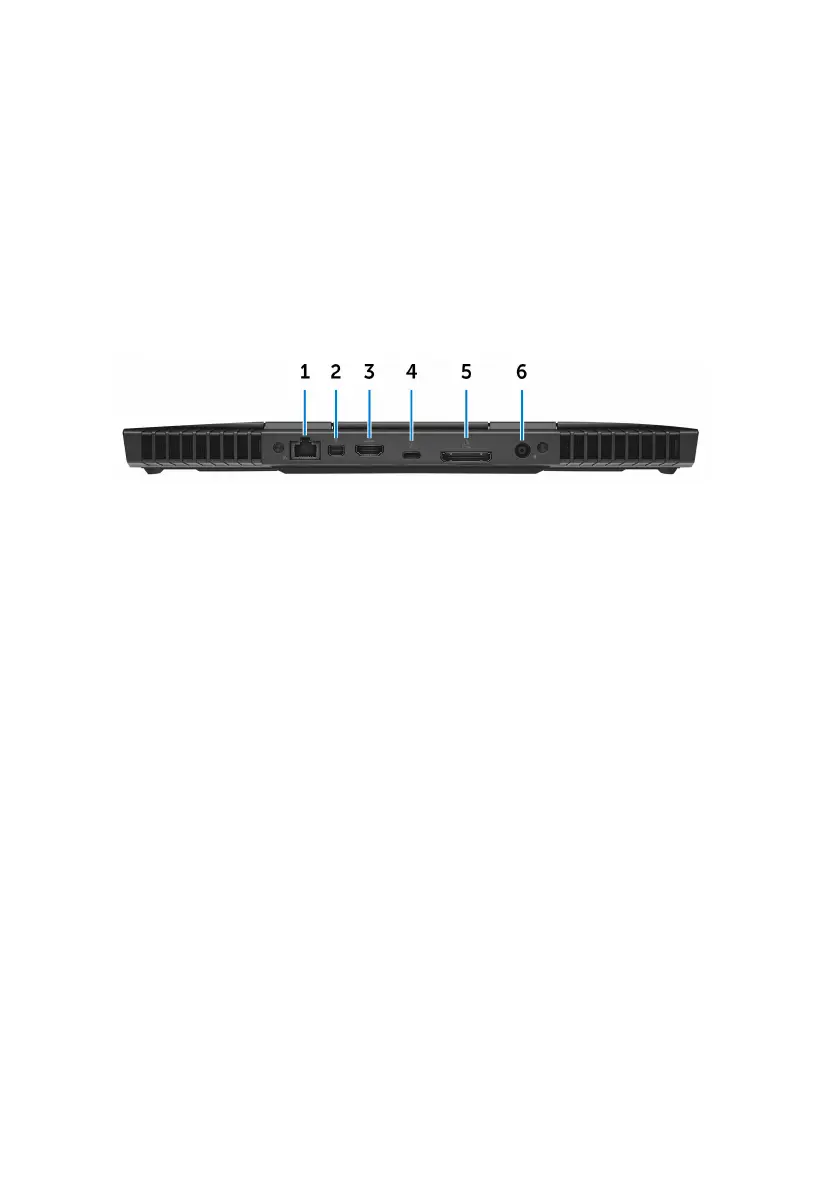
Back
1 Network port (with lights)
Connect an Ethernet (RJ45) cable from a router or a broadband modem for
network or internet access.
The two lights next to the connector indicate the connectivity status and
network activity.
2 Mini DisplayPort
Connect a TV or another DisplayPort-in enabled device. Provides video and
audio output.
3 HDMI port
Connect a TV or another HDMI-in enabled device. Provides video and audio
output.
4 Thunderbolt 3 (USB Type-C) port
Supports USB 3.1 Gen 2, DisplayPort 1.2, Thunderbolt 3 and also enables
you to connect to an external display using a display adapter.
Provides data transfer rates up to 10 Gbps for USB 3.1 Gen 2 and up to 40
Gbps for Thunderbolt 3.
5 External graphics port
Connect an Alienware Graphics Amplifier to enhance the graphics
performance.
8












 To Next Page