6 Power-adapter port
Connect a power adapter to provide power to your computer and charge
the battery.
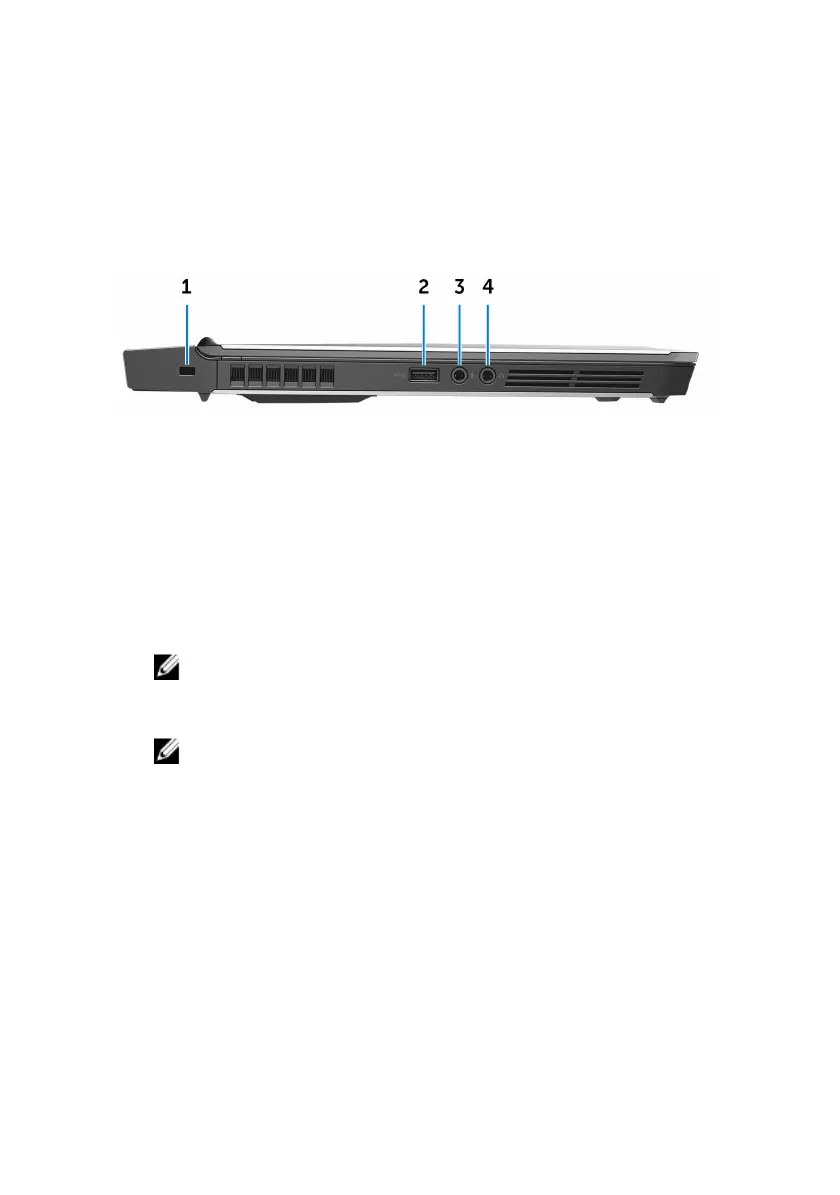
Left
1 Security-cable slot
Connect a security cable to prevent unauthorized movement of your
computer.
2 USB 3.0 port with PowerShare
Connect peripherals such as storage devices and printers.
Provides data transfer speeds up to 5 Gbps. PowerShare enables you to
charge your USB devices even when your computer is turned off.
NOTE: If the charge on your computer’s battery is less than 10
percent, you must connect the power adapter to charge your
computer, and USB devices connected to the PowerShare port.
NOTE: If a USB device is connected to the PowerShare port before
the computer is turned off or in Hibernate state, you must
disconnect and connect it again to enable charging.
3 Microphone/headphone port (configurable)
Connect an external microphone for sound input or a headphone for sound
output.
4 Headset port
Connect a headphone or a headset (headphone and microphone combo).
Right
9












 To Next Page