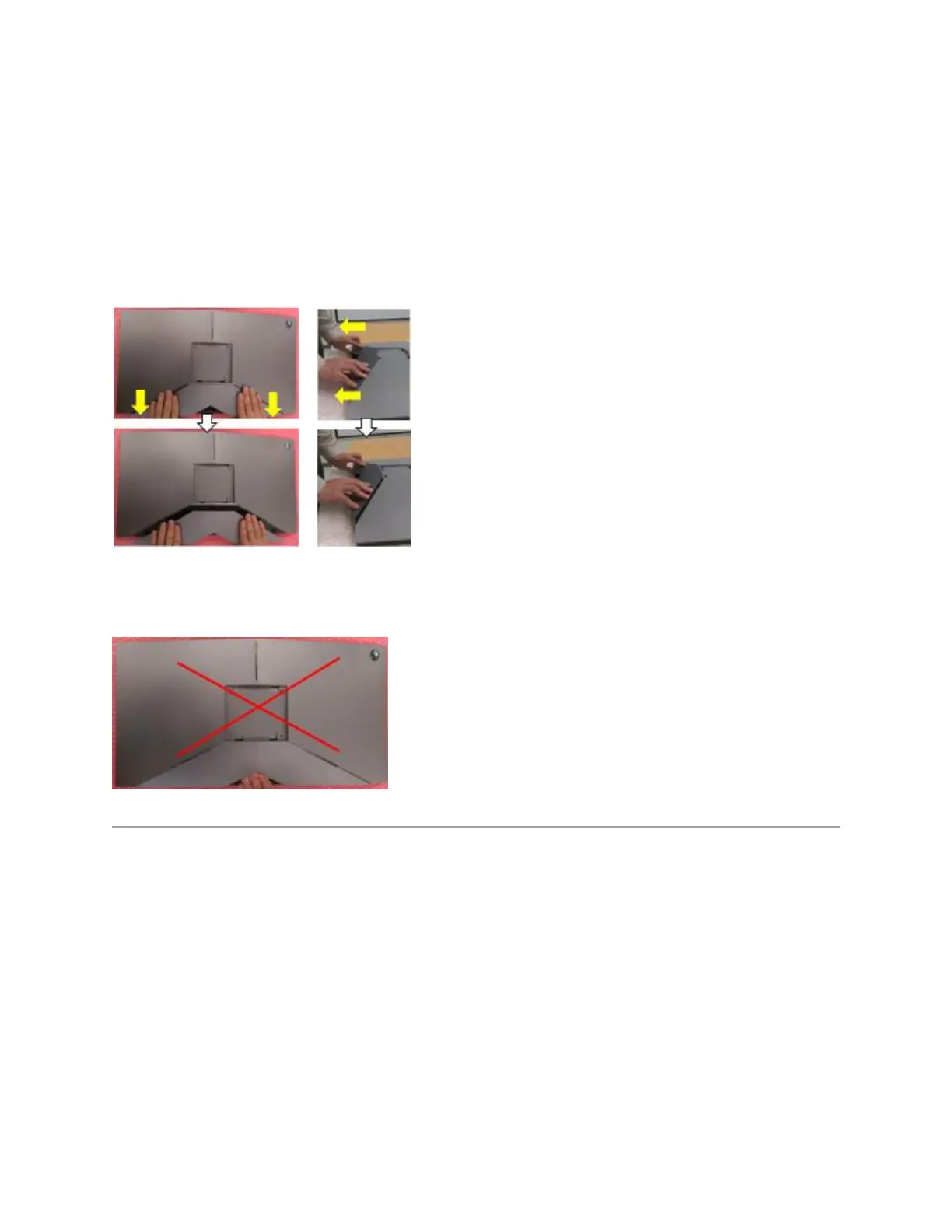
AW2518HB has a cable cover to assemble with the back cover of monitor. If you want to
disassemble cable cover, please gently slide off the cable cover from the back cover of monitor
to prevent from breaking the snap of cable cover.
To disassemble cable cover from the back cover of monitor:
Using your thumbs, apply gentle pressure on the cable cover to horizontally slide it off from the
monitor. (Figure 12.)
Figure 12. - Disassembling/reassembling the Cable Cover.
NOTE: Please don't pull cable cover directly. Otherwise, it may cause damage to cable cover.
(Figure 13.)
Figure 13. - Incorrect cover removal
NVIDIA G-SYNC setup requirements
AW2518HB contains a G-SYNC module for gaming at high refresh rates. See the hardware
requirements below to configure your G-SYNC monitor.
G-SYNC minimum system requirements:
Desktop
1. GPU: NVIDIA GeForce GTX 650 Ti BOOST GPU or higher.
2. Driver: R340.52 or higher
3. Operating System: Windows 7/ 8/ 8.1/ 10
4. System Requirement: Must support DisplayPort 1.2 directly from the GPU.















 To Next Page