AliveCor, Inc. For support, please email support@alivecor.com or visit www.alivecor.com 9
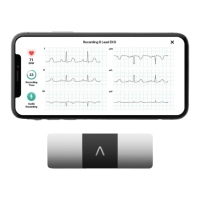
2. Rest two or more fingers (it doesnt matter which fingers) on Kardia Mobile; your right hand
should contact the electrode closest to the bottom of the smartphone or tablet, and your
left hand should contact the electrode closest to the top of the smartphone or tablet. This
is a Lead I EKG.
3. While recording your EKG, speak your symptoms (e.g. Im feeling palpitations. Maybe due
to anxiety) into the smartphone. Any voice memo recorded will be transcribed to text and
added to the Notes section for that EKG recording.
You may also choose from two other placements:
For a Lead II ECG, the left knee should contact the electrode closer to the top of the
smartphone or tablet and the right hand should contact the electrode closer to the
bottom of the smartphone or tablet.
For an Anterior Precordial Lead, the device can be placed on the lower left side of the
chest, just below the pectoral muscle. The bottom of the smartphone or tablet should
be pointing towards the center of the body.
4.2. To take an EKG recording with the Kardia Band System, follow the instructions below.
NOTE: For the sake of clarity, the instructions below are specific for those who wear their Apple
Watch on their left wrist. If you wear your watch on your right wrist, follow the instructions by
swapping left and right.
1. Tap the Kardia watch app on the Apple Watch to open the application.
2. In the in-app tutorial, swipe right to left to view the instructions.
3. With your right hand, grasp your left hand. Rest your right thumb on the outer electrode on
the Kardia Band EKG. Push your right thumb with enough force to ensure that the inner
electrode is in contact with the skin of your left wrist for the entire duration of the
recording. This is a Lead I EKG.
4. Tap the Record EKG button. A 3-second countdown will appear; ensure that your hands
and fingers are in the proper position (described above).
5. While recording your EKG, speak your symptoms (e.g. Im feeling palpitations.) into the
smartwatch. Any voice recording taken will be transcribed to text, which will be found in the
Notes section for that EKG recording in the Kardia phone app.
6. The recording takes 35 seconds.
Additionally, you may add notes or tags to the recording in the Kardia phone app. Tags include
symptoms, activities, diet, etc. that are relevant to heart health:
When your recording is complete, you will arrive at the Data Entry screen where you may add
notes or tags such as symptoms, activities, diet, etc.
Alternatively, you may go to the Journal screen, and tap the dropdown arrow to the right of the
EKG recording, then tap Edit. This will also take you to the Data Entry screen where you may
add or edit notes and tags.


 To Next Page