EasyManua.ls Logo

ALLEN & HEATH DR128 - Setup Menu Navigation; Using Setup Keys; Menu Map Overview

ALLEN & HEATH DR128
113 pages
Print Icon
To Next Page IconTo Next Page
To Previous Page IconTo Previous Page
Loading...
28 Hardware Configuration
DR128 U
SER
G
UIDE
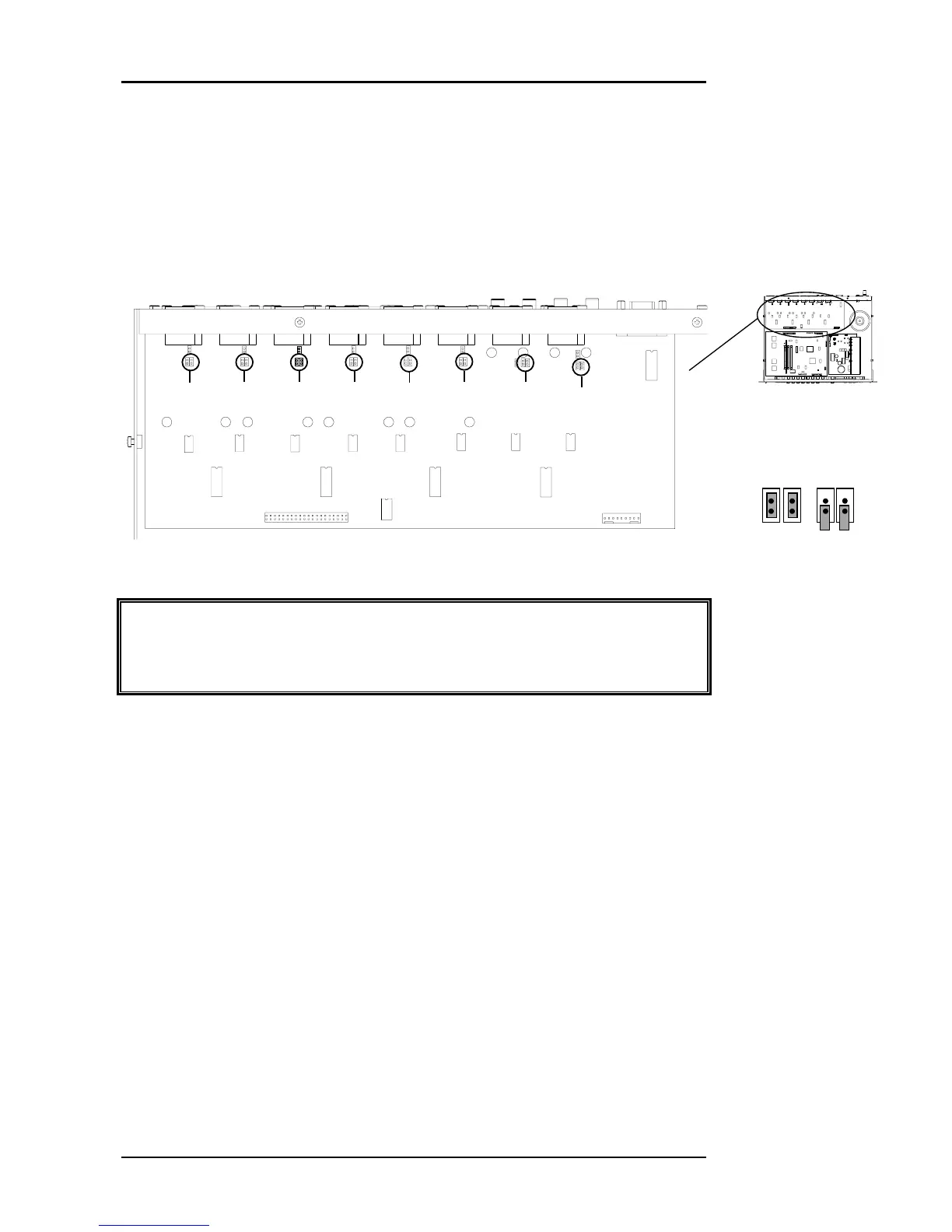
Selecting Mic Pad
6&()$&*&6
 . &    
).!&
)  .6    
%!6&,'
Precaution
Make sure that the Phantom Power is disconnected when using the
Mic/Line inputs with Line level sources.
Phantom Power
6()$@&*&
"A68$9:&B#&;).
&&&    *  2  ,
      A  / * *
,
2.,,6,
   ? . )        
.6%!6&
,'
Pad
Disabled
Pad
Enabled
1
2 3
4
5
6 7
8

Other manuals for ALLEN & HEATH DR128

Related product manuals