EasyManua.ls Logo

Allis-Chalmers HD-4 - Page 40

Allis-Chalmers HD-4
80 pages
Print Icon
To Next Page IconTo Next Page
To Previous Page IconTo Previous Page
Loading...
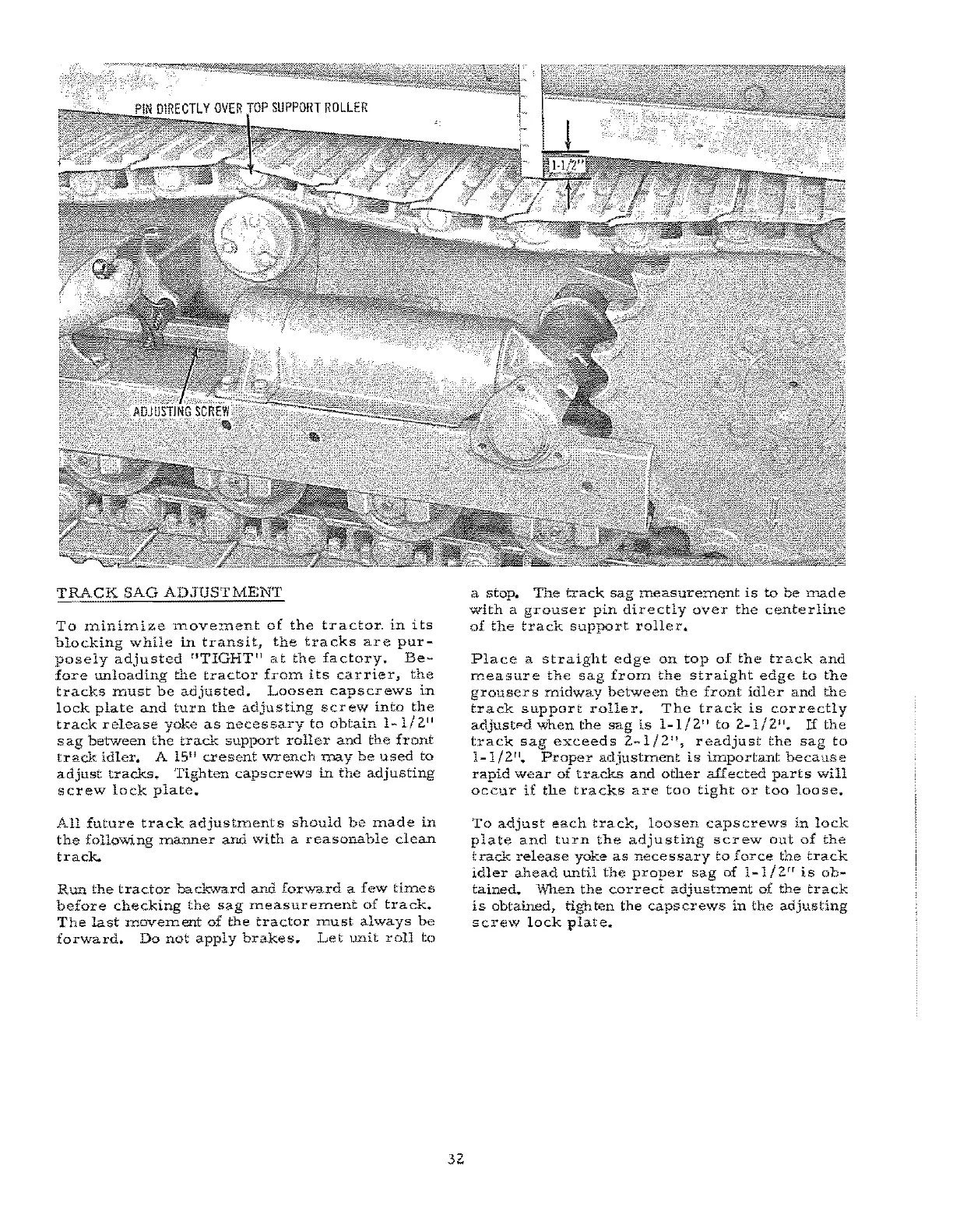
TRACK
SAG
ADJUSTMENT
To
miniInize
rnove:ment
of
the
tractor"
in
its
blocking
while
in
transit
l
the
tracks
are
pur-
posely
adjusted
"TIGHT"
at
the
factory.
Be-
fore
tmloading
the
tractor
from
its
carrier,
the
tracks
must
be
adjusted.
Loosen
capscrews
in
lock
plate
and
tUrn
the
adjusting
screw
into
the
track
release
yoke
as
necessary
to
obtain
I-I/zl'
sag
between
the
track
support
roller
and
the
front
track
idler.
A 15
11
cresent
V?rench
Ulay
be
used
to
adjust
tracks..
Tighten
caps
crews
in
the
adjusting
screw
lock
plate.
All
future
track
adjustments
should
be
made
in
the
follo'Wing
manner
and
with
a
reasonable
clean
track..
Run
the
tractor
backward
and
forward
a
few
times
before
checking
the
sag
measurement
of
track.
The
last
movement
of
the
tractor
must
always
be
forward.
Do
not
apply
brakes.
Let
unit
roll
to
32
a
stop.
The
track
sag
measure:::nent
is
to
he
made
with
a
grouser
pin
directly
over
the
centerline
of
the
track
support
roller.
Place
a
straight
edge
on
top
of
the
track
and
measure
the
sag
from
the
straight
edge
to
the
grouser
S ITIidway
between
the
front
idler
and
the
track
support
roller.
The
track
is
correctly
adjustFd
when
the
sag
is
1-1/2"
to
2-1/2".
If
the
track
sag
exceeds
2-1/2",
readjust
the
sag
to
1-1/2".
Proper
adjustment
is
important
because
rapid
wear
of
tracks
and
other
affected
parts
will
occur
if
the
tracks
are
too
tight
or
too
loose.
To
adjust
each
track,
loosen
caps
crews
in
lock
plate
and
turn
the
adjusting
screw
out
of
the
track
release
yok.e
as
necessary
to
force
the
track
idler
ahead
until
the
proper
sag
of
1_1/2rr
is
ob-
tained.
wnen
the
correct
adjustment
of
the
track
is
obtained,
tighten
the
caps
crews
in
the
adjusting
screw
lock
plate~