Allworx
®
Verge™ IP Phone Series User Guide
Page 74 866.ALLWORX * +1 585 421 3850
www.allworx.com
Version: T Revised: February 14, 2019
When Allworx users hot desk into a Verge IP phone, the phone stores the user’s volume settings. When
the Allworx user hot desks back into the phone, the Verge IP phone restores the saved settings with no
adjustments required. Additionally, the Verge 9312 IP phone stores the user’s Bluetooth paired devices.
To see the list of paired devices available on the hot desked Verge 9312 IP phone, go to Settings >
Bluetooth.
The Verge IP phone stores the volume settings and paired Bluetooth device information for up to 10
Allworx users. If Allworx user number 11 hot desks into the Verge IP phone, the user profile with the
oldest last-logged-in date is deleted.
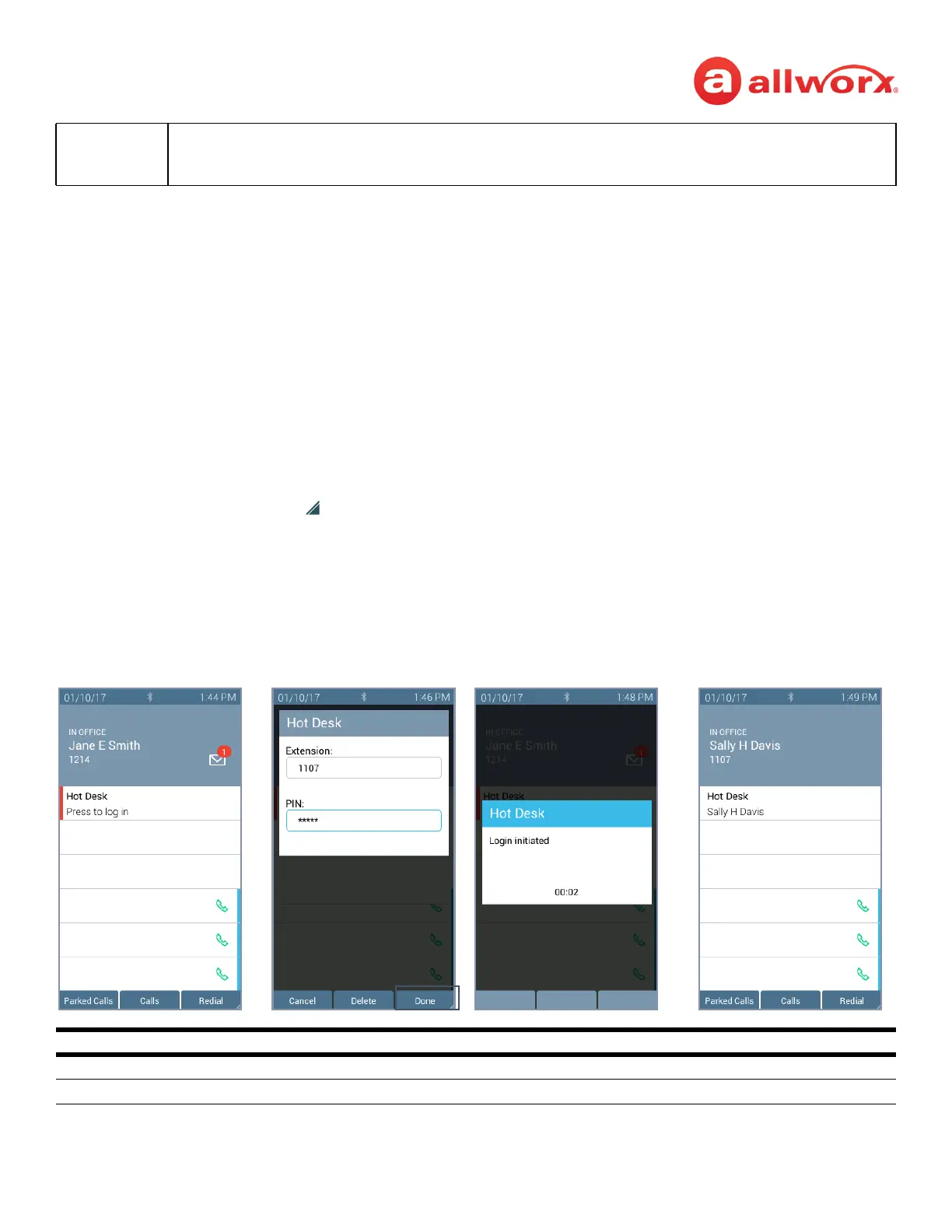
To Hot Desk into another phone:
1. Do one of the following to access the Hot Desk log in screen:
• Press the Hot Desk programmable button, if available.
• Press the More ( ) function button, and then the Settings soft key. Use the up or down
navigation and the Select buttons to choose the Hot Desk setting.
2. Enter the Allworx assigned extension and PIN number in the respective fields.
3. Press the Done soft key. To reenter the extension, press the Clear soft key. The Verge IP phone
displays the presence and the caller ID name/number on the phone screen.
Note:
The Verge 9304 IP phone does not share Allworx Personal Contacts with other Allworx phones or
applications (including the Hot Desk feature). Allworx users that use the Hot Desk feature lose any
personal contacts previously entered on the Verge 9304 IP phone used to Hot Desk.
Hot Desk Programmable Button LED
solid red phone is available for Hot Desk log in.
not lit Hot Desk feature is in use.
Press the Hot Desk programmable
button, if available.
Enter the user extension and
Allworx PIN. Press Done.
Verge IP phone updates per
the Hot Desk request.
Allworx user is hot desked to
Verge IP phone.



 To Next Page