866.ALLWORX * +1 585 421 3850 Page 2
www.allworx.com Version: B
© 2017 Allworx Corp, A Windstream Company. All rights reserved. Revised: April 13, 2017
While in Cell Phone Dialing mode, do I need to press the send ( )soft key for 911 calls?
No, the Verge IP phone series does not require pressing the send soft key for emergency calls.
How many Personal Contacts can I have?
The number of Personal Contacts each user can have depends on the amount of data that the user’s Personal Contacts consume. This varies
depending on whether or not the Personal Contacts have an associated image (images require more storage space than textual information).
Approximate number of Personal Contacts (actual numbers may vary due to available storage space):
• 7,000 - NONE of the contacts have associated images.
• 800 - ALL of the contacts have associated images.
How do I add my contact image (the image other users see with my contact information)?
Add your contact image using the Reach application (with or without a handset license) or the Interact Professional application. These user guides
are available at www.allworx.com.
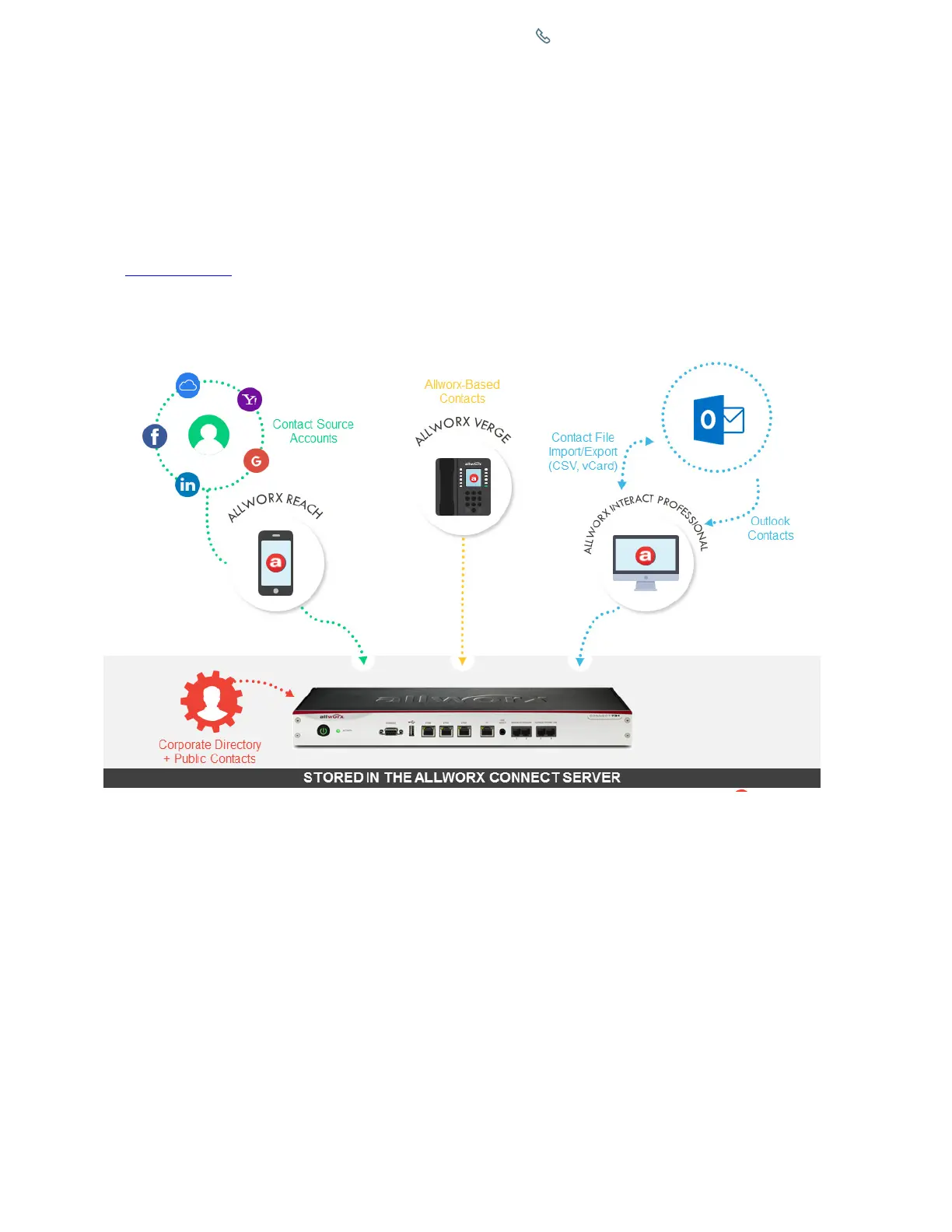
Where are the contacts stored?
Contacts exist on all clients (i.e. Verge IP phones, Reach application, and Interact applications - for shared accounts) as well as the Allworx server.
The Allworx server is the authoritative source (clients sync to the Allworx server).
Can the Allworx Server Administrator add to, edit, or limit my Personal Contacts?
No. The Allworx Server Administrator does not have access to your Personal Contacts.
Can the Allworx Server Administrator delete my Personal Contacts?
Yes. The Allworx Server Administrator can delete your Personal Contacts stored on the Allworx server. If a Personal Contact is synced from a Reach
device (i.e. iPad or Android Tablet Contact app) or an account (i.e. Gmail), the Reach device continues to store Personal Contacts in the contact app
or the email account. If a Personal Contact is synced from the Interact Application (i.e. Outlook application), the Outlook application continues to
store the Personal Contacts.
Where are the Park Orbit and Park Set Monitoring programmable buttons?
The Allworx System Software Version 8.2 combined the Park Orbit and Park Set Monitoring programmable buttons and replaced the buttons with
the Park Monitor programmable button on all Allworx phones.
The Park Monitor programmable button:
• enables watching calls assigned to a single parking orbit or multiple parking orbits.
• lights an LED indicator when a call is waiting in one of the assigned parking orbits.
• enables one-touch retrieval for programmable buttons assigned to a single parking orbit.


 To Next Page
 Loading...







