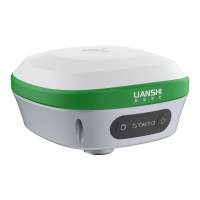
The R30-NET receiver, developed by Shanghai AllyNav Technology Co., Ltd., is a sophisticated device designed for analyzing satellite signals, primarily for positioning and navigation applications. This user manual, version 1.0, dated August 19, 2020, provides comprehensive instructions for configuring and operating the R30 device.
Function Description
The R30 receiver's core function is to process satellite signals to determine precise positioning data. It can operate in various modes, including Rover and Base, and is capable of outputting different types of differential data, such as RTCM (Radio Technical Commission for Maritime Services) and GPGGA (Global Positioning System Fix Data). The device is designed to be configured via a dedicated software interface, allowing users to set communication parameters, output formats, and operational modes.
Important Technical Specifications
The R30 device configuration involves several hardware components:
- R30 Receiver: The main unit responsible for satellite signal analysis.
- Antenna: Essential for receiving satellite signals. The manual emphasizes the importance of proper antenna installation, advising against large area covers, high voltage cables, or transformers nearby to avoid interference.
- Antenna Cable: A 10-meter cable for connecting the antenna to the R30 receiver.
- Data Cable (RS232): Used for data communication between the R30 and a computer.
- USB-Serial Port Converter: Facilitates the connection of the RS232 data cable to a computer's USB port.
- Laptop: A computer is required for running the configuration software.
Communication Parameters:
- Baud Rate: The default baud rate for communication is 38400. However, after a
FRESET command, the baud rate should be changed to 115200 for subsequent commands.
- Output Ports: The R30 supports multiple communication ports (COM1, COM2, COM3, ICOM1) for various data outputs.
- Differential Age: The device allows setting RTK (Real-Time Kinematic) and DGPS (Differential Global Positioning System) differential age to 6 seconds using
RTKTIMEOUT 6 and DGPSTIMEOUT 6 commands, respectively.
- NMEA Talker ID: The
NMEATALKER GP command sets the statement header to GP format.
- IP Address Information: The device's IP address, subnet mask, and default gateway can be configured using the
CONFIG ETH1 command (e.g., CONFIG ETH1 192.168.0.200 192.168.0.1 255.255.255.0).
- Return Port Code: The return port code for ICOM1 can be set using
CONFIG ICOM1 TCP command (e.g., CONFIG ICOM1 TCP 47.254.178.218 10001). The last five numbers of this command should be obtained from an AllyNav engineer.
- RTCM Differential Data Output: The receiver can be configured to output various RTCM differential data types, including RTCM1004, RTCM1104, RTCM1012, RTCM1033, and RTCM1005, typically with an
ONTIME 1 or ONTIME 10 setting.
Usage Features
The R30 device is configured using the sscom5.13.1.exe software.
Installation and Connection:
- Hardware Connection: Connect the R30 receiver, antenna, antenna cable, data cable, USB-Serial Port Converter, and power supply. The USB-Serial Port Converter should connect to the DB9 connector on the data cable with the "COM" label.
- Antenna Placement: Ensure the satellite antenna is installed in a location free from large area covers, high voltage cables, or transformers to prevent signal interference. It is recommended not to move the antenna or change the internet port after configuration.
- Software Launch: Open the
sscom5.13.1.exe software on a laptop.
Software Configuration Steps:
- Communication Setup:
- Select the correct COM port number corresponding to the USB-Serial Port Converter.
- Set the baud rate to 38400 (initially).
- Click "OpenCom" to establish communication.
- Communication Check:
- Send the
LOG VERSION command to verify successful communication. A feedback starting with #VERSION indicates normal communication.
- Reset and Baud Rate Adjustment:
- Send the
FRESET command to reset the device.
- Immediately change the software's baud rate to 115200.
- Clear Output Statements:
- Send
UNLOGALL COM1, UNLOGALL COM2, UNLOGALL COM3, and UNLOGALL ICOM1 to clear any previous output data on the respective ports.
- Set Port Baud Rates:
- Send
COM COM3 38400, COM COM2 38400, and COM COM1 38400 to set the baud rate for these ports to 38400. Remember to change the software's baud rate back to 38400 after sending these commands.
- Receiver Settings:
- Send
MASK 10 to set the satellite antenna height cut-off angle to 10 degrees.
- Send
RTKTIMEOUT 6 and DGPSTIMEOUT 6 to set differential ages.
- Send
NMEATALKER GP to set the NMEA talker ID.
- Operating Mode:
- Send
MODE ROVER to configure the device as a rover station.
- GPGGA Data Output:
- Send
LOG COM2 GPGGA ONTIME 1 to request 1Hz GPGGA data output on COM2.
- Obtain Best Position (Base Station Setup):
- Send
LOG BESTPOSA to obtain the best coordinate of the current satellite antenna. The feedback will provide longitude, latitude, and elevation data (e.g., 31.16230632665,121.30707809099,24.9839).
- Set Base Station Coordinate:
- Edit the
MODE BASE command with the coordinates obtained from LOG BESTPOSA (e.g., MODE BASE 31.16230632665 121.30707809099 24.9839). Send this command to set the receiver's start coordinate.
- IP Information Configuration:
- Obtain Laptop IP: Connect the R30's internet cable to the laptop. Open "Run" (Win+R), type "cmd", and press Enter. In the command prompt, type "ipconfig" and press Enter to view the laptop's IP address information.
- Configure R30 IP: Use the
CONFIG ETH1 command with the appropriate IP address, gateway, and subnet mask derived from the laptop's IP information (e.g., CONFIG ETH1 192.168.0.200 192.168.0.1 255.255.255.0).
- Return Port Configuration:
- Send
CONFIG ICOM1 TCP 47.254.178.218 10001 (using the specific port code provided by AllyNav engineer) to set the return port code.
- RTCM Differential Data Output:
- Send commands like
LOG ICOM1 RTCM1004 ONTIME 1, LOG ICOM1 RTCM1104 ONTIME 1, LOG ICOM1 RTCM1012 ONTIME 1, LOG ICOM1 RTCM1033 ONTIME 1, and LOG ICOM1 RTCM1005 ONTIME 10 to configure the receiver to output RTCM differential data.
- Save Configuration:
- Send
SAVECONFIG to save all the configured commands into the receiver's memory.
Maintenance Features
- Antenna Position Changes: If the antenna position or internet port is changed after initial configuration, it is crucial to re-configure the device. This involves re-obtaining the best position using
LOG BESTPOSA and updating the base station coordinate with MODE BASE.
- Internet Connection Changes: If the internet connection for the R30 device changes, the IP information must be re-obtained and re-configured using the
CONFIG ETH1 command.
- Troubleshooting: The manual advises contacting an AllyNav company engineer for any questions or issues during the configuration process.
- FCC Compliance: The device complies with FCC rules (Part 15) regarding harmful interference and must accept any received interference. It also adheres to FCC radiation exposure limits, requiring a minimum distance of 20cm between the radiator and the user's body. In case of interference, users are advised to reorient/relocate the antenna, increase separation from other equipment, connect to a different circuit, or consult a radio/TV technician.

 Need help?

 To Next Page
 General