`
___________________________________________________________________
Alpha ESS Co., Ltd.
Page 42 of 61
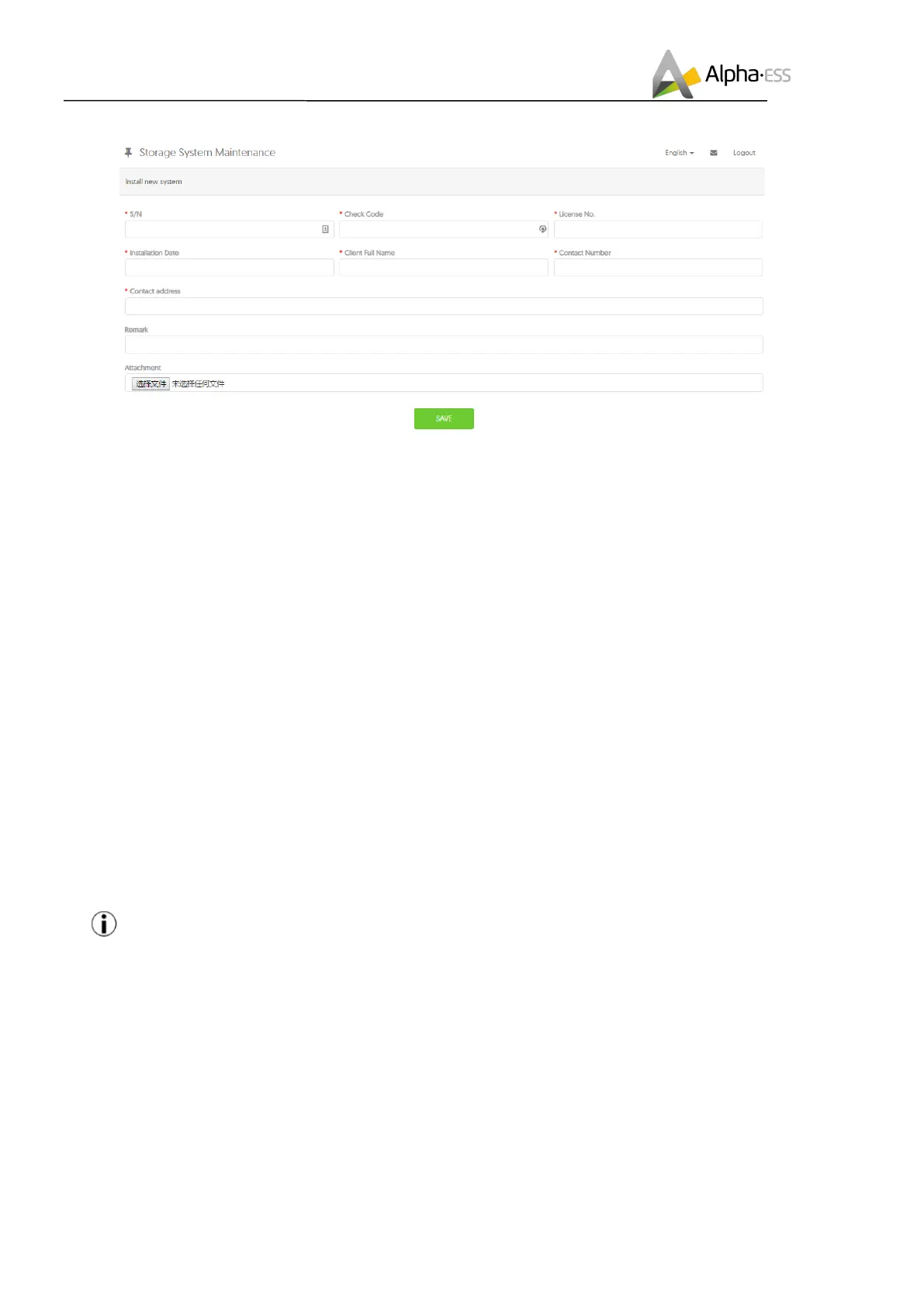
Enter the system S/N, check code, license, installation date, client name, contact number, contact
address, and click the save button. The red * in front of it is required. Clic
k the Browse button to select
the attachment you want to add.
6.1 System(Setup(in(Monitoring(
The system settings of the SMILE-B3 must be carried in the installer monitoring. To do this, follow
the steps below:
Step 1: Please login in the installer account, click the list of storage systems and enter the SN.
F"$"$ :)'+?-%&G,34)(+,&-
Step 2: After selecting the correct system, enter System Setup interface. Enter in the "Basic Information"
and input below information:
- Address,
- Zip code,
- Contact name,
- E-Mail address,
- Currencies and
- Telephone number.
Note: Do not forget to click “Save” button!
F"$"! 7/(/3-%&G,34)(+,&-
The initial setup is CT connection. If you use CTs, please ignore this section. Otherwise please find the
“Meter Information” interface in the “System setup” menu.













 To Next Page