48
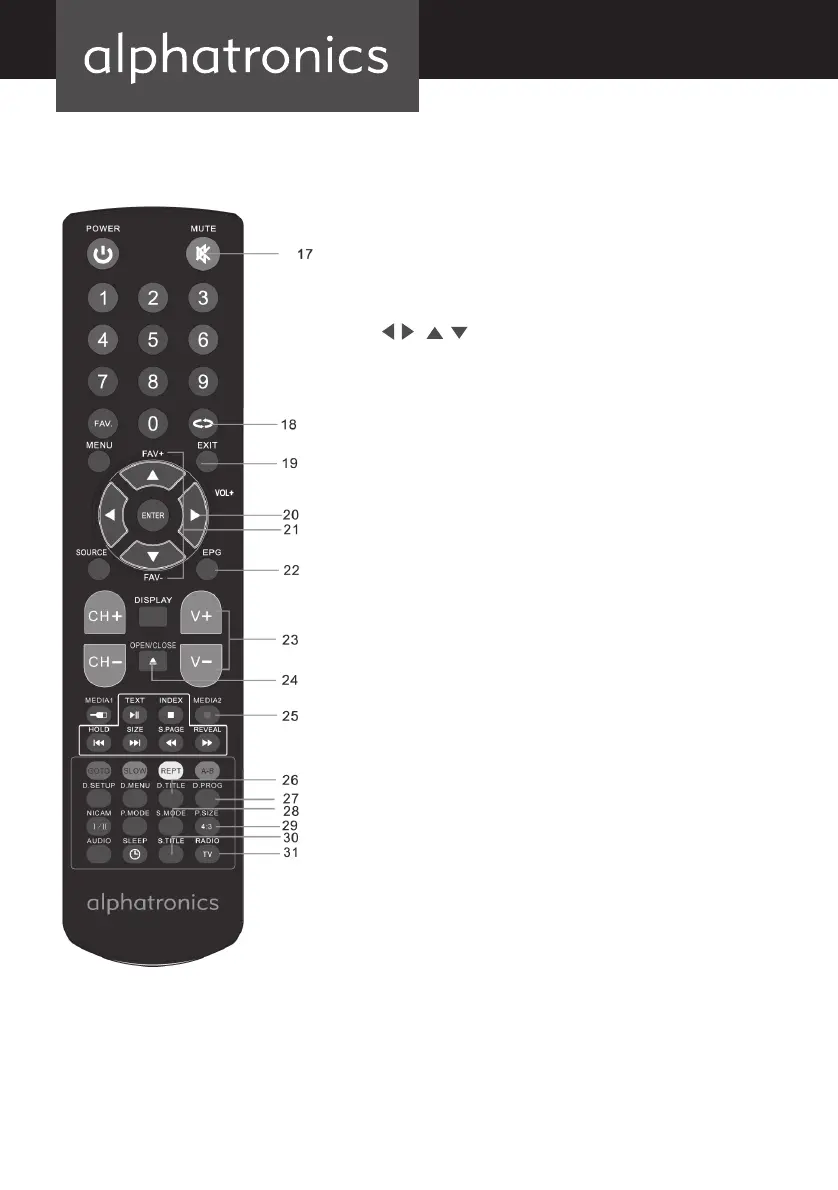
17. MUTE (To switch the sound on or off.)
18. RETURN (To return to the previously selected program
number.)
19. EXIT (To exit the menu.)
20.
|
AND ENTER (Use to select on screen menu
items and change menu values.)
21. FAV+/FAV- (To select a favorite channel according to the
service sequence in current favorite list.
22. EPG (To start the EPG application.)
23. VOL+/VOL- (To adjust the audio levels.)
24. OPEN/CLOSE (Press to open or close the disctray.)
25. MEDIA2 (Once button recording.)*
26. D.TITLE (During DVD playback, press to display the DVD
title menu.)**
27. D.PROG (While watching the digital TV, press to start
time shift. During DVD playback, press to disply the
program menu for edit.) enter the program*
28. S.MODE (To select the sound mode.)
29. P.SIZE (To select picture size.)
30. S.TITLE (To enable/disable the subtitle in DTV, USB and
DVD mode.)
31. TV/Radio (To select TV and Radio in DTV mode.)
* only if PVR is enabled (T-Line+ / SL-Line+)
alphatronics_BDA_Kurzversion_SL+_T+_DE_EN_2019_KL3.indd 48 09.04.19 12:34


 To Next Page