64
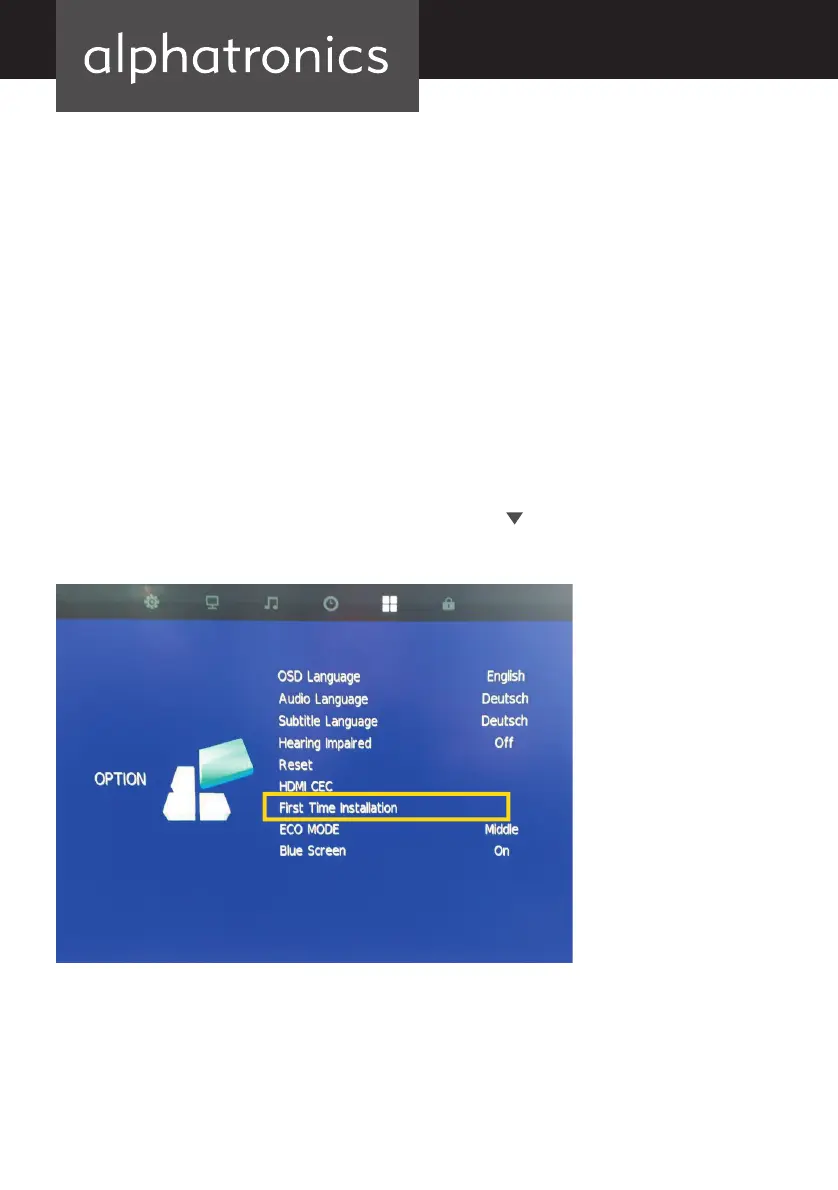
18. MENU “OPTIONS”
The “OSD language” option allows you to change the display language.
The “audio language” option plays back additional information in German or other languages
for certain fi lms.
The “subtitle language” option allows the text language to be changed for certain fi lms.
The “hearing-impaired” option activates the subtitles.
The “reset” option resets everything and the TV then returns to the “antenna” source. This
must then be changed to “satellite” by pressing the “source” button.
The “HDMI CEC” option allows you to connect CEC-compatible devices.
The “initial setup” option allows you to reactivate the preset channel list for Astra 19.2°. Move
the yellow marker to “initial setup” using the arrow button
and press ENTER.
alphatronics_BDA_Kurzversion_SL+_T+_DE_EN_2019_KL3.indd 64 09.04.19 12:34



 To Next Page