41
ENGLISH
2. LOCATION AND FUNCTION OF CONTROLS
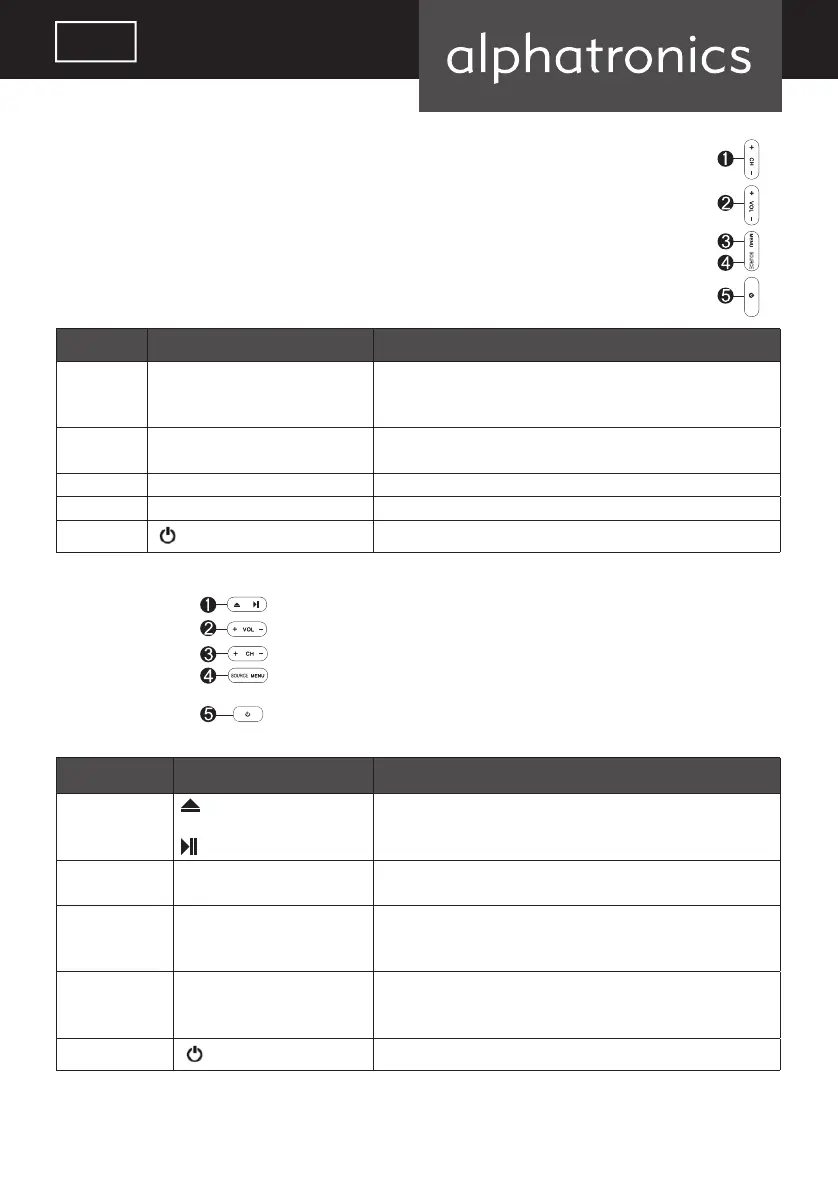
T-Line+ / SL-Line+
Item Button Name Description
1 CH+/- When you are watching the TV program, press these buttons to
select channel in ascending or descending order. Select the upper or
lower menu item in the OSD menu.
2 VOL+/- Increase or decrease the volume.
Adjust the values of the selected menu item in the OSD menu.
3 MENU Enter or exit from the menu
4 SOURCE Select an input signal.
5
Switch on the LED TV when at standby mode or vice versa.
SL-32 DSB / -I+
Position Tastenbeschriftung Funktion
1 • Open / Close available in DVD Mode
• Play / Pause
2 VOL+/- • Increase or decrease the volume. Adjust the values of the
selected menu item in the OSD menu.
3 CH+/- • When you are watching the TV program, press these buttons to
select channel in ascending or descending order. Select the upper
or lower menu item in the OSD menu.
4 Source
MENU
• Select an input Signal
• Enter or exit from the menu
5
Switch on/off the LED TV
Attention:
Power indicator lights blue in standby and no light when TV is switched on.
alphatronics_BDA_Kurzversion_SL+_T+_DE_EN_2019_KL3.indd 41 09.04.19 12:34


 To Next Page