EasyManua.ls Logo

Alpine 7289M - Page 15

Alpine 7289M
31 pages
Print Icon
To Next Page IconTo Next Page
To Previous Page IconTo Previous Page
Loading...
10.
When
you
wish
to
change
the
preset
stations
you
have
stored
in
memory,
enter
new
Stations
as
stated
in
the
steps
1
through
5.
The
old
ones
are
automatically
erased
and
new
ones
will
be
memorized.
Auto
MEMOry
Preset
1.
Press
the
TUNE
switch
@
and
light
up
the
“A.
MEMO”
indicator
©
in
the
display.
2.
Select
the
desired
tuning
band
(FM1,
FM2,
MW
or
LW)
43
with
the
TUNER
BAND
switch
@.
3.
Press
the
UP
or
DN
switch
@.
The
tuner
will
automatically
seek
the
six
strongest
stations
in
each
band
and
memorize
them
in
order
of
the
signal
strength.
These
stations
are
automatically
placed
in
the
preset
memory
with
the
strongest
station
in
Preset
No.
1
and
the
6th
strongest
station
in
Preset
No.
6.
When
seeking
stations,
the
tuner
first
seeks
in
the
local
tuning
mode.
If
less
than
6
stations
are
memorized,
the
tuner
seeks
again
in
the
distance
(DX)
mode.
4.
After
finishing
Auto
Memory
Preset,
the
tuner
goes
to
the
station
placed
in
preset
memory
No.
1.
If
no
stations
are
memorized,
it
returns
to
the
original
station
you
were
listening
to
before
the
auto
memory
preset
procedure
began.
FM
STEREO/MONAURAL
Selection
(MONO
Switch)
During
stereo
reception,
should
the
signal
becomes
weak
(the
“ST”
indicator
@
in
the
display
blinks),
select
monaural
reception
by
pressing
the
MONO
switch
@3
to
decrease
the
noise
level.
NOTE:
The
unit
has
been
initially
set
in
the
monaural
mode.
Push
the
MONO
switch
@
to
change
to
stereo
mode.
Local/Distance
Switch
Operation
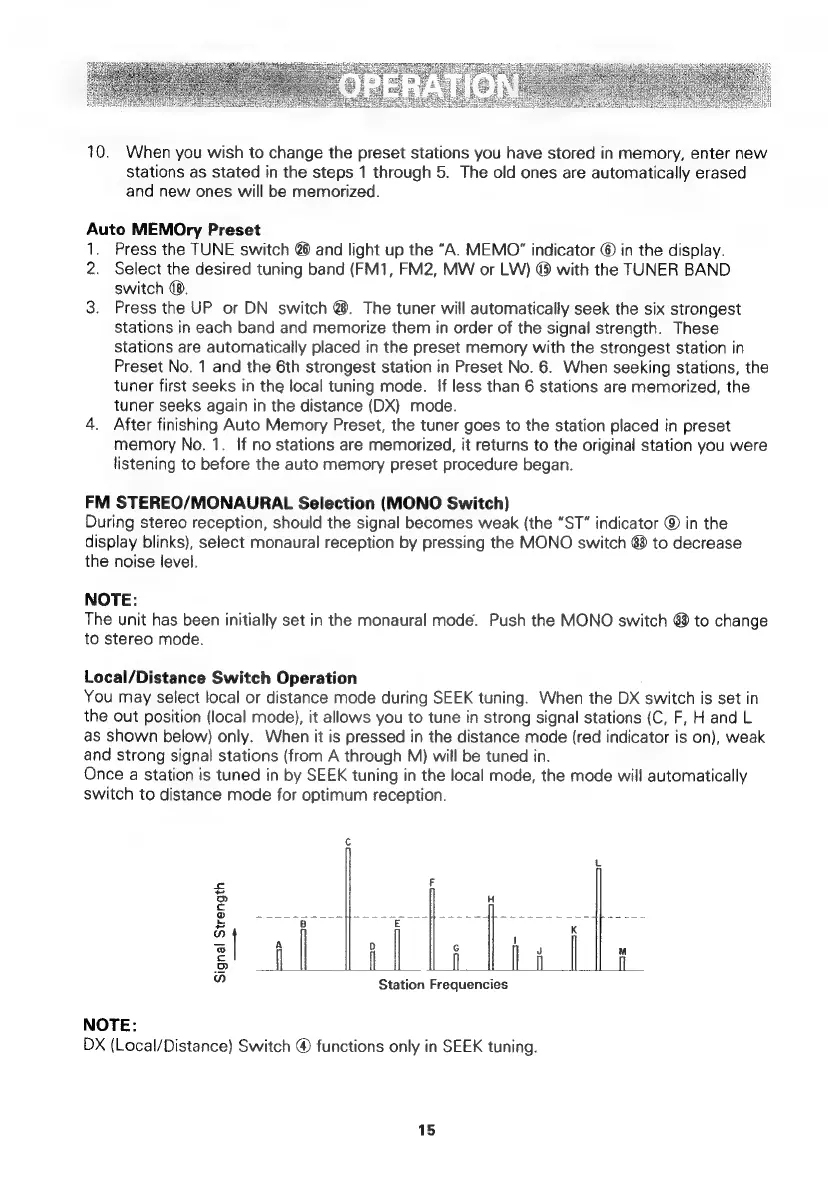
You
may
select
local
or
distance
mode
during
SEEK
tuning.
When
the
DX
switch
is
set
in
the
out
position
(local
mode),
it
allows
you
to
tune
in
strong
signal
stations
(C,
F,
H
and
L
as
shown
below)
only.
When
it
is
pressed
in
the
distance
mode
(red
indicator
is
on),
weak
and
strong
signal
stations
(from
A
through
M)
will
be
tuned
in.
Once
a
station
is
tuned
in
by
SEEK
tuning
in
the
local
mode,
the
mode
will
automatically
switch
to
distance
mode
for
optimum
reception.
Signal
Strength
—s
Ep
|
SE
|
fooee
|
o |
———d
rae
—-
oc
<r
i
-4
Station
Frequencies
NOTE:
DX
(Local/Distance)
Switch
®
functions
only
in
SEEK
tuning.
15

Related product manuals