PARKING AIDS
2
Driving - 129
Depending on the equipment, when
shifting into reverse gear, camera
1
transmits a view of the area behind the
vehicle to the instrument panel or on
the multimedia screen along with,
depending on the vehicle, a moving
guide line and a fixed guide line.
Note: you can adjust certain settings
from the vehicle settings customisation
menu (refer to "Vehicle settings
customisation menu" in Section 1).
Special feature
Make sure that the camera is not
obscured (by dirt, mud, snow,
condensation etc.).
This function is an
additional aid. It cannot,
therefore, under any
circumstances replace
the vigilance or the responsibility
of the driver.
The driver should always be
ready for sudden incidents while
driving: always ensure that there
are no small, narrow moving
obstacles (such as a child,
animal, pushchair, bicycle, stone,
post, etc.) in the blind spot when
manoeuvring.
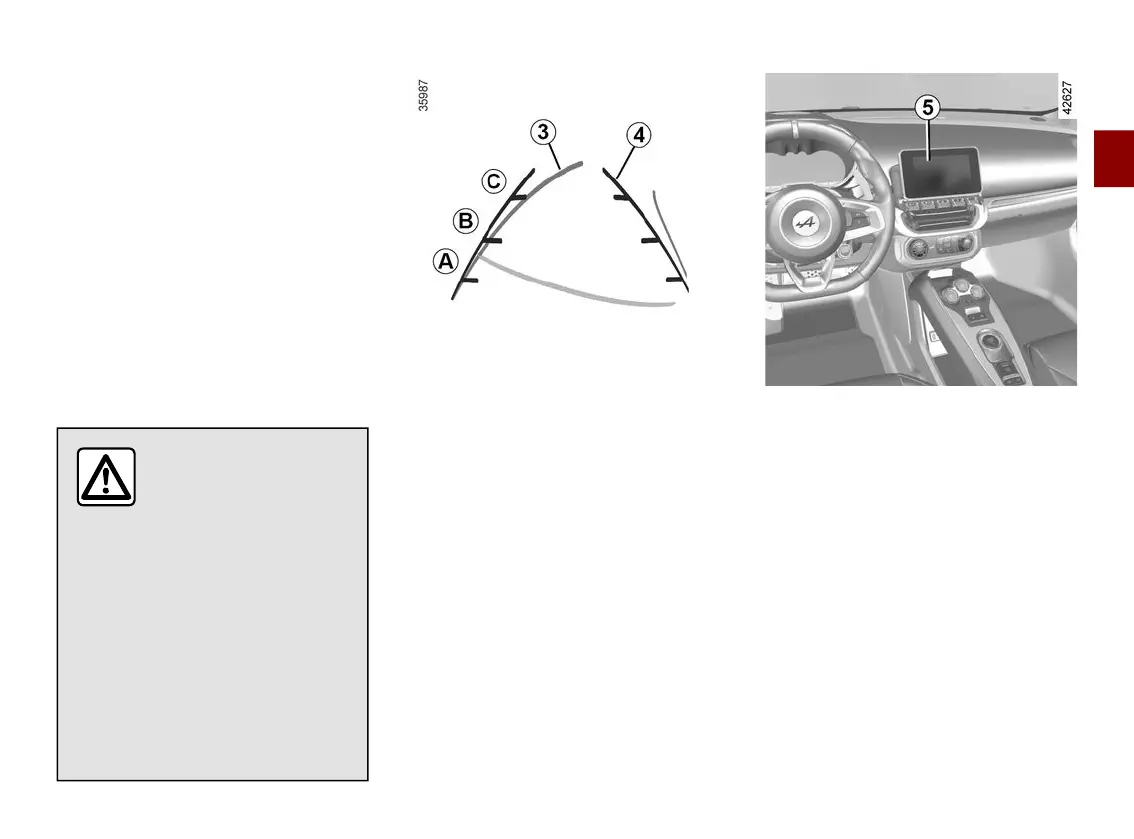
Moving guide line
3
(depending on the vehicle)
This is shown in orange on the
multimedia screen
5
. It indicates the
vehicle trajectory according to the
position of the steering wheel.
Fixed guide lines
4
The fixed gauge includes coloured
markers
A
,
B
and
C
indicating the
distance behind the vehicle:
–
A
(red) at approximately 30
centimetres from the vehicle;
–
B
(white) approximately 60
centimetres from the vehicle;
–
C
(blue) approximately 120
centimetres from the vehicle.
This gauge remains fixed and
indicates the vehicle trajectory if the
wheels are in line with the vehicle.
This system is initially used with the
aid of several gauges (mobile for
trajectory and fixed for distance).
When the red zone is reached, use the
bumper image to stop accurately.



 To Next Page