7
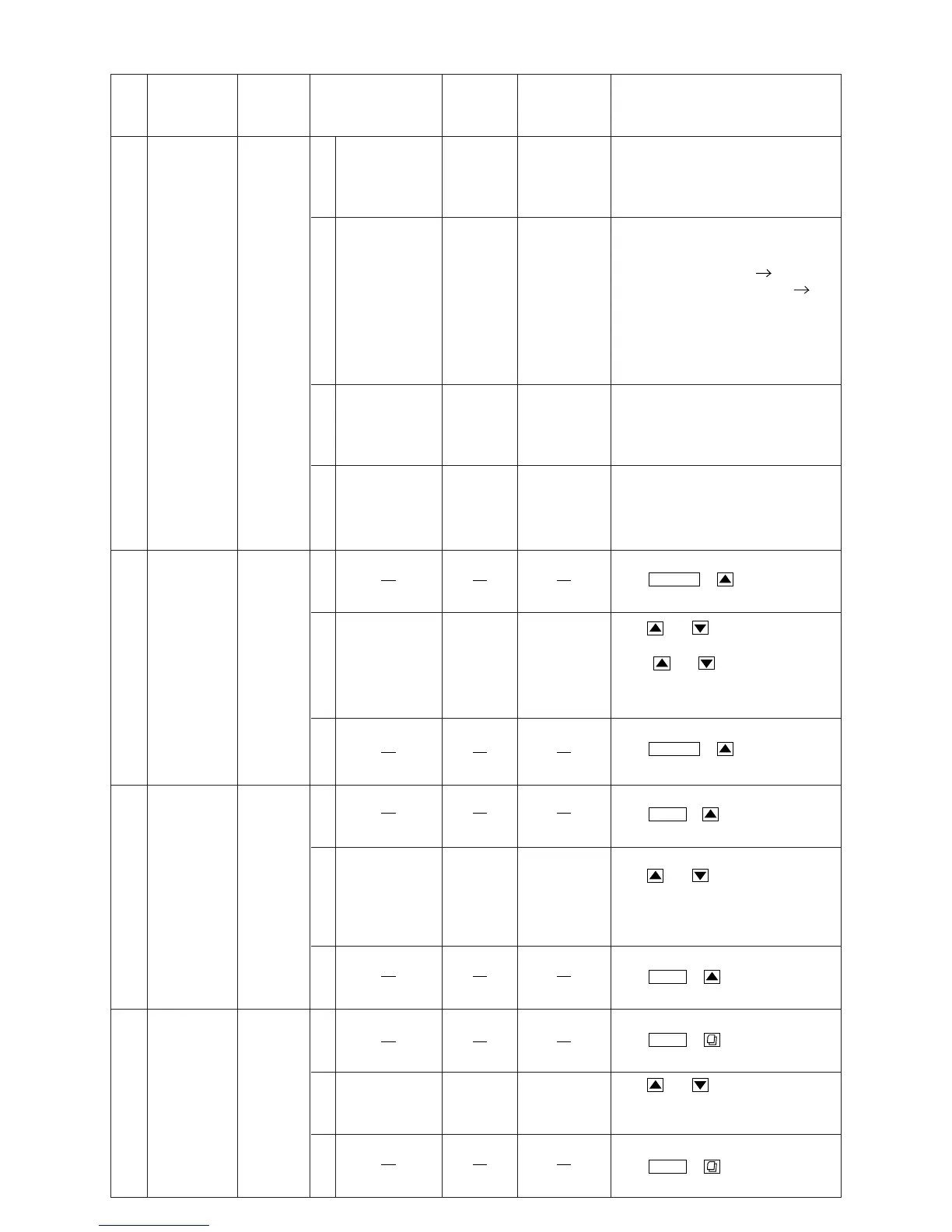
Limitting
Adjustment
Figure 6
(1)
Set up of Adjustment Mode
Push
at the same time.
(2)
98.1MHz, 24dBµ
(Mod. 400Hz,
Dev. 40kHz)
98.1MHz
Audio Output
(RCA)
Push
observe value of limitting.
(SPEC) : Limitting : 3dB.
(3)
Cancel Adjustment Mode :
Push
at the same time.
6
Stereo Blend
Adjustment
(Lch)
Figure 5
(1)
(2)
98.1MHz, 46dB
(Mod. 400Hz,
Dev. 40kHz,
Stereo, 1kHz,
Lch only)
98.1MHz
Audio Output
(RCA)
Push
observe value of blend.
(SPEC) : Blend : 8±6dB.
(3)
5
FM ST
Separation
(Roll OFF)
Adjustment
Figure 5
(1)
Set up of Adjustment Mode :
Push KeyPOWER
+
at the same time.
(2)
98.1MHz, 72dBµ
µ
(Mod. 400Hz,
Dev. 40kHz,
Stereo, 1kHz,
Lch only)
98.1MHz
Audio Output
(RCA)
Push Key, andand
observe value of separation.
Select of maximum
separation.
(SPEC) : separation : more than 20dB.
(3)
Cancel Adjustment Mode :
Push
at the same time.
4
Signal Meter
Auto
Adjustment
(LW)
Figure 4
(1)
216kHz,
34dBµ
(Mod. OFF)
216kHz
TP002
(3-F)
TP501
(3-F)
(2)
216kHz,
34dBµ
(Mod. OFF)
216kHz
TP002
(3-F)
TP501
(3-F)
(3)
216kHz,
29~31dBµ
(Mod. OFF)
216kHz
TP002
(3-F)
TP501
(3-F)
(4)
216kHz,
34dBµ
(Mod. OFF)
216kHz
TP002
(3-F)
TP501
(3-F)
Auto Adjustment :
After setting up of Signal Genarator,
short GND and TP501 (Pull-Down)
for 2~3 seconds.
Proceed same Auto Adjustment of step
(1) under step (2).
(SPEC) TP002 : 1.0±0.1V OK
(SPEC) TP002 : others 1.0±0.1V NG
NOTE : NG : Proceed same Auto
Adjustment of step (1)
under step (3).
Proceed same Auto Adjustment of step
(1) under step (3).
Proceed same Auto Adjustment of step
(1) under step (4).
Step Description Connection Signal Generator Dial Control
Test Point /
P.W.Board
Coordinates
Adjustment
Set up of Adjustment Mode :
:
Push KeyBAND
+
at the same time.
KeyPOWER
+
Cancel Adjustment Mode :
Push
at the same time.
KeyBAND
+
KeyBAND
+
Key, andand
Key, andand
Keyand
KeyBAND
+
CDA-9855R


 To Next Page