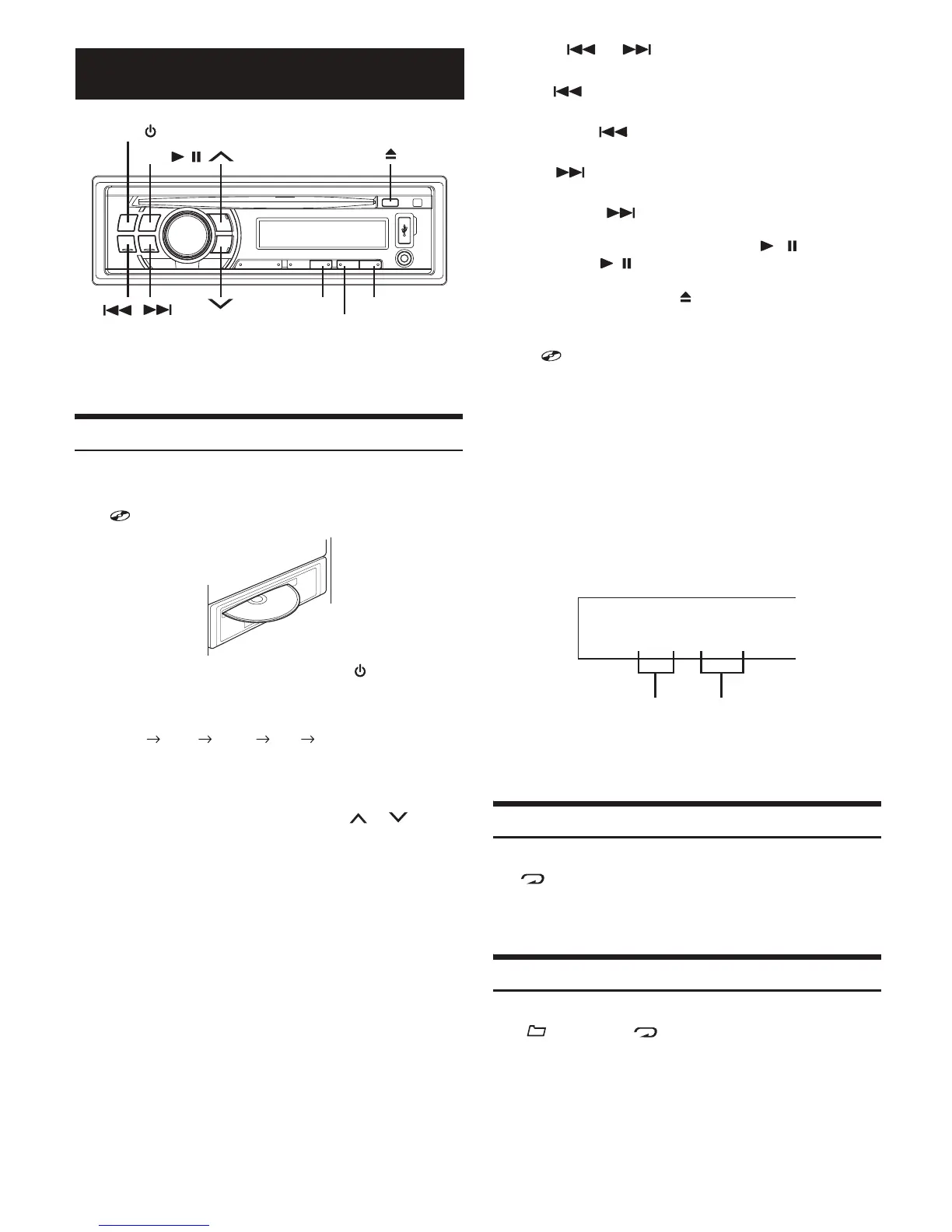
Playback
1
Insert a disc with the label side facing up.
The disc will be pulled into the unit automatically, and the
“ DISC IN” indicator lights up .
When a disc is already inserted, press SOURCE/ to
switch to the DISC mode.
The mode will change every time the button is pressed.
RADIO CD
*
1
USB
*
2
AUX RADIO
*
1
Displayed only when a disc has been inserted.
*
2
Displayed only when USB memory is connected.
2
While playing back MP3/WMA, press or
to select the desired folder.
3
Press or to select the desired track (file).
Returning to the beginning of the current track (file):
Press .
Fast backward:
Press and hold .
Advancing to the beginning of the next track (file):
Press .
Fast forward:
Press and hold .
4
To pause playback, press
BAND/ /
.
Pressing BAND/ / again will resume playback.
5
To eject the disc, press .
Ř Do not remove a CD during its eject cycle. Do not load more than
one disc at a time. A malfunction may result from doing either.
Ř The “ DISC IN” indicator lights up wh
en a disc is inserted.
Ř Three-inch (8 cm) CDs cannot be used.
Ř The CD-player can play discs containing audio data, MP3 data,
and WMA data.
Ř WMA format files that are protected by DRM (Digital Rights
Management).
Ř The track display for MP3/WMA data playback is the file
numbers recorded on the disc.
Ř The playback time may not be correctly displayed when a VBR
(Variable Bit Rate) recorded file is played back.
MP3/WMA Play Display
The folder number and file number will be displayed as
described below.
Ř Press VIEW to swi
tch the display. See “Displaying the Text” for
information about display switching.
Repeat Play
Press 6(RPT) to repeatedly play back the current track.
The “ RPT” indicator lights up, and the track (file) will be
played repeatedly.
Press 6(RPT) again to cancel.
Folder Repeat Play (MP3/WMA)
Press and hold 6(RPT) for at least 2 seconds.
The “ FOLDER” and “ RPT” indicators appear in the
display, and only files in the current folder are repeatedly played
back.
Press and hold 6(RPT) again to cancel.
CD/MP3/WMA
6(RPT)
SOURCE/
BAND/ /
5(SCAN)
4(M.I.X.)
003–002
Folder number
display
File number
display
6
Note
* CDE-110UB does not support WMA.


 To Next Page