17-EN
Switching the Tuner Mode
(CDM-9807RB/CDM-9805R only)
The CDM-9807RB/CDM-9805R incorporates the
MAX TUNE Pro for the highest quality tuner audio.
Moreover, you can choose between 3 settings to
suit your own personal sound preferences usage.
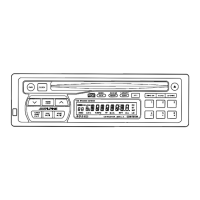
1 Press and hold the F/SETUP button for at least 3
seconds.
2 Press the g or f button to select
NORMAL.
3 Press the BAND button to switch the TUNER
mode.
NORMAL: Standard setting
HI-FI: Sound quality priority setting
STABLE: Noiseless priority setting
NOTES
• The initial setting at the factory is "NORMAL."
• If you find the sound is very noisy while listening to
the tuner in the HI-FI mode, we recommend you
change to the NORMAL mode.
4 When the setting is completed, press the
F/SETUP button to return to the normal mode.
→ HI-FI → NORMAL → STABLE



 To Next Page