14
9. BREEZ PLUS - LOCAL CONTROL OPTION
Adjusting the temperature of your AC:
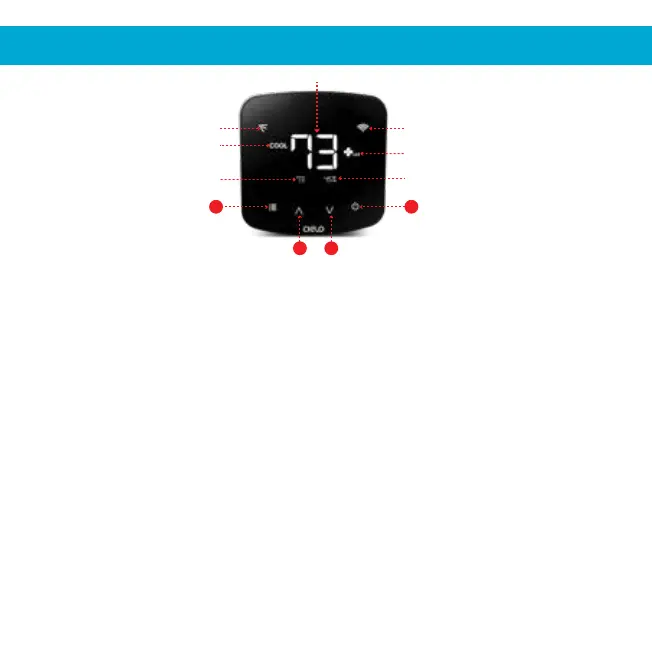
Use the up or down button to set the temperature of your choice.
Changing the mode of your AC:
Touch the menu button once. The AC modes will start blinking. Use the up or down
button to select the mode (e.g. Cool, Heat etc.). Your selected mode is set.
Changing the fan speed:
Touch the menu button twice. The fan speed icon will start blinking. Use the up or
down button to change the fan speed. Your selected fan speed is set.
Adjusting the swing position:
Touch the menu button thrice. The swing position icon will start blinking. Use the up
or down button to select the swing position. Your selected swing position is set.
Changing multiple settings in one go:
You can set mode, swing position & fan speed in one go. Touch the menu button
once and select the mode of your choice. Touch the menu button again and adjust
the fan speed. Touch the menu button again and select the swing position. All your
settings are completed in one go.
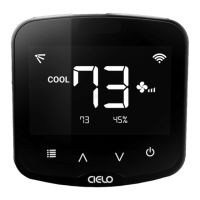
AC Modes
Room Temperature
Room Humidity
Power On/Off ButtonMenu Button
Temperature Down ButtonTemperature Up Button
Fan Speed
Wi-Fi Status
Swing Positions
Set Point Temperature
4
1
3 2


 To Next Page