15
10. BREEZ PLUS - LOCAL CONTROL OPTION (CONT’D)
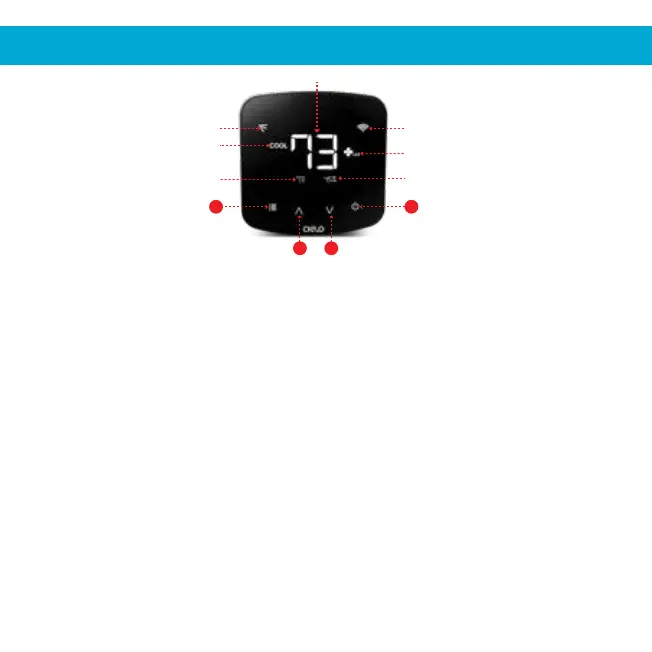
AC Modes
Room Temperature
Room Humidity
Power On/Off ButtonMenu Button
Temperature Down ButtonTemperature Up Button
Fan Speed
Wi-Fi Status
Swing Positions
Set Point Temperature
4
1
3 2
Turning the display of Breez Plus On:
Press the Temperature Down button for six seconds and release.
Locking/Unlocking the display interface:
Press and hold Temperature Up and Temperature Down buttons simultaneously for six
seconds and release.
Enabling Wi-Fi of Breez Plus:
Press and hold the Temperature Up button for six seconds and release.
Resetting the Wi-Fi of Breez Plus:
Press and hold Temperature Up and Power buttons simultaneously for six seconds and
release.
Wi-Fi Icons:
Case 1:- Stable Wi-Fi Icon - Device is connected to internet, showing the Wi-Fi strength.
Case 2:- Blinking Wi-Fi Icon - Device is in broadcast (AP) mode. Please complete
registration process as per step 3A/3B of this manual. If the device is
already registered, refer to case 3.
Case 3:- Wi-Fi Icon with small triangle - Device connected with router but has no internet
access. Please ensure you have a working internet connection and restart the device.


 To Next Page