34-EN
Using Ballgame Mode (HD Radio™
Mode only)
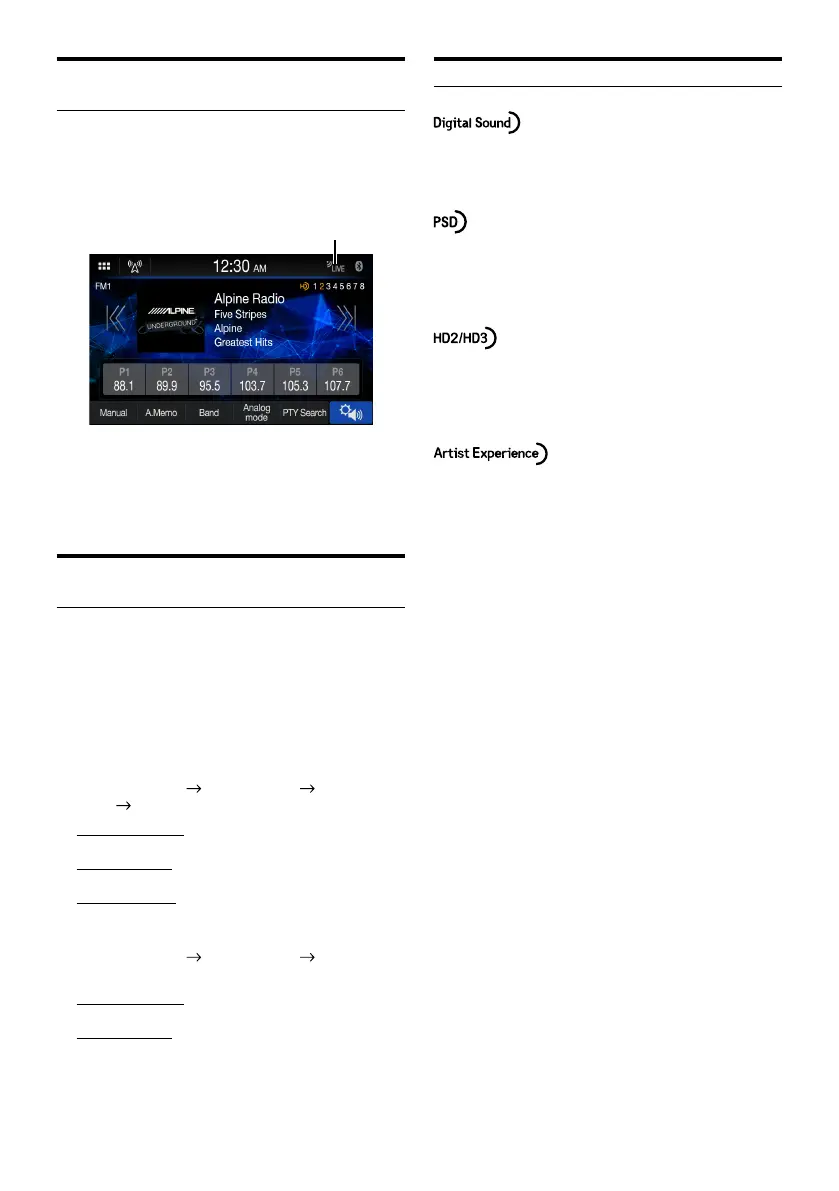
When [Ballgame Mode] is set to [On] (page 15), the LIVE
indicator will lights up when receiving live broadcast such
as sportscast.
■
Ballgame mode screen example
LIVE indicator
• In live broadcast, such as sportscasts, etc., a time lag occurs
between digital sound and analog sound. Therefore, when live
broadcasts are received, a time lag between the real broadcast
may occur and the unit can change to analog broadcasting
automatically.
Displaying Radio Text (HD Radio™/
RBDS FM Radio mode only)
Text messages from a radio station can be displayed.
1 Tune in a radio station that transmits text
messages.
2 Touch the information display area in the FM
radio mode repeatedly to switch to the
desired display.
RBDS:
Station Info Mode
Song Info Mode Radio Text
Mode
Station Info Mode
Station Info Mode:
PS / PTY / Frequency / Song Name
Song Info Mode:
PS/Song Name / Artist Name / Album Name
Radio Text Mode:
Radio Text
HD Radio:
Station Info Mode
Song Info Mode Station Info
Mode
Station Info Mode:
Station Name / Frequency / Song Name
Song Info Mode:
Station Name / Song Name / Artist Name / Album Name
About the Feature Logos
• Digital, CD-quality sound. HD Radio Technology enables
local radio stations to broadcast a clean digital signal. AM
sounds like today’s FM and FM sounds like a CD.
• Program Service Data: Contributes to the superior user
experience of HD Radio Technology. Presents song name,
artist, station IDs, HD2/HD3 Channel Guide, and other
relevant data streams.
• Adjacent to traditional main stations are extra local FM
channels.
These HD2/HD3 Channels provide new, original music as
well as deep cuts into traditional genre.
• Visual information related to content being played on your
HD Radio receiver, such as Album Art, historical photographs,
still art from live broadcasts, among other related content.















 To Next Page