20-EN
01GB04INE-S920E.fm
ALPINE INE-S920E/INE-Z928E 68-21057Z31-A (EN)
Initial System Start-Up
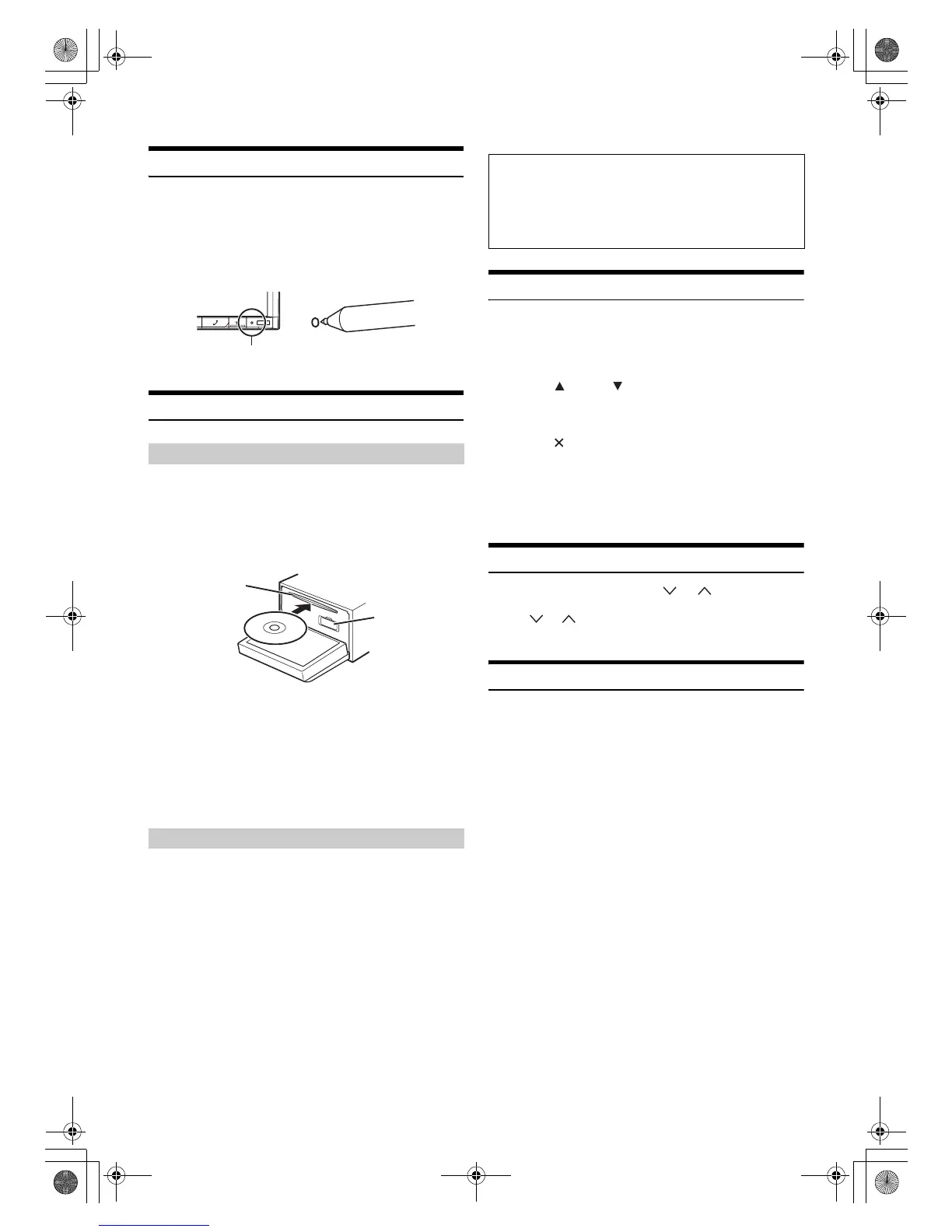
Be sure to press the RESET switch when using the unit for the first
time, after changing the car battery, etc.
1
Turn off the unit power.
2
Press RESET switch with a ballpoint pen or similar
pointed object.
Inserting/Ejecting a Disc
1
Press c (Eject).
The Open/Tilt screen is displayed.
2
Touch [Open].
3
Insert the disc with the label side facing up.
Insert the disc until it is automatically pulled into the unit.
The unit starts to play the disc.
* The SD memory card does not support Music/Video playback.
For details on how to use SD memory cards, refer to “Navigation
system OM” on the supplied CD-ROM.
• Insert the SD memory card into the slot until it is locked.
If the SD memory card is not inserted properly, the monitor cannot be
closed.
1
Press c (Eject).
The Open/Tilt screen is displayed.
2
Touch [c Disc].
The monitor will open. Then the disc is ejected.
When the disc has been ejected part way, take it out.
3
Touch [Close], or press c (Eject).
• If the disc does not eject after touching [c Disc], press and hold
c (Eject) for at least 5 seconds.
• Do not apply shock to the monitor when it is open as it may result in
malfunction of the unit.
• The monitor will stop at the set tilt angle when closing.
Adjusting the Monitor Viewing Angle
Adjust the monitor’s angle for better visibility.
1
Press c (Eject).
The Open/Tilt screen is displayed.
2
Touch [Up] or [Down] of “Tilt” to adjust the
desired monitor angle.
The monitor angle can be adjusted in 5 stages.
3
Touch [] to return to the normal mode.
• The screen colour will vary when viewed at certain angles. Adjust the
screen angle for the best viewing position.
• If the voltage of the vehicle’s battery power is low, the screen may
blink when the screen angle is changed. This is normal and not a
malfunction.
Adjusting the Volume
Adjust the volume by pressing or .
Volume decreases/increases continuously by pressing and
holding or .
Volume: 0 - 35
Lowering Volume Quickly
Activating the Audio Mute function will instantly lower the volume
level by 20 dB.
1
Press MUTE to activate the MUTE mode.
The audio level will decrease by about 20 dB.
2
Pressing MUTE again will bring the audio back to its
previous level.
Inserting the Disc
Removing the Disc
RESET switch
SD memory
card slot*
Disc Slot
CAUTION
Keep hands (or any other object) away from the monitor while it
is opening or closing to avoid damage or injury. The back of the
monitor tends to become very warm under normal operating
conditions. This is not a malfunction, but care should be taken to
avoid prolonged contact with it.
01GB00INE-S920E.book Page 20 Tuesday, June 12, 2012 10:56 AM












 To Next Page