2.5 The update takes approximately 2-3 minutes.
2.6 Once the update has completed a pop-up message will appear. ‘MCU update is
completed please remove USB’.
2.7 Remove the USB from the unit.
2.8 Another pop-up message will appear ‘The update is completed, please click ok button
to restart the system’.
2.9 Tap the ‘OK’ button. The unit will the restart automatically.
iXE-W400E Software Update Instruction Manual
Step Three: Checking The Update Was Successful
3.1 Once the unit has restarted you will need to check the software version to ensure the
update was successful.
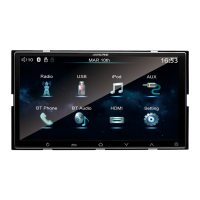
3.2 To do this you tap the ‘Settings’ button on the Home Screen.


 To Next Page
 Loading...










