FR
ES
DE
SE
IT
11-EN
Battery Replacement
Applicable battery: Use two “AAA” sized dry
batteries or equivalent.
• Point the remote control transmitter toward the
remote sensor on the TMX-R705 and use the
remote control within 2 meters from the TMX-
R705.
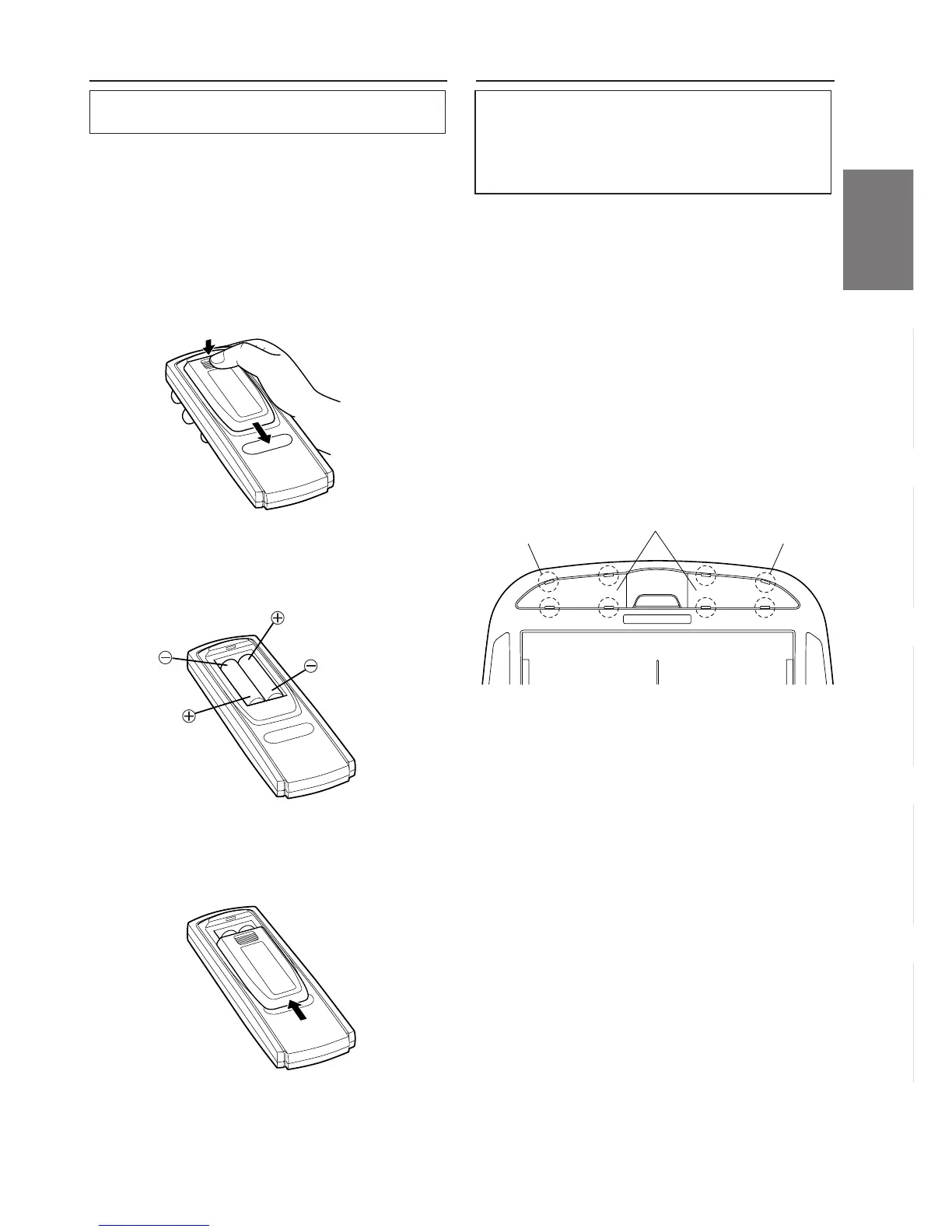
1 Opening the battery cover.
Slide out the battery cover while firmly pressing
in the direction of arrow.
2 Replacing the battery.
Put the batteries in the case observing the
polarities as illustrated.
3 Closing the cover.
Push the cover as illustrated until a click is heard.
Replacing the Dome Light Bulb
NOTE
When replacing the dome light bulb, replace with one
of the specified 12V, 5W capacity. Use of a different
capacity bulb may cause damage to the unit. Please
note that no guarantee is carried out if this is the
case.
1 Use 12V, 5W rated bulb (End Cap Base: T8 x 28)
available at any autoparts store or consult your
authorized Alpine Mobile Multimedia dealer for
further information.
2 Use a flat-bladed screwdriver to release the
hooks and open the lense, being careful not to
scratch the product.
3 Pry at two recessed points at rear of lense.
4 Be careful not to crack the lense.
5 Change the bad bulb and press the lense back in
place.
4 Hooks 4 Hooks
Lense


 To Next Page