16-EN
Installation and Connections
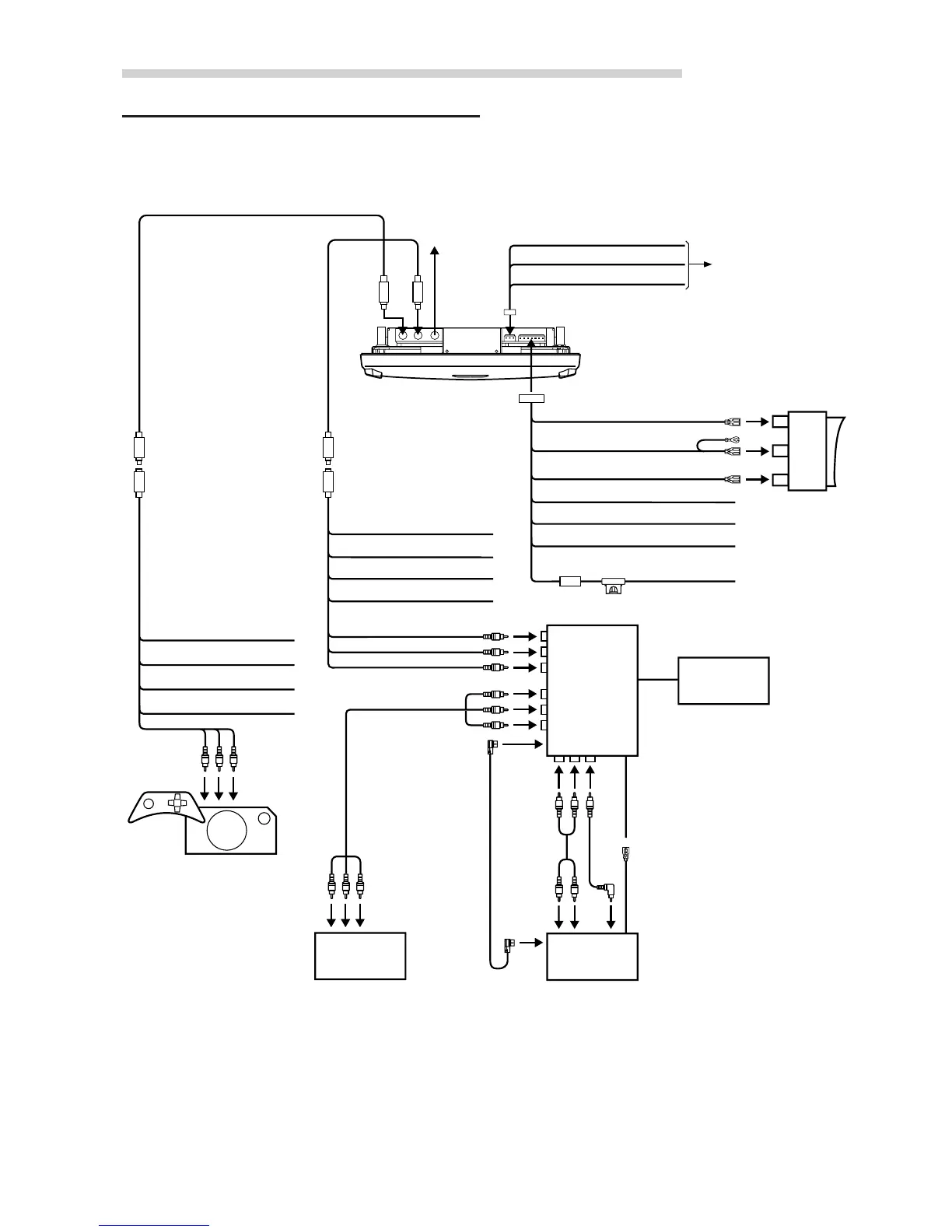
Connections
1
2
3
To other
monitor
5m Mini-DIN Extension CableMini-DIN to RCA Interface
Mini-DIN to RCA Interface
5m Mini-DIN Extension Cable
AUX-IN 2
connector
AUX-IN 1
connector
Audio/Video
output
connector
Accessory/Ignition (Red)
GND (Black)
Ext. A/V Select (Pink/Blue)
IR Remote Out (White/Brown)
Accessory/Ignition (Red)
GND (Black)
Ext. A/V Select (Pink/Blue)
IR Remote Out (White/Brown)
To AUX Output
To Audio/Video
Output Terminals
To Audio/Video
Output Terminals
To AUX Input
(AUX 1)
To Audio/Video
Output
To AUX Input (AUX 2)
Video Game
Console
(Sold Separately)
DVD Changer
(Sold Separately)
For Front
Monitor
(Sold Separately)
For Front
Monitor
Tune Box
VPE-V180A
(Sold Separately)
Ai-NET
Connector
Ai-NET
Connector
Remote IN
(White/Brown)
Remote Out Aux 1
(White/Brown)
(IVA-C801 etc.)
Battery (Yellow)
GND (Black)
(Rear View)
Dome Light Battery (Yellow/Green)
Dome Light-Door (Blue/Green)
Dome Light-Always ON (Red/Green)
Dome Light-Always OFF (Gray/Green)
Common Ground (Black)
Right Positive (Green)
Left Positive (Blue)
Remote Turn-on (Blue/White)
1
3
4
6
7
8
9
q
w
e
r
q
w
e
r
t
i
o
iu
y
p
5
w
Connect to the cable
of the vehicle side
Dome Light
Rocker switch is
located on Alpine
overhead console
t
2


 To Next Page