43
Connection
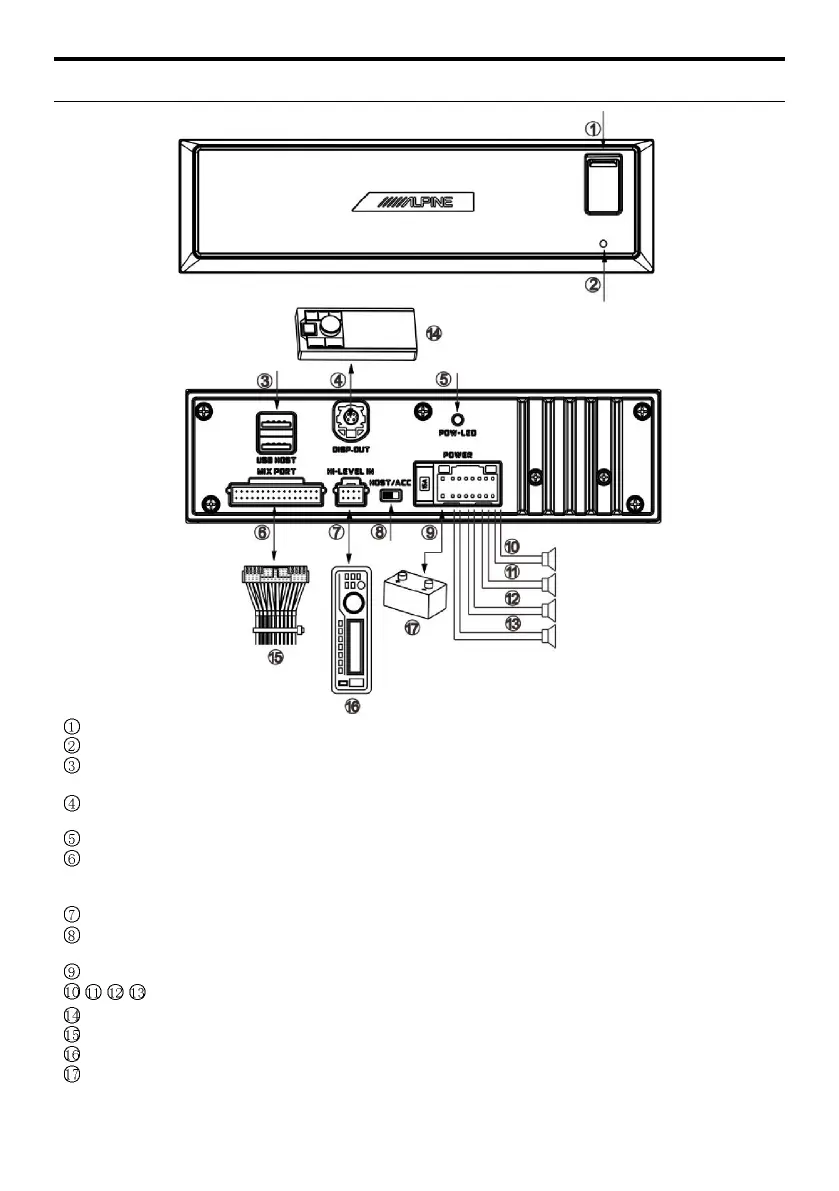
Front USB ports: used to connect USB flash disk, mobile hard disk drive or USB HUB.
RESET switch: Press and hold it for 3 seconds to restart the host machine.
Rear two USB ports: connect USB flash disk or mobile hard disk with the accompanied USB extension
cable.
Controller interface: by connecting the controller, play control, volume adjustment and audio source selection
can be performed.
Complex line interface: including 1 group of 3.5mm socket audio input interface, 3 groups of RCA audio
output interface, fiber output interface, coax output interface, steering wheel controller interface, and Alpine
system matching interface (for connection with DSP product).
High level input interface: connected to the power output of onboard CD/DVD player.
Input selection switch: when the switch is turned to “ACC,” the device will be started by ACC; when turned
to “HOST,” the device will be started by the high level input signal FL-/FL+.
Power output interface: connect the vehicle battery.
Power output interface: connect the external amplifier.
Complex line (for connection of the complex line, refer to “Instructions on the Complex Line”)



 To Next Page