6
Altai Technologies Ltd. All rights reserved
1. Change TCP/IP Setting on your computer
For Windows 7 users,
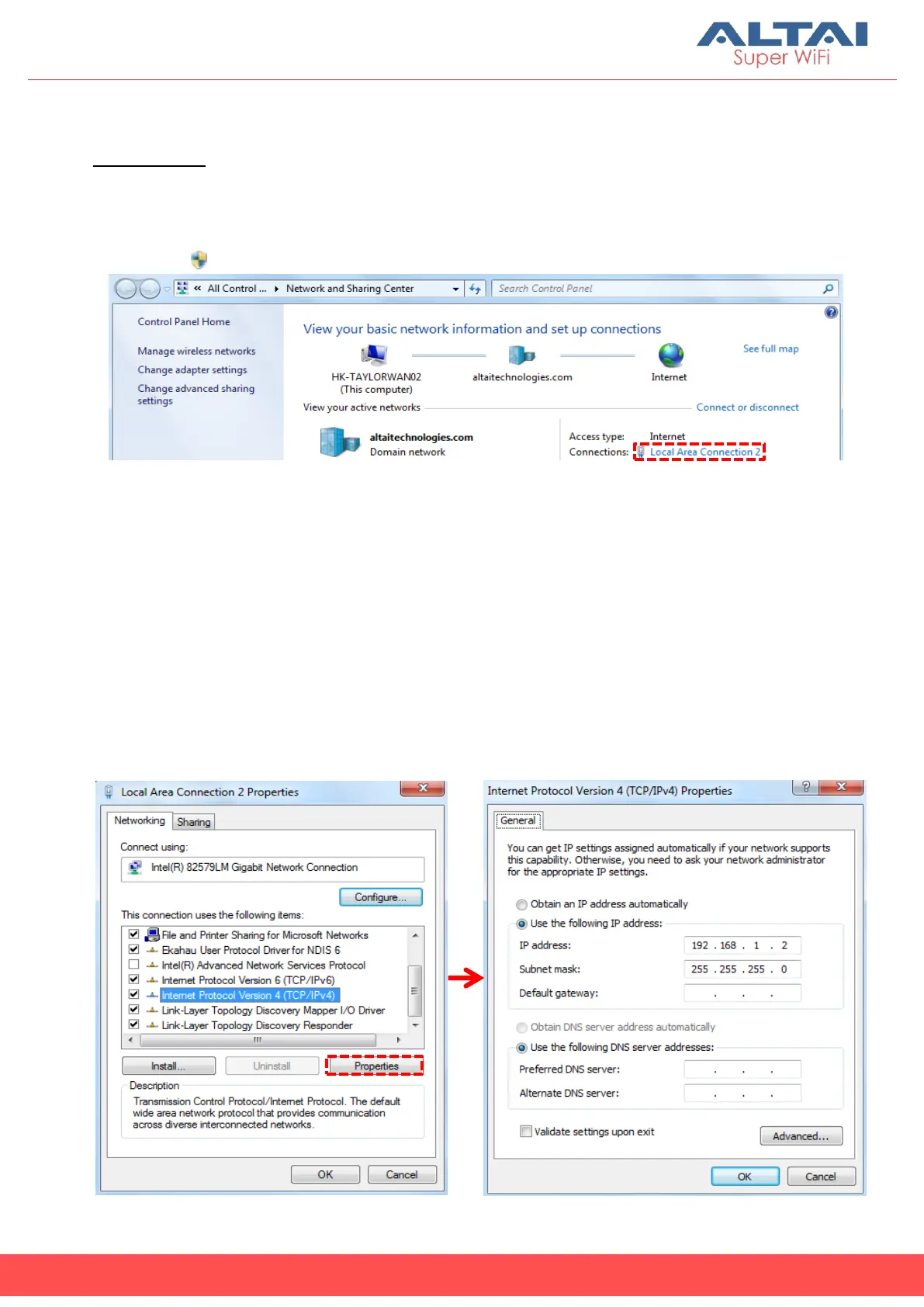
1. Go to Control Panel, click Network and Sharing Center and then choose
the adapter that you want to connect to A2c unit. In this example,
adapter “Local Area Connection 2” is in connection with A2c. Click it and
then click Properties.
2. Under the Networking tab, click Internet Protocol Version 4 (TCP/IPv4) in
the list box “This connection uses the following items”, and then click
Properties.
3. Type in the following IP address and Subnet mask:
IP address: 192.168.1.2
Subnet mask: 255.255.255.0
4. Click OK to close the Internet Protocol Version 4 (TCP/IP) Properties dialog
box and click OK again to close the Local Area Connection Properties
dialog box.



 To Next Page