INTRODUCTION
Welcome to the extraordinary world of Altec Lansing high fidelity sound.
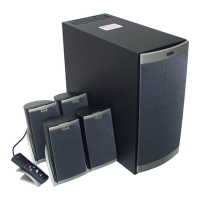
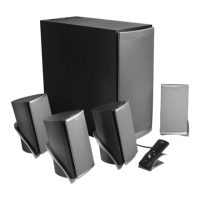
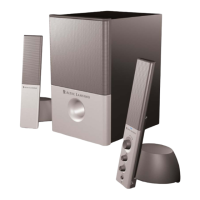
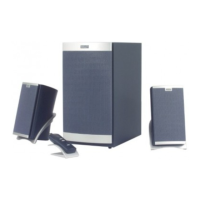
The 621 is an amplified multimedia speaker system delivering 200
watts of total system power especially designed for a variety of personal
audio devices such as MP3 players, DVD players, CD players, cassette
players, personal computer systems, gaming consoles and various
other video/audio sources.
FEATURE HIGHLIGHTS
·200 Watts total system power; 100 Watts true RMS.
·Front-firing, wooden subwoofer features a 6.5"
(165 mm) driver for extended low frequency response.
·Separate Subwoofer volume control for fine-tuning
system balance and overall system low volume/high
volume performance.
·2 Satellite speakers each designed with a 1" (24 mm)
tweeter and 3" (75 mm) full range driver delivering crisp,
clear high and smooth mid-bass.
·Separate wired Digital Controller including power on/off
and volume control, allows optimum speaker placement
without worrying about control access.
·2 audio inputs to allow mixing of audio signals from
two audio sources
·Dual angle Satellite stands for optimum audio
positioning.
·AAC1 Y-Adapter included for easy connection
to gaming consoles.
The satellite speakers are magnetically shielded to prevent color
distortion on video displays. However, the subwoofer is not magnetically
shielded and should not be placed in close proximity to a computer
monitor, television or computer hard drive.
IMPORTANT
If you experience any difficulties with your speaker system, check the
Troubleshooting section of this Guide. The answers to most setup and
performance questions can be found there. If you cannot find the
information you need, please call our customer service team for
assistance before returning the speakers to your retailer under their
return policy. We’re available 7 days a week for your convenience:
Monday to Friday: 8:00 am to 12:00 midnight
Saturday & Sunday: 9:00 am to 5:00 pm
1-800-ALTEC-88 (1-800-258-3288)
Color Coding: Notice that the input jacks on the subwoofer are
color coded to prevent errors. The plugs that are inserted into these
jacks have matching colors. As an example, the left front speaker
satellite has a brown connecting plug. The plug is inserted into the left
front jack with the brown color strip marking. All other connections are
made in the same way.
CONNECTIONS
Do not insert the power plug into an AC outlet until all connections are
made.
To insure first-time operation as expected, please follow the setup
sequence below carefully in the order indicated:
1. Connect the orange plug from the 621 right satellite to the jack
marked RIGHT at the rear of the subwoofer.
2. Connect the brown plug from the 621 left satellite to the jack marked
LEFT at the rear of the subwoofer.
3. Connect the gray DIN plug from the System Controller unit into the
DIN jack on the Subwoofer. Note that the DIN plug has an arrow. The
arrow should be faced to the right for correct insertion into the DIN jack
on the subwoofer. Please insert this plug securely.
4. Turn off the audio source device (computer sound card, portable
music system, etc.). Shut computer systems down using the
manufacturer's recommended procedures.
5. Connect the lime green audio plug from the MAIN INPUT at the rear
of the Subwoofer to the 3.5mm output jack on your audio source.
6. Optional: Connect a second audio source to the AUX INPUT at the
back of the Subwoofer. See How To Enhance Presentations With
Dialogue and Other Uses For The AUX (Auxiliary) Input below.
7. Connect the power cord (at back of Subwoofer) to an AC Wall socket.
8. The unit is now ready to operate. Turn on the audio source device.
Note: Always turn on your audio source device before turning on your
Altec Lansing 621 Speaker System. If you turn on the speaker system
before turning on the audio source, you will hear a loud POP sound
when the audio device is turned on.
9. Turn on the Altec Lansing 621 Speaker System.
See USE OF CONTROLS below.
USE OF CONTROLS
Power On/Off
The Power On/Off button is located on the System Controller unit.
Press the POWER button to turn on the speaker system. Push it again
to turn the unit off. A green LED power indicator on the base of the
controller will glow to show power is on.
Volume Control
A Volume Up button and a Volume Down button are located on the
System Controller unit. Repeated pressing of the buttons changes the
volume setting by increments.
Subwoofer Level Control (Bass Level)
With the Subwoofer in the desired location, the Subwoofer Level control
is used to mix the volume level of the Subwoofer with the Satellite
speakers. Mixing is usually done by playing a wide variety of music and
speech and adjusting the control until a natural sound is obtained. See
PLACEMENT OF SPEAKERS below.
Main Input and the AUX (Auxiliary) Input
Both inputs are equal. One input can be used for the computer output
and the other as described in How To Enhance Presentations With
Dialogue below. Make connections as described in step 5
(CONNECTIONS) above. Do not put the AC power plug into the wall
outlet before all connections are made.


 To Next Page
 Loading...