10
Watch
When you’re ready to watch the programs you’ve recorded, just follow these easy instructions.
Find your recordings
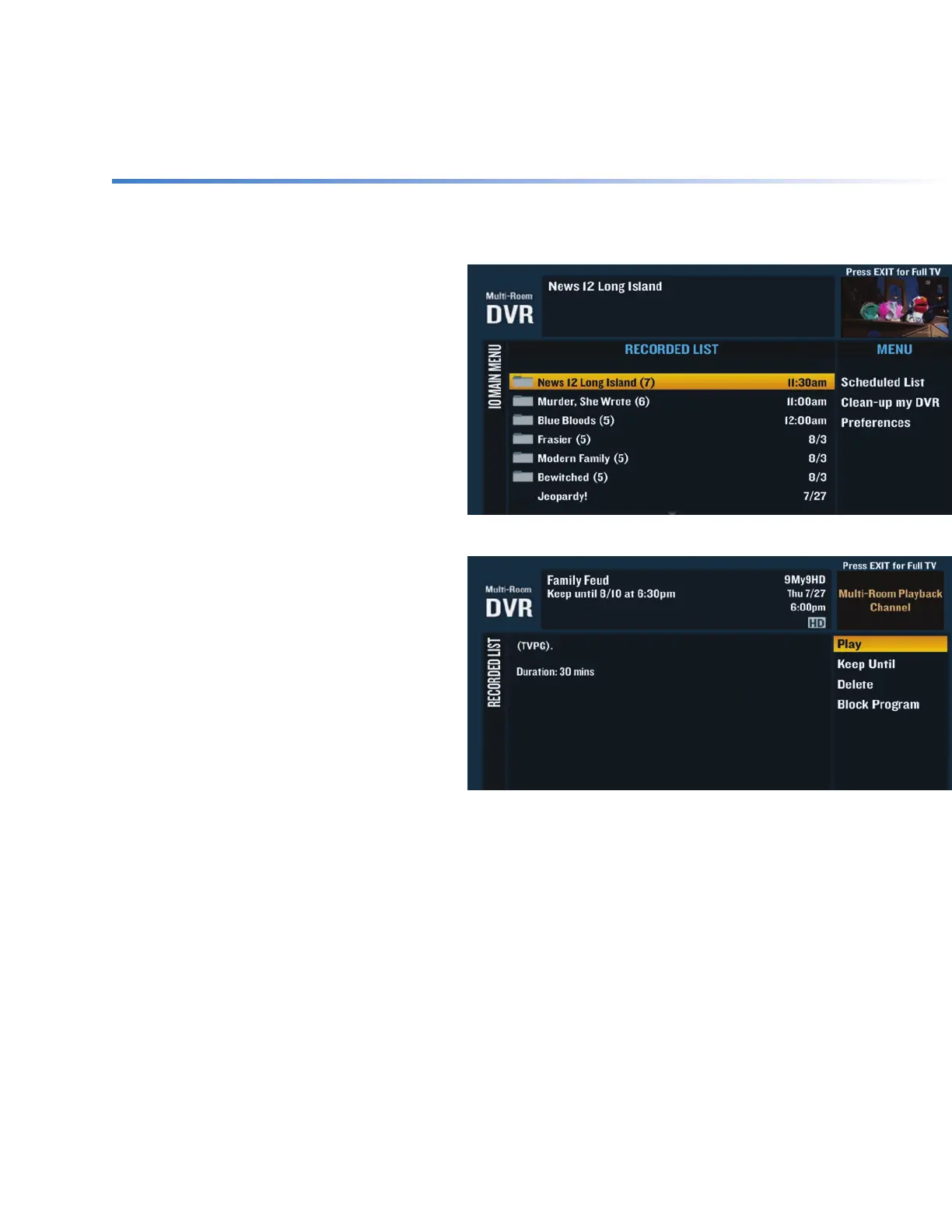
All of your recorded programs and
programs that are currently recording are
in the Recorded List. To access it, press DVR
on your remote or go to Channel 1001.
Watch your recordings
+ Press DVR or go to Channel 1001 to
access the Recorded List.
+ Use the ARROWS to highlight what you
want to watch and press SEL.
+ Highlight “Play” on the right-hand
menu and press SEL.
Watch your recordings in another room
+ Press STOP on the program that you’re currently watching.
+ Switch to the new TV and press DVR or go to Channel 1001 to access the Recorded List.
+ Use the ARROWS to highlight the program you want to watch and press SEL.
+ Highlight “Resume” on the right-hand menu and press SEL to resume watching.


 To Next Page