12
Manage
Making changes to your preferences is easy too. You can edit or cancel scheduled recordings for
a program or series in no time.
Edit your scheduled recordings
+ Press DVR on your remote or go to Channel 1001 to get the Recorded List.
+ Highlight “Scheduled List” on the right-hand menu and press SEL.
+ Choose the program from the scheduled list you wish to change.
+ Highlight “Modify Recording” from the right-hand menu and press SEL.
+ Use the ARROWS to highlight any option you wish to change and press SEL.
+ When the change is made, use the ARROWS to highlight “Accept Changes” on the right-hand
menu and press SEL.
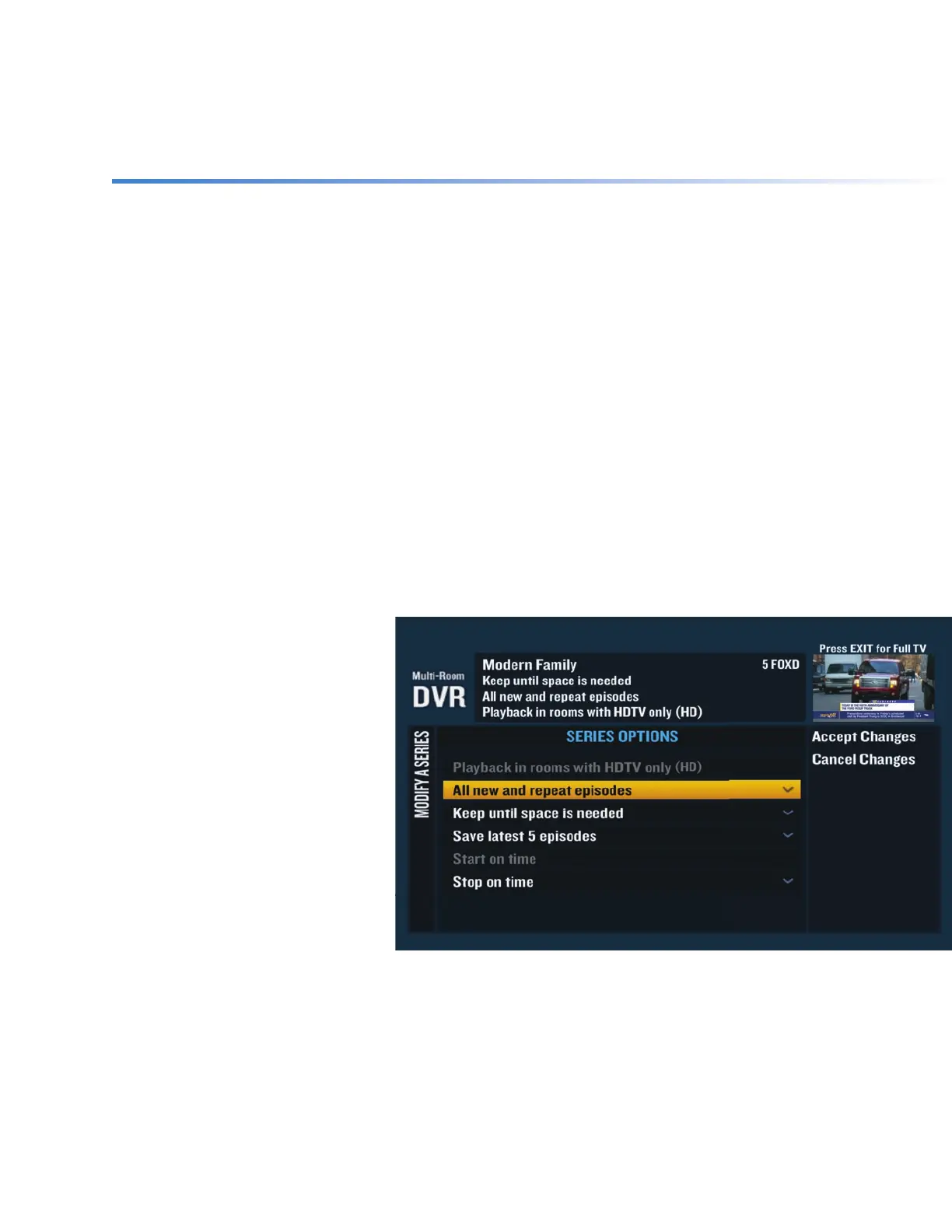
Modify a series
recording
+ Press DVR or go to Channel
1001 to get the Recorded List.
+ Highlight “Scheduled List”
on the right-hand menu and
press SEL.
+ Select “Modify a Series” from
the right-hand menu.
+ Use the ARROWS to highlight
the series you wish to change
and press SEL.
+ When the change is made,
use the ARROWS to highlight
“Accept Changes” on the right-hand menu and press SEL.
When you modify a series, it will only aff ect future episodes of the series. It doesn’t aff ect the
episodes you’ve already recorded.


 To Next Page