16 IP 710 Manual
To Use IP 710 in Power over Ethernet Mode
1. Unplug the power cord.
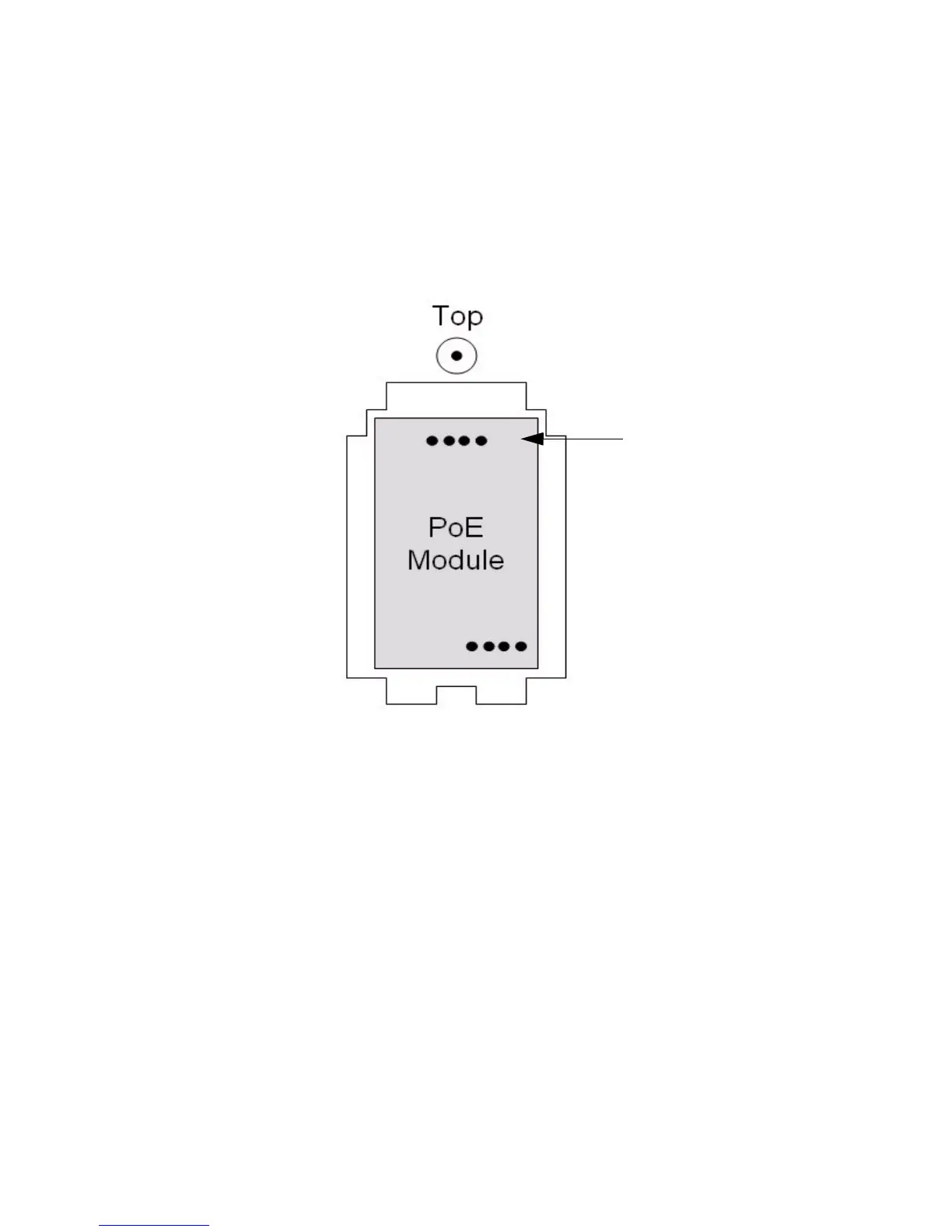
2. Remove the screw on the PoE Module cover, and remove the cover.
3. Plug in the PoE Module as illustrated below. The side with four pins
in the middle faces the top.
4. Put the PoE module cover back, and tighten the screw.
5. Move the DC/PoE switch to the PoE position.
6. Connect the phone to an AltiGen-certified PoE-enabled switch.
To Remove the PoE Module
1. Remove the screw on the PoE Module cover, and remove the cover.
2. Notice the “feet” on the two tabs on the lower end of the cover. Use
these feet to lift the PoE module out of the compartment: Holding the
upper end of the cover, slip the cover into either the right side or left
side of the module compartment, between the compartment and the
module, until the feet of the two tabs is under the module (the inside
of the cover should be facing toward the module).
3. Pull up to remove the module.
Note the centered
pins are at the top



 To Next Page