| 7
CoNNECTiNG viA WiRELESS (SMART PhoNE)
CoNNECTiNG viA WiREd (CoMPUTER)
On your smart device, enter Wi-Fi settings to connect to the
router. The Wi-Fi name and password will be located on the
product label.
Once successfully connected, you will be able to connect
through the 4G router as well as share this connection to other
devices.
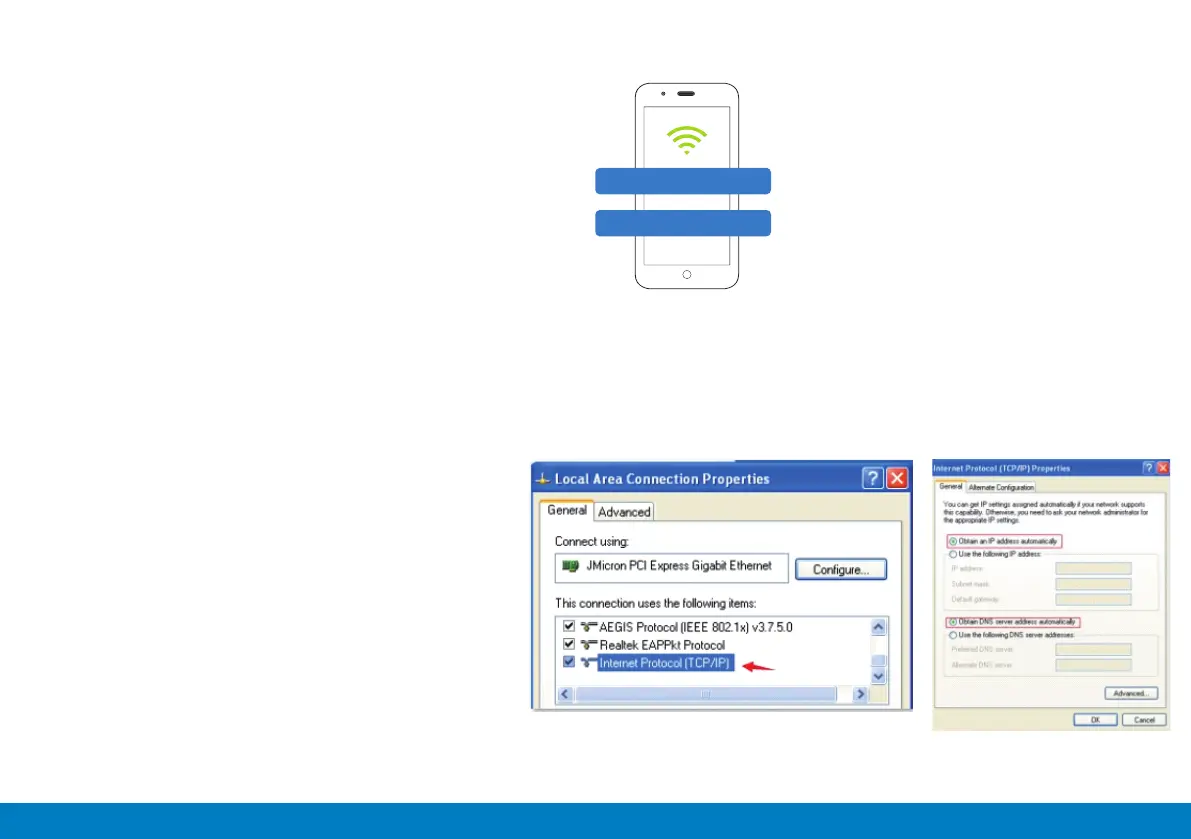
Connect the supplied Ethernet cable to the Ethernet port on the router and the other end to your computer. Usually the
connection will be setup automatically, without intervention. However you can nd the correct settings from windows below.
1. Network > Properties > Change adaptor settings
2. Local connection (for wired connection) or
WLAN (for wireless connection)
3. Internet Protocol Version 4 (TCP/IPv4)
4. Select “obtain IP address automatically”
5. Select “obtain DNS service address
automatically”
6. Select “Ok”
LTE-WiFi_XXXX
Password: xxxxxx
Images are for reference only, the images will depend
on your computer software version.


 To Next Page