6 |
SETUP ANd CoNNECTioN
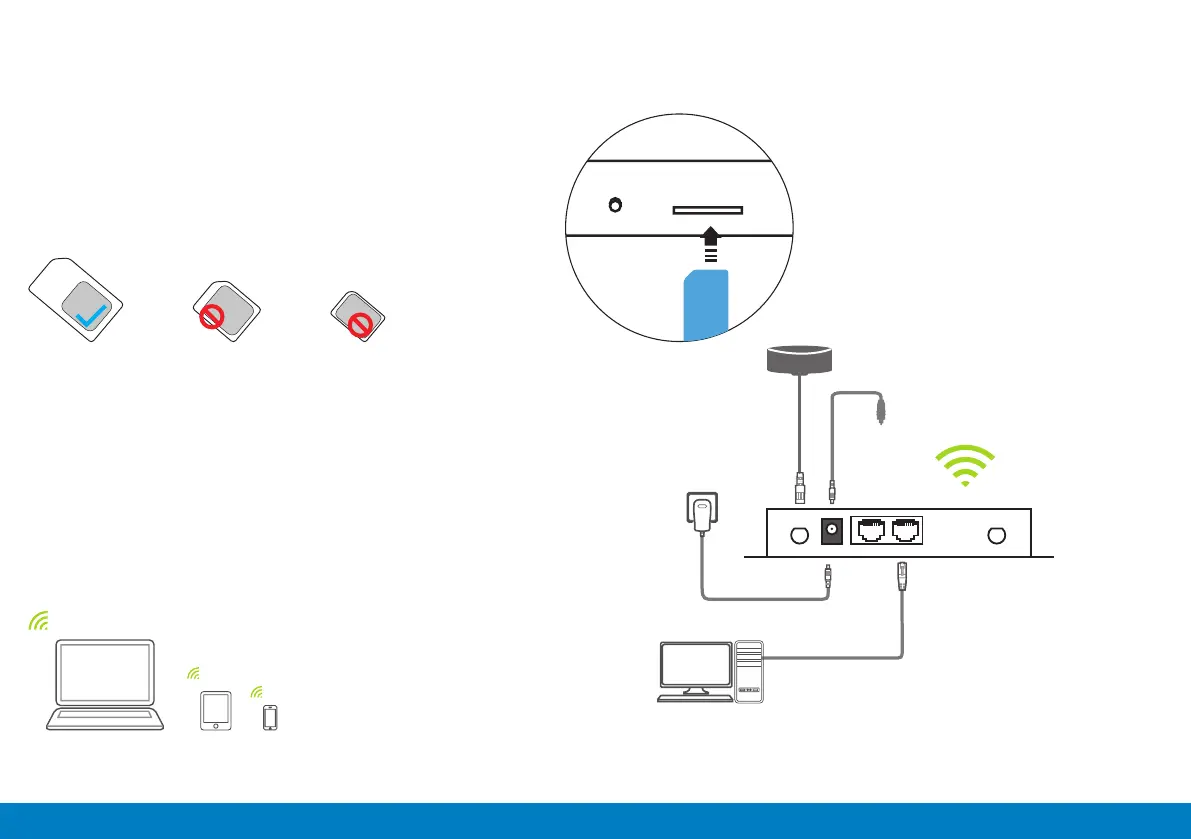
Insert SIM card (not included) to the SIM cards slot on the
device. Ensure the metal contact and angle of the SIM card
aligns with the port. When you hear a “click” sound, this
indicates the SIM card is securely inserted into the port.
NOTE: DO NOT turn on the device before inserting the SIM card.
Connect the supplied AC-DC power adaptor to the power
socket on the product and the other end to an external power
supply (you can also use the supplied 12V Cigarette Adaptor
when using from a car).
You can also connect the supplied Ethernet cable to the
Ethernet port on the device and the other end to a computer.
Standard SIM
Micro SIM
Nano SIM
Power supply socket
LAN network port
Wired connection
(optional)
The default Wi-Fi name (SSID)
and password are available on
the product label.
12V Cigarette Adaptor
External Main LTE Antenna
If you are experiencing a weak signal,
we recommend connecting the
external LTE antenna as shown below.


 To Next Page