EasyManua.ls Logo

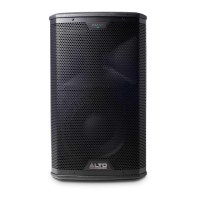
Alto Professional BLACK 10 - User Manual

Alto Professional BLACK 10
57 pages
Print Icon
To Next Page IconTo Next Page
Loading...
Service Manual
BLACK 10
Version: A7
Date: 2013/12/19
Specifications
Amplifier: Tweeter:
Power Source .................... AC 90V-240V/50Hz-60Hz Impedance ............................................................. 8Ω
Power Handling ........................................... 120 Watt
Power Consumption .................................. 1500 Watt
Sensitivity ........................................................ 110 dB
Output Power ................ 400 W(Set)+800 W(Woofer)
Frequency ........................................................ 2 kHz
(THD 1%, Without Limiter)
Woofer:
Frequency Response ....................Sat 1.5kHz~20kHz
Impedance .............................................................
Woofer 50Hz~1.5kHz
Power Handling ........................................... 300 Watt
Sensitivity ........................................................ 97 dB
Frequency ........................................................ 1 kHz
Dimensions ....................330(W)x344(D)x563(H) m/m
Specifications subject to change in order to accommodate improvement in design.

Questions and Answers

  • J
    jamesbentleyAug 3, 2025
    Why does my Alto Professional BLACK 10 Speakers keep disconnecting from Bluetooth?
    • R
      Richard GreenAug 3, 2025
      If your Alto Professional Speakers are disconnecting from Bluetooth, consider the following: * Confirm that the Bluetooth switch is turned on and the Bluetooth LED is in search mode. * Ensure the Bluetooth switch on your Apple device is also turned on and in search mode. * If the device is found, verify that the pairing process completes successfully.
  • E
    Eric KingAug 7, 2025
    How to increase the sound on Alto Professional Speakers?
    • A
      alexanderjohnsAug 7, 2025
      To address low sound issues with your Alto Professional Speakers: * First, verify that the connected signal lines are functioning correctly and try different signal lines. * Check if the connected sound sources are working properly, and test with alternative sound sources. * Make sure the volume knob is adjusted appropriately. * Also, check that the DSP mode is set to the correct setting.
  • A
    arogersAug 11, 2025
    Why is there no sound coming from my Alto Professional Speakers?
    • K
      Kimberly ThompsonAug 11, 2025
      If you're not getting any sound from your Alto Professional Speakers, here are a few things to check: * Make sure the power plug is correctly connected. * Verify that the function switches are in the correct positions. * Ensure the volume knob is turned up. * Confirm that the mixer volume is also on. * Check all signal lines to ensure they're working. You might also want to try different signal lines.
  • R
    Renee BaileyAug 15, 2025
    How to fix Alto Professional BLACK 10 that won't turn on?
    • F
      Felicia RodriguezAug 15, 2025
      If your Alto Professional Speakers are not turning on, please check the following: * Ensure the power cable is securely connected to the speaker and properly plugged into the outlet. * Verify that the power switch is in the 'ON' position. * Confirm that all wiring is correct and complete. * Check that the function switches are set to the appropriate positions.
  • M
    Matthew LyonsAug 19, 2025
    What to do if my Alto Professional BLACK 10 have audio distortion?
    • J
      Jacob CastanedaAug 19, 2025
      Experiencing audio distortion with your Alto Professional Speakers? Here's what you can do: * First, check that the DSP Mode switch is in the correct position. * Ensure that the connected sound sources are outputting sound properly. Try testing with different sound sources to isolate the issue. * Also, make sure the volume knob is adjusted to the appropriate level.
  • P
    Pamela AbbottAug 23, 2025
    What to do if the Alto Professional BLACK 10 Speakers APP is not responding?
    • C
      Charles JohnsonAug 25, 2025
      If the app for your Alto Professional Speakers isn't responding, try these steps: * First, ensure the Bluetooth software is successfully installed on your Apple device. * Confirm that your Apple device is successfully paired with the machine. * If paired, turn off, restart, and reconnect the machine. * If problems persist, turn off, restart, and reconnect the software. * As a last resort, turn off and restart your Apple device, then reconnect and pair it again.
  • T
    tinastoutAug 28, 2025
    Why can't I update my Alto Professional Speakers?
    • X
      xrodriguezAug 28, 2025
      If you're having trouble updating your Alto Professional Speakers, please check: * Ensure that the Bluetooth function is turned on. * Verify that Bluetooth is successfully paired. * Confirm that the update software is the correct version.

Summary

Specifications

Amplifier Specifications

Technical details for the amplifier section, including power source and output.

Woofer Specifications

Technical details for the woofer, covering impedance, handling, and frequency.

Tweeter Specifications

Technical details for the tweeter, including impedance, handling, and frequency.

Block Diagram

Troubleshooting Guide

Turn-on Issue Troubleshooting

Guidance for resolving power-on problems.

No Sound Troubleshooting

Steps to diagnose and fix audio output issues.

Audio Distortion Troubleshooting

Procedure for addressing audio clarity problems.

Bluetooth Disconnected Troubleshooting

Steps to resolve Bluetooth connectivity failures.

APP No Response Troubleshooting

Guidance for when the application does not respond.

Low Sound Troubleshooting

Steps to diagnose and fix low volume issues.

Machine Update Troubleshooting

Procedure for resolving issues with software updates.

Wiring Diagram

ADC Schematic Diagram

Bluetooth Schematic Diagram

Buffer_PWA Schematic Diagram

DAC Schematic Diagram

Digital_Main Schematic Diagram

DSP Schematic Diagram

MCU Schematic Diagram

DCOP Schematic Diagram

Driver_Main Schematic Diagram

IRS2092_HF- Schematic Diagram

IRS2092_HF+ Schematic Diagram

IRS2092_WF- Schematic Diagram

IRS2092_WF+ Schematic Diagram

Outputs Schematic Diagram

PS_Pre Schematic Diagram

PWA_HF Schematic Diagram

PWA_WF Schematic Diagram

Auto Schematic Diagram

Auto_08 S Schematic Diagram

CTRL_BT Schematic Diagram

IO_Pre_Main Schematic Diagram

Lin Schematic Diagram

Mute Schematic Diagram

TODSP Schematic Diagram

Vr_Lin Schematic Diagram

HFPS_Main Schematic Diagram

PWA Schematic Diagram

PWA_Main Schematic Diagram

HFPS_PS Schematic Diagram

AC Power Filter Schematic Diagram

5573 A Power Stage Schematic Diagram

5573 A PFC Control Schematic Diagram

5573 A Bias Supply Schematic Diagram

5573 A Microcontroller Schematic Diagram

5573 A Secondary Power Supplies Schematic Diagram

5573 A Power-good Schematic Diagram

5573 B Power Stage Schematic Diagram

Exploded View

Power Amp Exploded View

Tweeter Exploded View

Woofer Exploded View

Mechanical Parts List

Power Amp Parts List

Tweeter Parts List

Woofer Parts List

DSP P.C. Board Layout

Driver P.C. Board Layout

I;O-Preamp P.C. Board Layout

Power Amp P.C. Board Layout

Power Supply P.C. Board (5573 A) Layout

Power Supply P.C. Board (5573 B) Layout

EMI Filter P.C. Board Layout

DC Filter P.C. Board Layout

Logo P.L. P.C. Board Layout

Alto Professional BLACK 10 Specifications

General IconGeneral
LF Driver10" Woofer
Crossover Frequency2.2 kHz
Maximum SPL126 dB
EnclosureTrapezoidal, Injection-Molded Polypropylene
Type2-Way Active Speaker
ConnectorsXLR/TRS Combo, XLR Link Output
MountingPole Mountable
InputsXLR, 1/4" combo jack
OutputsXLR

Related product manuals