5
Use only witha 250V fuse
Use only witha 250V fuse
Use only witha 250V fuse
Use only witha 250V fuse
Use only witha 250V fuse
Use only witha 250V fuse
Quick Start
Setup
Items not listed under Introduction > Box Contents are sold separately.
Connect cables with all equipment powered off, and ensure that all main volume controls are
turned down. Follow the procedure below to have a signal amplified through TX15USB:
1. Set the Input Volume knob and USB Volume knob to zero.
2. If you are connecting a line-level device, such as a synthesizer, drum machine, or CD
player, set the Line/Mic switch to Line. If you are connecting a microphone, set this
switch to Mic.
3. Connect your device to the XLR-1/4” input. If using a USB flash drive, connect this to the
USB port.
4. Adjust the Input Volume knob or USB Volume knob slowly to reach the desired level.
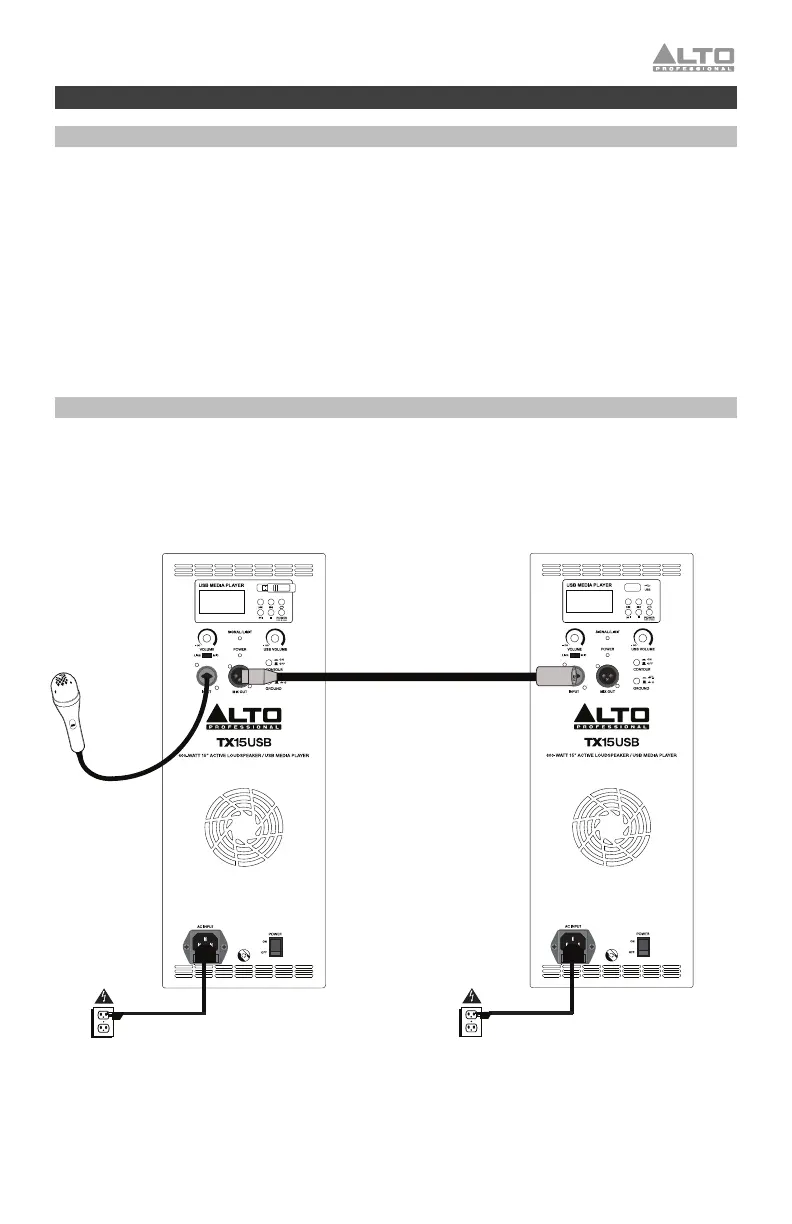
Connection Diagram
Items not listed under Introduction > Box Contents are sold separately.
Power
Microphone
USB Flash Drive
Second TX15USB
(sold separately)
Power



 To Next Page