FORM DD-40NTV II 12-09
4
DD-40NTV DIGITAL ANNUNCIATOR
4.2 CONFIGURE MODE:
The mode selection allows the unit to be programmed in one of four
modes as shown. The RESET button must be pressed after a change
in mode number.
MODE TYPE OF POINTS CHANNELS NOTES
1 24 Class A 30-37, 40-47, 50-57 Duplicates operation
16 Class B1 10-17, 20-27 DD-40NT series.
2 24 Class A 30-37, 40-47, 50-57
12 Class B1 10-17, 20-23
4 Class B2 24-27
3 24 Class A 30-37, 40-47, 50-57
10 Class B1 10-17, 20-21
2 Class B2 22-23
4 Class C 24-27
4 12 Class A 20-27, 30-32, 40 Duplicates operation
8 Class B1 10-17 of DD-20NT series.
Class Denitions:
Class A Point is always armed.
Class B1 Point is armed B1 time after power-up or pressing the
RESET key.
Class B2 Point is armed B2 time after power-up or pressing the
RESET key.
Class C Point is armed after it clears.
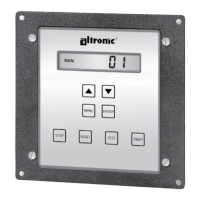
Use the UP and DOWN keys to select the mode and press the ENTER
key to save the mode.
4.3 PROGRAM RPM 1:
This selects the RPM pre-divide number equal to the pulses per
revolution (PPR). The RPM signal can be from either a CD ignition
shutdown lead or a magnetic pickup. The range is selectable from 0
to 361 PPR. A “0” PPR VALUE is used in applications where a speed
input is not used. Use the UP and DOWN keys to select the proper pre-
divide number and press the ENTER key to save.
4.4 PROGRAM RPM 2:
This selects the RPM overspeed value. The range is selectable from
1 to 2499 RPM. Use the UP and DOWN keys to select the overspeed
value and press the ENTER key to save the selection. To disable the
NOTE: A keypad sequence
(password) is required to
edit values. From the sta-
tus screen press and hold
the ENTER key, then press
the MENU key allow values
to be modied. Otherwise,
selected items may only be
viewed. There is no similar
protection for the TIMER
button (Class B1 and B2
timers) or hourmeter.


 To Next Page