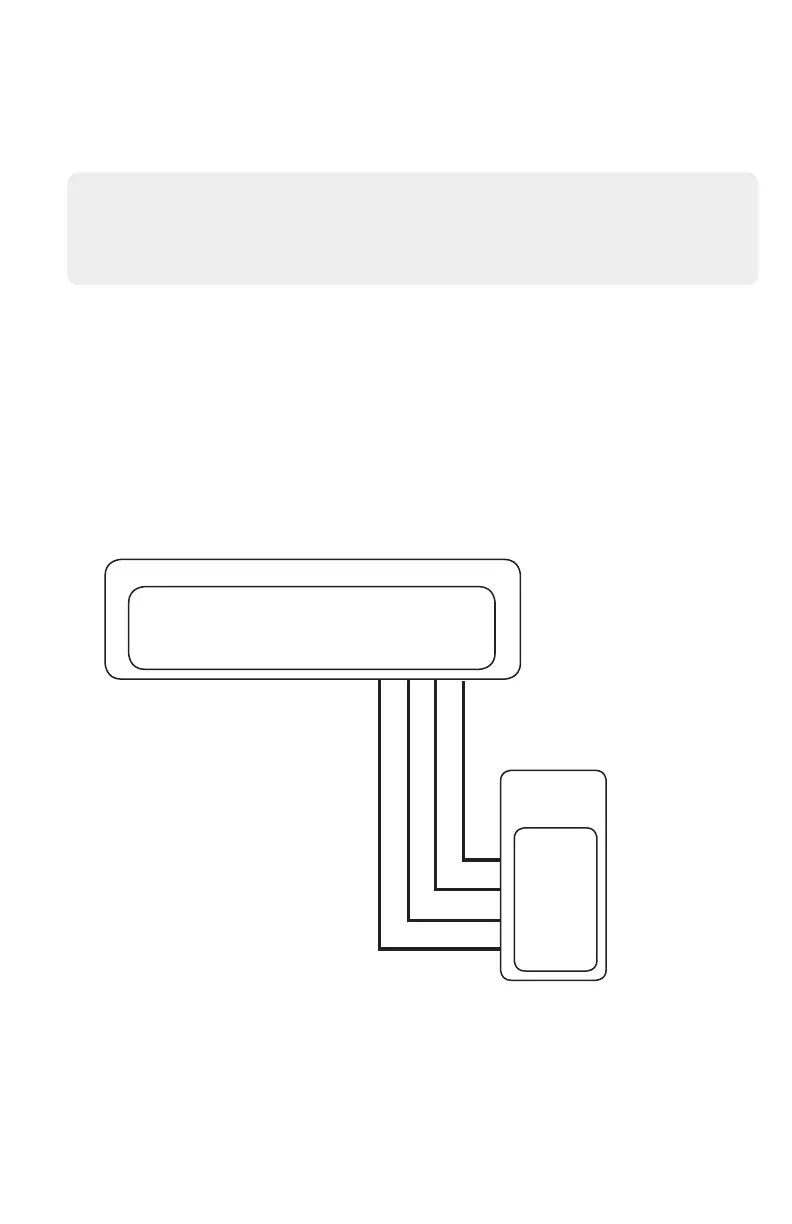
Generic Alarm Panel Wiring for Event Reporting
Generic Alarm Programming
1. Set up an account in the AlulaConnect portal.
2. Disarm the system (all partitions).
3. Enter panel programming mode using the installer code and program the following:
4. Exit programming mode and power down the system.
5. Connect the system and the BAT-Connect as shown in the wiring diagram below.
6. Power up the system.
7. Verify proper operation and reporting of all event codes using your control panel’s installation
manual.
• Enter a Telephone Number into the Central Station Phone Number eld
• Enter Customer Account Number
• Enter Reporting Codes
• Program panel to transmit in Contact ID
• Any control panel can be supported for event reporting as long as it provides Tip & Ring
connection and transmits Contact ID.
• Tip & Ring should not be wired to BAT-Connect using the same multi-conductor cable as the
panel wiring. Tip & Ring should be in a separate cable.
OPEN
COLLECTOR
PC-LINK
RD TD
OC2 OC1
ØØØØØØØØØØØØ
PHONE
POWERRS485 COMM
RING TIP
GND 12V
G IN Y IN
A B
BAT-CONNECT
GENERIC
ALARM
PANEL
ØØØØ
- AUX
+ AUX
TIP
RING


 To Next Page