Need help?
Do you have a question about the Amano EX3000N and is the answer not in the manual?
Lists and illustrates the components included with the EX3000N Series time recorder.
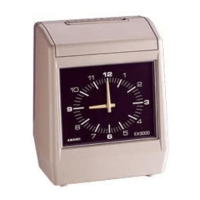
Identifies and labels the external components of the time recorder.
Details the functions of the first setting index buttons for programming the time recorder.
Explains the functions of the second setting index buttons for clock and daylight savings time.
Describes the third setting index functions for weekly programs and ribbon color.
Specifies requirements for a stable and continuous power source for the time recorder.
Provides guidelines for proper installation location and environment to ensure long-term operation.
Explains how to choose the IN or OUT print position for time cards using column buttons.
Guides users on the correct method for inserting time cards and mentions the surface detection function.
Tabular overview of settable items, their value ranges, and default initial values. Covers items like pay period, day time change, clock, imprint, time signal, and daylight savings.
Details how to set card types, surface detection, print formats, minute indication, and day of the week.
Details the procedure for correcting the clock's minutes using specific buttons.
Step-by-step guide to setting the year, month, and date on the time recorder.
Instructions for setting the hour and minute values on the time recorder.
Guides on setting the starting month and day for daylight savings time.
Details setting the starting day of the week and time for daylight savings.
Instructions for setting the day of the week and time for weekly programs.
Instructions for modifying existing weekly program settings.
Procedures for deleting or canceling set weekly program data.
Step-by-step guide on how to replace the ribbon cassette in the time recorder.
Provides instructions for routine cleaning and care of the time recorder's exterior.
Lists technical specifications, power requirements, operating conditions, and dimensions.
 General
| Battery Backup | Yes |
|---|---|
| Time Format | 12/24 Hour |
| Power | AC Adapter |
| Mounting | Wall or Table |
| Automatic Time Adjustment | Yes |


 To Next Page